


Updated November 04, 2025
TL;DR: Sales call follow-up emails are a critical system for pipeline health, not a courtesy. Sales leaders need standardized, personalized templates that ensure deliverability, track results, and consistently convert prospects into meetings. This guide provides actionable strategies, 7 ready-to-use templates, and a proven timing framework. We show how platforms like Instantly automate this process without risking sender reputation or team efficiency. Key takeaways: send first follow-up within 24 hours, maintain 5-8 touchpoints per sequence spaced over 3-4 weeks, personalize beyond first names using call-specific details, and monitor deliverability health (85%+ primary inbox, under 1% bounces) as rigorously as reply rates.
Your sales team just had a great call. What happens next determines if that opportunity moves forward or dies in the inbox. Your follow-up email is often your last chance to reinforce value and secure the next step.
Sales leaders face a tough reality. Reps spend hours crafting follow-ups, but deliverability tanks, replies are inconsistent, and tracking is a mess. Generic "checking in" emails get ignored, while manual processes consume time that should go to live conversations. The gap between a strong call and a closed deal widens when follow-up systems fail.
This guide provides sales leaders with actionable strategies, customizable templates, and best practices to ensure follow-ups are sent, delivered, opened, and acted upon.
Why sales call follow-up emails matter for sales leaders
Follow-up emails are not just polite gestures. They are a conversion system that directly impacts pipeline health and revenue predictability.
The cost of inconsistent follow-up
Inconsistent follow-up creates three immediate problems for sales leaders:
- Revenue leakage: Qualified prospects go cold because no one followed up at the right time with the right message. Deals that should close slip through the cracks.
- Rep inefficiency: Without templates or automation, reps waste hours crafting individual emails. This busywork prevents them from focusing on high-value activities like discovery calls and demos.
- Unpredictable pipeline: When follow-up quality varies by rep, you cannot forecast accurately. Some reps excel at persistence, others drop leads after one try.
How effective follow-ups impact pipeline velocity
Effective follow-up emails accelerate deals by:
- Reinforcing value: Prospects forget details quickly. A timely follow-up restates how your solution addresses their specific pain points discussed on the call.
- Reducing friction: Clear next steps and a single call to action make it easy for prospects to say yes. Lead follow-up timing shows that speed matters. For post-call follow-ups specifically, sending within 24 hours while the conversation is fresh significantly improves conversion rates.
- Building trust: Consistent, helpful follow-ups demonstrate reliability and professionalism. Generic or delayed emails signal disorganization.
Essential components of a high-converting follow-up email
A high-converting sales follow-up email is not long or complicated. It follows a clear structure that respects the prospect's time while moving the deal forward.
Clear subject lines that drive opens
Your subject line determines whether the email gets opened. Salesforce research on follow-up emails recommends referencing the call or a specific topic discussed, which can improve open rates by 20-30% compared to generic phrases like "Just checking in."
Good examples:
- "Following up on our discussion about [Pain Point]"
- "Next steps: [Project name]"
- "Re: [Specific topic from call]"
Bad examples:
- "Touching base"
- "Quick question"
- "Hey"
Keep subject lines under 60 characters. Personalize when possible by including the company name or a detail from the call.
Personalized opening that references the call
Start by addressing the prospect by name and immediately establishing context. Personalized emails that reference specific conversation details achieve higher reply rates than generic templates.
Good opening:
"Hi [Name], thanks again for our conversation yesterday about [Specific Pain Point]. I appreciated your insights on [Detail they shared]."
Bad opening:
"Hi [Name], I hope this email finds you well."
The first sentence should jog their memory and show you listened. This is where you differentiate from the dozens of other vendors in their inbox.
Value reinforcement and next steps
Briefly recap the main points from your conversation, especially pain points and how your solution addresses them.
Then add something new. This could be a case study, an article, a data point, or an answer to a question they raised. Ignored emails confirms that "checking in" without added value is the fastest way to get deleted.
Example:
"Based on our discussion about reducing time spent on manual follow-ups, I found this case study showing how [Similar Company] saved 40 hours per week using automated sequences. I thought you might find it relevant."
Single, clear call to action
Every follow-up needs one clear next step. Zendesk's research on email response rates shows that multiple CTAs dilute focus and reduce response rates by up to 50%.
Good CTAs:
- "Are you available for a 15-minute call next Tuesday at 10 AM to discuss implementation?"
- "Would it help to see a demo of how this works for your team?"
- "Should I send over a proposal based on the requirements we discussed?"
Bad CTAs:
- "Let me know if you have questions or want to chat or need more info."
- "Feel free to reach out anytime."
Offer specific times or use a scheduling link to reduce friction.
Professional closing and signature
Close with a friendly, professional sign-off and include your full contact information. A complete signature builds credibility and makes it easy for prospects to respond via their preferred channel.
Example:
"Best regards,
[Your Name]
[Your Title]
[Your Company]
[Phone Number]
[Website]"
For even more detail on what makes a great follow up email, watch our 1M+ cold email study below:
Sales call follow-up email templates for every scenario
Here are seven templates for common post-call scenarios. Customize these based on your conversation, adding specific details from your call.
Template 1: Post-discovery call follow-up
Use when: You've just completed an initial discovery call and want to move to the next stage.
Subject: Following up: Our discussion on [Prospect's Pain Point]
Hi [Prospect Name],
Thanks for taking the time to speak today about [Prospect's Company Name] and your team's challenges with [Specific Pain Point]. I especially appreciated hearing about [specific detail they shared].
Based on what we discussed, I believe [Your Product/Service] can help by [reiterate key benefit 1] and [reiterate key benefit 2]. I've attached a brief case study showing how we helped [Similar Company Name] achieve [Specific Result] using a similar approach.
Would you be open to a 15-minute demo next week so you can see how this would work for your team? Please let me know what day and time work best, or feel free to grab a slot on my calendar: [scheduling link].
Best regards,
[Your Name]
Template 2: Post-demo follow-up (providing requested info)
Use when: You've completed a demo and promised to send additional information.
Subject: Here's the [Requested Information] from our demo
Hi [Prospect Name],
Thanks again for taking the time for the demo on [Date]. I enjoyed showing you how [Specific Feature] can address [Specific Need] at [Prospect's Company Name].
As promised, I've attached the [pricing information/detailed product sheet/custom proposal] you requested. The key points we discussed:
- [Benefit 1]: [Brief explanation]
- [Benefit 2]: [Brief explanation]
- Implementation timeline: [Timeframe]
Please take a look, and if you have any questions, feel free to reply to this email or call me directly at [Phone Number].
I'm available to schedule a follow-up discussion whenever you're ready.
Best regards,
[Your Name]
Template 3: Value proposition reinforcement
Use when: The prospect needs more time to consider your solution, and you want to reinforce value.
Subject: Quick thought on [Their Goal/Challenge]
Hi [Prospect Name],
I've been thinking about our conversation regarding [Specific Challenge] and wanted to share a quick insight.
Many of our clients in [Their Industry] faced the same issue. What worked for them was [Specific Approach]. For example, [Client Name] saw [Specific Result] within [Timeframe] by implementing this strategy.
I believe we could achieve similar results for [Prospect's Company Name]. Would it be helpful to discuss how we'd adapt this approach for your team?
Let me know if you'd like to explore this further.
Best regards,
[Your Name]
Template 4: Addressing objections or concerns
Use when: The prospect raised specific concerns during the call.
Subject: Re: Your question about [Specific Concern]
Hi [Prospect Name],
Thanks for raising the question about [Specific Concern] during our call. I wanted to follow up with a clear answer.
[Provide direct, honest response to their concern. Include data, case studies, or specific details that address the objection.]
Many clients had similar questions before getting started. What they found was [how the concern was resolved or why it wasn't actually an issue].
Does this address your concern? I'm happy to discuss further if you'd like more details.
Best regards,
[Your Name]
Template 5: Re-engagement after no response
Use when: Previous follow-ups went unanswered, and you want to re-engage without being pushy.
Subject: Should I close your file?
Hi [Prospect Name],
I haven't heard back from you since our call on [Date], so I wanted to check in one last time.
I understand priorities shift. If now isn't the right time to move forward with [Solution], that's completely fine. Just let me know, and I'll close your file.
If you're still interested but haven't had a chance to respond, I'm happy to schedule a brief call next week to discuss next steps.
Either way, I'd appreciate knowing where things stand.
Best regards,
[Your Name]
Template 6: Follow-up with resources or case studies
Use when: You want to provide additional proof points or educational content.
Subject: Resource you might find helpful: [Topic]
Hi [Prospect Name],
Following up on our conversation about [Topic], I came across this [article/case study/whitepaper] and immediately thought of you.
It covers [Brief description of what it addresses] and includes data on [Relevant finding or statistic]. I thought it might provide a helpful perspective on [Their Challenge].
No need to reply unless you'd like to discuss how we're seeing similar results with clients in your space.
Best regards,
[Your Name]
Template 7: Follow-up after a referral
Use when: A mutual connection referred you, and you've just completed your first call.
Subject: Great connecting today (via [Referrer Name])
Hi [Prospect Name],
Thanks for making time to speak today. I appreciate [Referrer Name] making the introduction.
From our discussion, it sounds like [Specific Pain Point] is a priority for your team right now. I've worked with similar companies in [Industry], and what tends to work well is [Brief description of approach].
I've attached a one-pager showing how we helped [Similar Company] with a similar challenge. Would it make sense to schedule a follow-up next week to explore this further?
Thanks again for your time today.
Best regards,
[Your Name]
For multi-touch sequences that combine these templates into complete cadences, review Instantly's cold email sequence guide for additional frameworks and timing strategies.
Strategies for sales leaders to optimize follow-up email performance
Templates are a starting point, but optimization is where sales leaders create competitive advantage. Here's how to build a follow-up system that scales across your team.
Standardizing templates and playbooks across your team
Create a library of approved templates for common scenarios. Email cadence effectiveness shows standardized messaging increases consistency and makes it easier to track what's working across your team.
Sales follow-up standardization checklist:
- Build template library covering 5-7 core scenarios (post-discovery, post-demo, objection handling, re-engagement)
- Define which sections require personalization (opening, pain points, CTA) vs. standard (closing, signature)
- Set sequence structure: number of touches (5-8), intervals (2-3 days, 5-7 days, 10-14 days, 21 days), stop conditions
- Document template approval process and update cadence
- Train team on template library location and customization rules
- Set up CRM integration to log all follow-up activity automatically
- Establish reporting dashboard for follow-up volume, reply rates, and time-to-meeting by rep
Personalization at scale: Beyond {{first_name}}
Basic merge tags are table stakes. Effective personalization references specific details from the call. Follow-up email failures identifies generic content as the number one reason follow-ups fail, reducing reply rates.
Personalization tiers:
- Tier 1 (Basic): First name, company name, title
- Tier 2 (Contextual): Pain point discussed, goal mentioned, timeline shared
- Tier 3 (Advanced): Industry trend relevant to their business, mutual connection, recent company news
Store key call details in your CRM immediately after each conversation. This data feeds your personalization fields and ensures consistency across all follow-ups. Instantly's guide to CRM-integrated personalization shows how automated enrichment can pull company news, tech stack, and hiring signals to add third-tier personalization at scale.
Timing and frequency: When and how often to send
Timing is critical. InboxPlus's study of B2B email timing patterns shows mid-week days (Tuesday through Thursday) see the highest open and response rates, with optimal send windows between 10-11 AM and 1-2 PM in the recipient's time zone. LeadsAtScale's analysis of B2B lead follow-up frequency found 6-8 follow-ups are often necessary for B2B deals, with spacing that gradually increases between touches.
Follow-up timing and frequency guide:
| Touchpoint | Timing After Call | Channel | Goal |
|---|---|---|---|
| First follow-up | Within 24 hours | Recap call, provide promised resources | |
| Second follow-up | 2-3 days | Add value, reinforce benefit | |
| Third follow-up | 5-7 days | Email or Phone | Address potential objections |
| Fourth follow-up | 10-14 days | Share case study or new insight | |
| Fifth follow-up | 21 days | Re-engagement or breakup |
This balance maintains persistence without becoming pushy. For a complete walkthrough of timing best practices and deliverability protection, watch Instantly's tutorial on cold email deliverability in 2025.
Template performance benchmark guide:
| Template Type | Target Reply Rate | Avg. Time to Reply | Best Use Case |
|---|---|---|---|
| Post-discovery | 15-25% | 24-48 hours | Immediately after initial qualifying call |
| Post-demo | 20-30% | 48-72 hours | After product demonstration, includes promised materials |
| Value reinforcement | 8-15% | 3-5 days | Prospect needs time to consider, add new proof point |
| Objection handling | 12-18% | 48 hours | Address specific concern raised on call |
| Re-engagement | 5-10% | 5-7 days | Previous follow-ups went unanswered |
A/B testing and continuous improvement
Test one variable at a time to identify what improves performance. Email frequency optimization emphasizes that tracking engagement metrics is essential for refining both cadence and content.
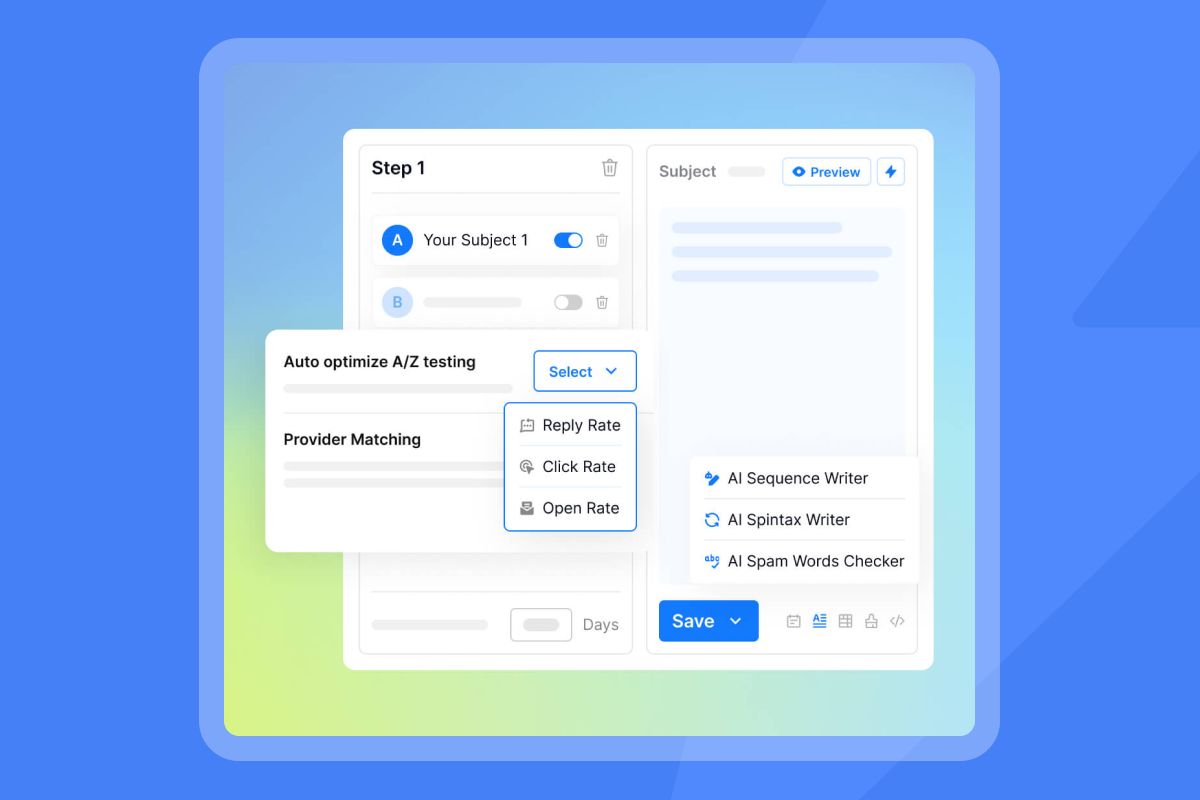
Variables to test:
- Subject lines: Question vs. statement, length, personalization level
- CTA placement: Early vs. late in the email
- Email length: 50-75 words vs. 100-125 words vs. 150+ words
- Value-add content: Case study vs. article vs. data point
- Send time: Morning vs. afternoon, different days of the week
Track reply rates, meeting bookings, and deliverability metrics for each variant. Run tests for at least 100 send attempts per variant to reach statistical significance.
Monitoring deliverability and sender reputation
Follow-ups don't work if they land in spam. Sales leaders must monitor deliverability as rigorously as reply rates. Instantly's 7 quick wins to boost deliverability guide shows consistent inbox placement requires authentication, warmup, and ongoing monitoring.
Deliverability monitoring checklist:
- SPF, DKIM, DMARC records: Verify all sending domains pass authentication checks
- Warmup schedule: New domains need 2-4 weeks gradual ramp (start 10-20/day, increase 10-20% weekly)
- Bounce rate: Keep total bounces below 1%, hard bounces below 0.5%
- Spam complaint rate: Maintain below 0.1% (1 complaint per 1,000 sends)
- Inbox placement tests: Run weekly tests, target 85%+ primary inbox placement
- Sender reputation score: Monitor domain reputation scores, act if score drops below 80/100
- Send volume consistency: Avoid spikes larger than 30% week-over-week
Integrating with CRM for tracking and accountability
Your CRM should be the single source of truth for all follow-up activity. Sales follow-up systems shows integration ensures visibility and accountability across the team.
Integration requirements:
- Automatic activity logging: Every sent email logs to the contact record
- Reply tracking: Responses update deal stages automatically
- Task creation: Missed replies trigger follow-up tasks
- Reporting: Dashboard shows follow-up volume, response rates, and time-to-reply by rep
This system eliminates manual data entry and gives you real-time visibility into pipeline health. Instantly also has its own CRM as well has a huge range of integrations, see Instantly's CRM in action below:
How Instantly helps sales leaders master follow-up emails
Building a follow-up system from scratch takes time. Instantly provides the infrastructure to implement these strategies immediately, with built-in deliverability protection and automation.
Unlimited accounts and built-in warmup for deliverability
Unlike tools that charge per seat, Instantly offers unlimited email accounts on a flat fee. This allows you to scale follow-up volume without compounding costs. Built-in warmup protects new domains by gradually increasing send volume over 2-4 weeks.
The platform uses a private deliverability network of 4.2M+ accounts to simulate natural engagement and build sender reputation. For high-volume teams, the Light Speed plan includes SISR (Server & IP Sharding & Rotation) with dedicated IP pools for additional reputation isolation.
Watch how to setup warmup in Instantly in under 5 minutes:
"Deliverability has been excellent, and the automation features save me a ton of time. I was able to get up and running in minutes." - G2 review
Unified inbox for efficient reply management
Instantly's Unibox centralizes all replies in one interface, making it easy to manage conversations across multiple sending accounts. Tags, filters, and collaboration features help teams triage responses quickly and ensure no prospect falls through the cracks.
AI Reply Agent for automated response handling
The AI Reply Agent can automatically handle lead replies in under 5 minutes, with configurable Human-in-the-Loop or Autopilot modes. This reduces manual workload while maintaining response quality. Integration with Slack allows for quick review and approval of AI-generated responses. Watch a complete walkthrough of the AI Reply Agent to see these modes in action.
Team workspaces and reporting for standardization
Admin controls allow sales leaders to create team workspaces with shared templates, global block lists, and unified reporting. This standardizes process execution across reps and provides audit-friendly dashboards that withstand CFO scrutiny.
The platform tracks opens, replies, meetings booked, and rep productivity in real-time, with exports to major CRMs for seamless handoffs to AEs.
SuperSearch for verified contact data
Instantly's SuperSearch provides access to 450M+ B2B leads with waterfall enrichment from 5+ providers. This reduces bounce rates and improves deliverability by ensuring you send to verified, active email addresses. Lower bounce rates directly protect sender reputation. To understand how these systems scale across larger teams and agencies, review Instantly's guide on scaling email warmup across multiple domains.
Drive consistent pipeline growth with strategic follow-ups
Sales call follow-ups are not a courtesy. They are a measurable system for converting conversations into closed deals. Sales leaders who standardize templates, monitor deliverability, and track results see higher reply rates, faster deal cycles, and more predictable revenue.
Traditional sales engagement platforms often trap teams with per-seat pricing that scales faster than revenue, or clunky UIs that slow reps down during live campaigns. The system outlined here requires infrastructure that protects deliverability while keeping costs predictable and execution fast.
Instantly provides the infrastructure to execute this system at scale without per-seat taxes, with deliverability protection built in. Unlimited accounts, automated warmup, AI reply handling, and unified inbox management eliminate the manual work that slows teams down.
Ready to transform your team's follow-up strategy?
Start implementing these templates today and measure the impact on your pipeline. Track reply rates, booked meetings, and time-to-close for each sequence variant. Test, refine, and scale what works.
Try Instantly free and use these proven templates to turn more sales calls into closed deals. Built-in warmup, unlimited accounts, and automated follow-ups let you focus on conversations that matter while the platform handles execution and deliverability.
FAQs
How many follow-up emails should I send after a sales call?
Send 5-8 follow-ups spread over 3-4 weeks. Research shows 80% of sales require at least five touches, yet most reps stop after one or two attempts. Space your follow-ups at increasing intervals: within 24 hours, then 2-3 days, 5-7 days, 10-14 days, and 21 days after the initial call. Each email should add new value (case study, insight, resource) rather than just "checking in." Stop when the prospect explicitly asks you to or after your final breakup email offers to close their file. Track reply rates by touchpoint to refine your optimal sequence length.
What is the best time to send a follow-up email?
Send follow-up emails mid-week (Tuesday through Thursday) between 10-11 AM or 1-2 PM in the prospect's time zone. These windows align with when B2B decision-makers are most likely to engage with their inbox. Avoid Mondays (busy catch-up day) and Fridays (preparing for the weekend). For your first follow-up after a call, send within 24 hours to reinforce the conversation while it's fresh. Subsequent follow-ups should go out during optimal windows. Always account for time zones. Most sales engagement platforms let you schedule sends based on recipient local time.
How can I personalize follow-up emails at scale?
Store key call details in your CRM immediately after each conversation: pain points discussed, goals mentioned, specific objections raised, and agreed-next steps. Use these data points as merge fields in your templates, going beyond basic first name personalization. Reference the specific challenge they shared, the timeline they mentioned, or the outcome they're trying to achieve. Emails that reference conversation-specific details see significantly higher reply rates. Automated enrichment can pull company news, tech stack, and hiring signals to add third-tier personalization at scale, letting you personalize hundreds of follow-ups without manual work.
What metrics should I track for follow-up email success?
Track reply rate (target 5-10%), meetings booked per 100 follow-ups sent, time from first follow-up to meeting booked, and inbox placement rate (target 85%+ primary inbox). Also monitor bounce rate (keep below 1%), spam complaint rate, and deliverability health scores. For team performance, track follow-up volume by rep, average time-to-first-follow-up after calls, and conversion rate from reply to meeting. Instantly's guide to calculating cold email metrics shows these metrics should roll up to cost-per-meeting and pipeline contribution. Use your CRM to attribute closed deals back to specific follow-up sequences so you can identify which templates and cadences drive revenue.
How do I ensure my follow-up emails don't land in spam?
Maintain sender reputation through proper authentication (SPF, DKIM, DMARC), email warmup for new domains (2-4 weeks of gradual volume increases), and low bounce rates (under 1%). Avoid spam trigger words, excessive links, and all-caps text. Send from domains that match your company website, not generic Gmail accounts. Run regular inbox placement tests to verify where emails land and monitor feedback loops for spam complaints. Keep send volume consistent and avoid sudden spikes. Instantly's guide on why cold emails land in spam and how to fix it walks through automated placement testing and reputation monitoring. If placement drops, pause, diagnose the issue (bounce rate spike, spam complaints, authentication problems), fix it, then resume at lower volume.


