


Updated November 14, 2025
TL;DR: Your AI reply agent fails when it lacks control, transparency, and deliverability protection. Instantly's AI Reply Agent gives Sales Leaders a reliable system to automate lead responses in under 5 minutes, with configurable Human-in-the-Loop or Autopilot modes, Slack approvals, transparent credit consumption (5 credits per reply), and deliverability safeguards built into a 4.2M+ account warmup network. This playbook shows you how to implement, optimize, and scale AI-powered reply handling without risking domain health or team control.
Your sales team drowns in replies, but your AI agent isn't booking meetings. The problem is not AI itself. The problem is using AI without a system for control, deliverability, and team alignment. Sales Leaders need predictable results, not black-box automation that crashes inbox placement or sends off-brand messages.
Instantly's AI Reply Agent solves this by combining instant response automation with approval workflows, deliverability protection, and transparent pricing. This playbook walks you through setup, optimization, and scaling so your team books more meetings while you maintain full visibility and control.
Why traditional AI reply agents fall short for sales leaders
Most AI reply tools promise automation but deliver risk. They fail on three fronts: hidden manual costs, deliverability damage, and lack of team control.
The hidden costs of manual reply handling
Manual reply handling burns hours your SDRs and AEs should spend on live conversations. Sales professionals waste 2 to 3 hours daily sorting, qualifying, and responding to inbound replies. That time multiplies across a 10-person team into 20 to 30 lost selling hours per day.
The math is clear. If your average rep books 1 meeting per 20 qualified conversations and spends 15 minutes per manual reply, you sacrifice pipeline velocity for busywork. Automated campaigns help teams reclaim that time and focus on conversations that matter.
"save a lot of time without feeling robotic" - Verified user on G2
Manual workflows also introduce inconsistency. Different reps use different language, miss follow-up windows, or fail to log activity in your CRM. This creates reporting gaps and stalls handoffs to AEs (Account Executives).
Common pitfalls of generic AI tools
Generic AI agents over-promise and under-deliver. Common failures include robotic tone, misclassified replies, and zero human oversight. Many tools lack guardrails, so the AI sends off-brand messages or engages with unqualified leads.
Deliverability is another blind spot. AI tools that blast high volumes without warmup, pacing, or health monitoring trigger spam filters. Generic AI agents ignore these dynamics and crash your sender reputation.
Finally, most AI reply tools hide costs behind per-seat pricing or opaque usage tiers. You discover the true cost only after your team scales, creating budget surprises and CFO scrutiny.
How Instantly's AI Reply Agent works as a system
Instantly's AI Reply Agent is not a standalone bot. It is part of an integrated outbound platform with unlimited email accounts, built-in warmup, and SuperSearch for 450M+ verified contacts. This architecture lets you automate replies without sacrificing control or inbox placement.
Automating lead responses in under 5 minutes
The AI Reply Agent monitors your campaigns and responds to incoming leads in under 5 minutes. It reads the incoming email, qualifies intent, handles objections, sends follow-ups, and shares calendar links automatically. Speed matters because fast responses keep leads warm.
A user testing the AI reply agent for 30 days found that instant engagement improved qualification rates and freed reps to focus on live calls. The agent handles routine queries like pricing questions, meeting availability, and out-of-office replies, routing complex conversations to humans.
This automation extends to meeting booking workflows. When a lead shows interest, the AI shares a Calendly link directly in the reply, eliminating back-and-forth scheduling emails.
Human-in-the-Loop vs. Autopilot modes
Instantly offers two operational modes to match your team's experience and risk tolerance. Human-in-the-Loop (HITL) requires approval before the AI sends replies. You review drafts in Instantly's Unibox or via Slack, edit tone or content, then approve. This mode is ideal for new users who want to fine-tune responses and build confidence in the AI's judgment.
Autopilot mode provides full automation. The AI replies instantly without human approval, recommended for experienced teams with refined workflows and clear guardrails. The Instantly AI full tutorial explains how to configure behavior, tone, and escalation rules for each mode.
Both modes track involvement rate (how often the AI drafts replies) and resolution rate (how often drafts are sent without edits). These metrics help you measure autonomy and identify areas for prompt refinement.
Seamless Slack integration for approvals
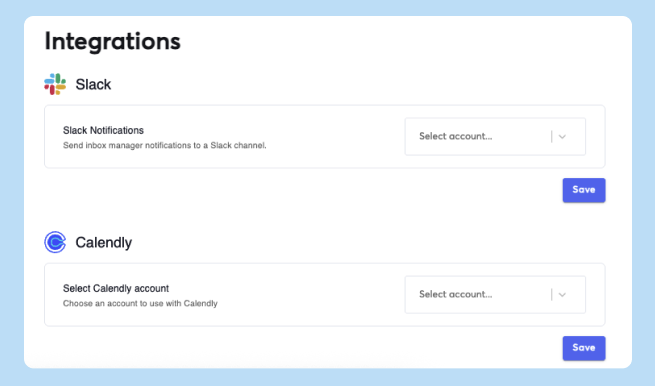
Instantly integrates with Slack to send real-time alerts when the AI routes a conversation to your team or when a reply needs review. This keeps approvals fast and visible. Slack notifications ensure no lead falls through the cracks and provide transparency into AI activity.
You configure Slack channels by campaign or inbox, so different reps monitor their own pipelines. This integration also supports escalation workflows. If the AI encounters a nuanced objection or detects a high-value lead, it flags the conversation and notifies the right person instantly.
"customer support is always available and responds instantly" - Verified user on G2
Transparent credit consumption
Each AI-generated reply costs 5 Instantly credits. This pricing model is clear and predictable, avoiding per-seat traps. You buy credits upfront via Instantly's pricing plans and monitor consumption in real time.
Compare this to platforms that charge per user or hide AI costs in enterprise tiers. Instantly's flat-fee structure for unlimited email accounts plus transparent credits means you can forecast costs as you scale.
" I can confidently say it’s one of the best tools I’ve ever used. The platform is smooth, reliable, and makes email outreach incredibly easy to manage." - Mohammed on Trustpilot
Credit usage appears in the Activity Feed alongside involvement rate and resolution rate, giving you full visibility into ROI per campaign.
Step-by-step playbook: Implementing the AI Reply Agent for your team
This section provides a ramp plan to deploy Instantly's AI Reply Agent safely and effectively across your sales team.
1. Setting up your Instantly account and AI Reply Agent
- Start by navigating to the "AI Agents" section in the left sidebar of your Instantly dashboard. Click "Add New" and select "AI Reply Agent." Choose your operational mode: HITL for control or Autopilot for speed.
- Next, assign the agent to specific campaigns or leave the field empty to monitor all campaigns. Targeting specific campaigns helps you test on a small list before full rollout. Configure behavior settings: decide whether the agent should handle follow-ups, respond to out-of-office replies, and engage with objections or negative responses.
A full tutorial for 2025 walks through account setup, email warmup, and campaign creation, providing context for where the AI Reply Agent fits in your workflow.
Ensure your email accounts are warmed for at least 30 days before activating the AI agent. Warmup builds sender reputation and reduces spam risk.
2. Crafting effective AI prompts and response rules
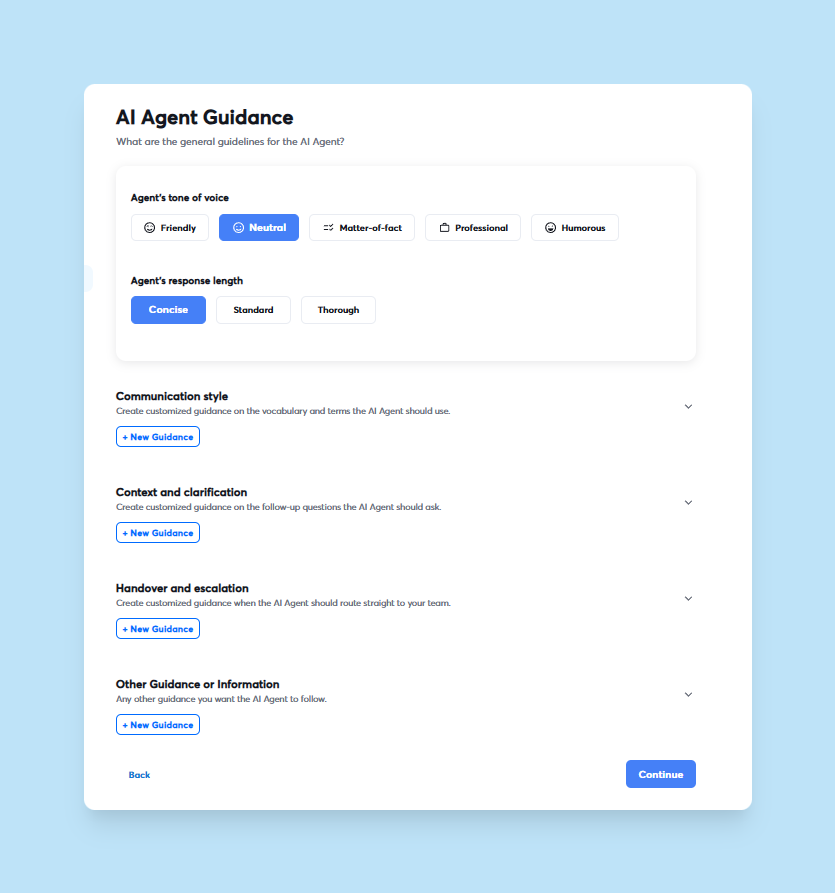
- Train the AI on your tone of voice, communication style, and key product details. The more context you provide, the more useful and accurate the replies will be.
- Define your tone (confident, professional, friendly, conversational) and specify response length (short, medium, detailed). Add product-specific guidance, such as pricing ranges, key features, and common objections. For example: "Our platform starts at $37/month for unlimited email accounts. Emphasize deliverability and flat-fee pricing when prospects ask about scale."
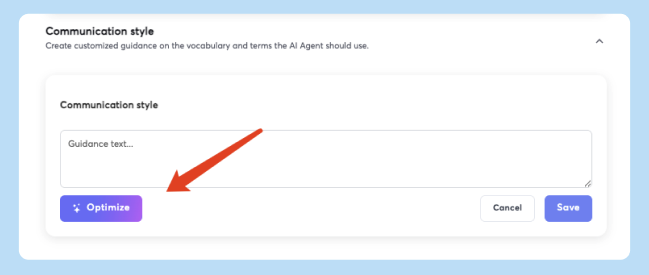
- Use the "Optimize" feature to refine your instructions. This tool checks for common issues and suggests improvements, helping you avoid vague prompts that lead to generic replies. Our guide on AI-powered cold email personalization provides prompt examples for pain points, value hooks, and follow-up logic.
- Test your prompts on a small batch of leads. Review AI-generated drafts in HITL mode, edit for tone and accuracy, then adjust your training instructions based on patterns.
3. Integrating with your CRM and calendar
- Connect Instantly to your CRM (Salesforce, HubSpot) via native connectors or OutboundSync. Map data fields so AI-generated replies, lead statuses, and meeting bookings sync automatically.
- Common fields to map include contact information (first name, last name, job title, company), campaign activity (sent, opened, replied, bounced), and lead status (Interested, Meeting booked, Not interested, SQL). This mapping ensures your CRM reflects real-time engagement and supports accurate reporting.
- Integrate Calendly or another calendar tool to enable the AI to share booking links. When a lead expresses interest, the agent includes a meeting link in its reply, reducing friction and accelerating pipeline velocity. Our article on building cold email workflows with Zapier and Make shows how to automate CRM updates and enrichment tasks alongside AI replies.
- Perform a test with a single contact to verify that data flows correctly from Instantly to your CRM. Monitor integration logs for 48 hours before full deployment.
4. Monitoring performance and optimizing AI responses
- Track key metrics to measure AI effectiveness and identify optimization opportunities. Focus on involvement rate (percentage of threads where the AI drafts replies), resolution rate (percentage of drafts sent without edits), meeting booking rate, lead qualification rate, and cost per meeting booked.
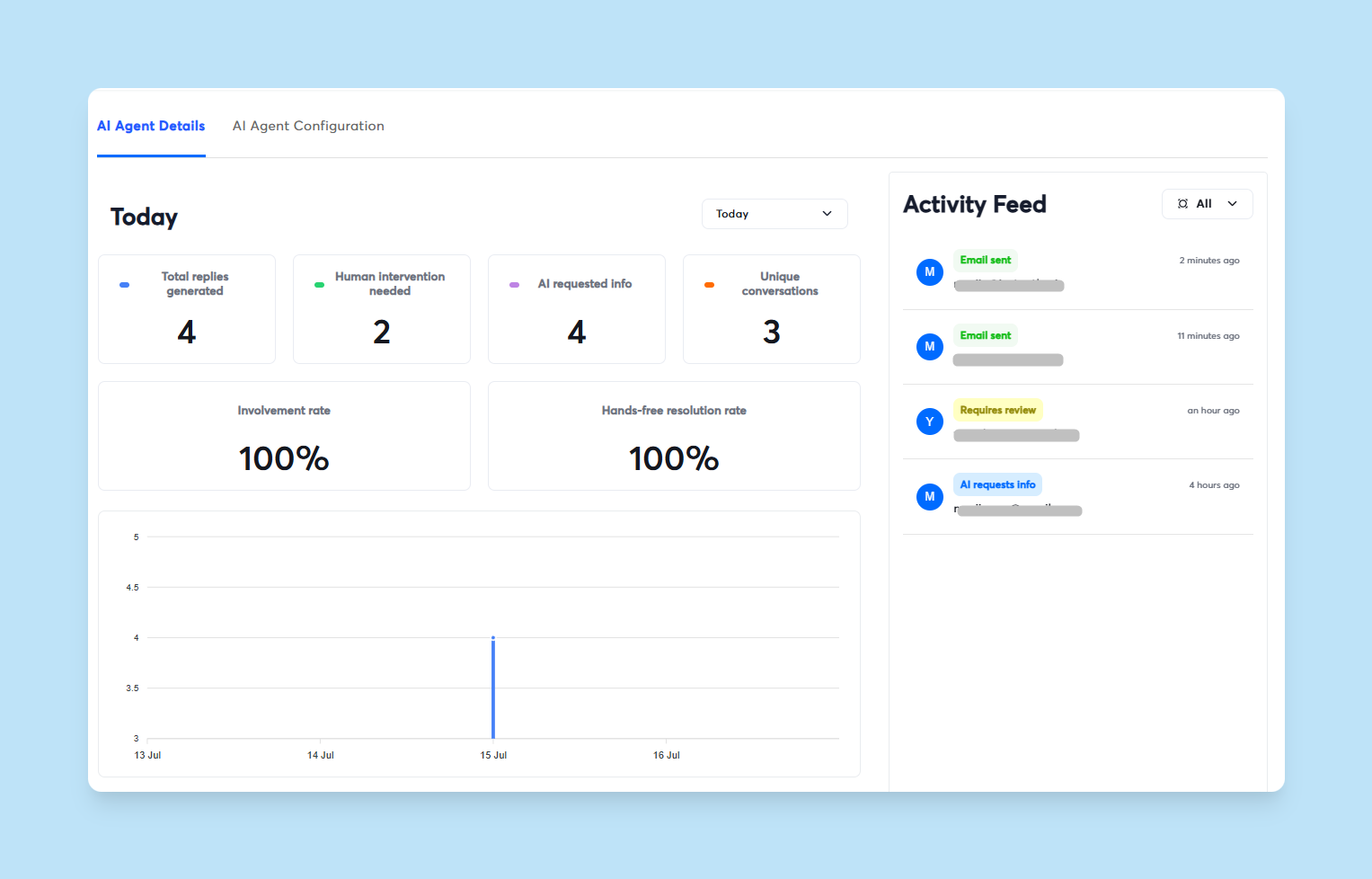
- Instantly's Activity Feed provides a real-time view of conversations, showing when a reply needs review or when the AI requested more information. Use this dashboard to spot patterns, such as objections the AI struggles with or message types that require frequent edits.
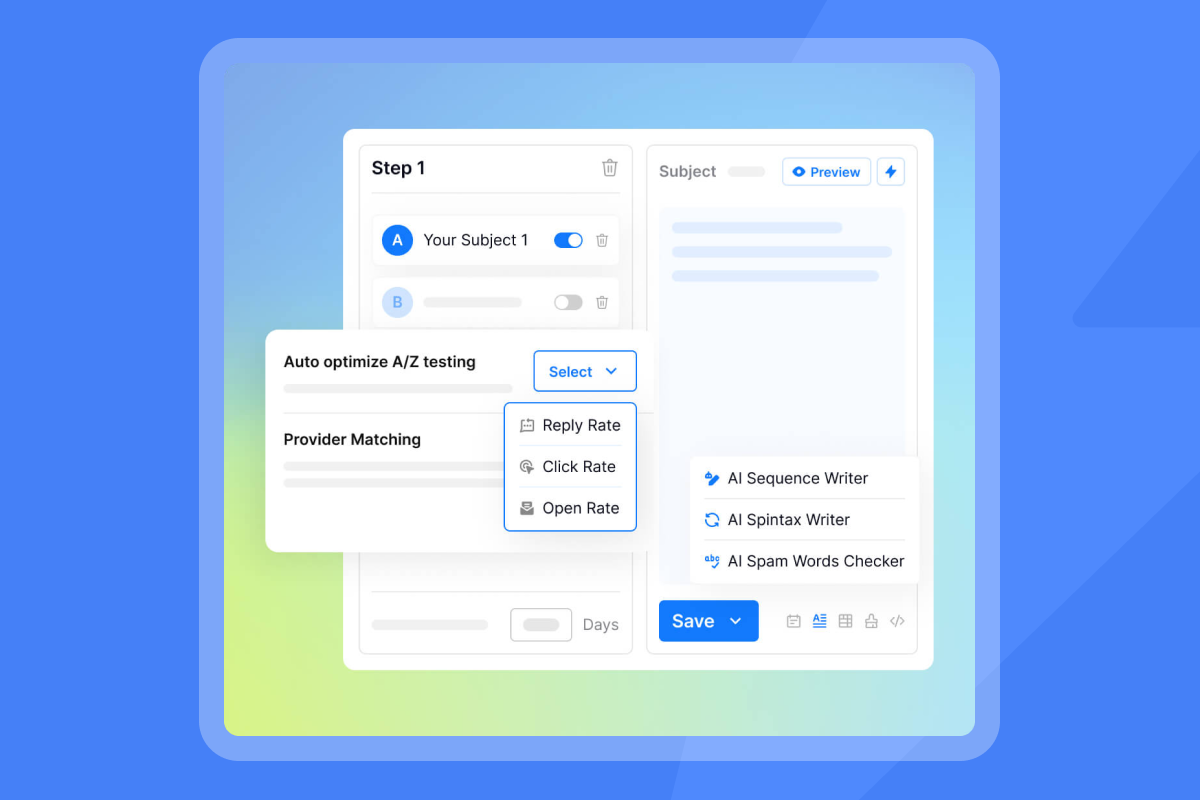
- Run A/B tests on AI responses. Our guide to boosting reply rate with AI and A/B testing strategies explains how to test subject lines, opening sentences, and CTAs systematically. Apply the same logic to AI reply drafts: test two response variants for common scenarios (pricing questions, objection handling) and measure which generates higher engagement.
- Monitor deliverability alongside reply performance. Use Instantly's Inbox Placement tests to confirm that AI-driven outreach maintains primary inbox placement. If health dips, pause sends, re-verify your list, and review send pacing.
5. Training your sales team to work with AI
- Educate your reps on how the AI Reply Agent operates, when it escalates conversations, and how to review and approve drafts in HITL mode. Create a playbook that documents tone guidelines, escalation rules, and approval SLAs (e.g., review drafts within 30 minutes).
- Emphasize that the AI handles routine queries so reps can focus on high-value conversations.
"takes mass outreach and does nicely so that you skip a lot of the manual work" - HB on Trustpilot
- Set clear expectations: the AI qualifies and warms leads, but reps own closing conversations. Use Slack channels to keep approvals visible and fast. Track resolution rate by rep to identify who needs more training or tighter prompt guardrails.
- Conduct weekly reviews of AI performance metrics with your team. Share examples of strong AI-generated replies and cases where human intervention improved outcomes. This builds trust and refines the system over time.
Maximizing results: Advanced strategies for sales leaders
Once your AI Reply Agent is live, apply these advanced tactics to increase booked meetings and protect deliverability.
Personalizing at scale with dynamic variables
Instantly's AI uses prospect data to create personalized replies at scale. Upload lead lists with custom fields like job title, industry, tech stack, and recent company news. Use AI prompts to generate custom variables such as {{PainPoint}} and {{ValueHook}} based on this data.
For example, a prompt might read: "Using Job Title, Industry, and Recent Company News, write a one-sentence {{PainPoint}} for each contact. Keep it under 20 words." The AI analyzes the data and populates the variable, which you then insert into reply templates. Our guide on AI-powered lead enrichment with Clay explains how to enrich leads further for hyper-personalization.
Dynamic variables ensure every AI-generated reply feels relevant and human.
"simplicity in managing inboxes and campaigns" - Nathan D. on G2
Combine dynamic variables with conditional logic to tailor follow-ups based on engagement (e.g., "I noticed you opened our email about {{ValueHook}}. Does this resonate with your goals at {{CompanyName}}?").
A/B testing AI responses for higher conversion
- Run continuous A/B tests on AI reply drafts to improve conversion rates. Test opening lines (direct question vs. empathy statement), response length (short vs. detailed), and CTA style (meeting link vs. soft ask for feedback).
- We recommend testing one variable at a time and measuring reply rate, meeting booking rate, and lead qualification rate. For example, test "Does {{PainPoint}} sound familiar?" against "Happy to share how we solve {{PainPoint}} for {{Industry}} teams. Here's my calendar."
- Track results over at least 100 interactions per variant to achieve statistical significance. Push winning variants to your AI training instructions and archive underperformers.
This video demonstrates how to automate A/B test setup using Clay and Instantly, reducing manual configuration time.
Maintaining deliverability with AI-driven outreach
- AI-powered replies increase send volume, which raises deliverability risk if you skip hygiene and pacing controls. Keep bounce rates at or below 1 percent by using verified contacts from SuperSearch and re-verifying lists before each campaign.
- Cap daily sends at 30 emails per inbox, even with AI automation. Ramp gradually (5 to 15 to 30 over 30 days) to build sender reputation safely. Instantly's built-in warmup helps new inboxes earn trust faster.
- Run Inbox Placement tests weekly to confirm primary inbox placement with Gmail, Outlook, and other providers. If placement drops below 80 percent, pause AI-driven campaigns, audit list hygiene, and adjust send windows to 8:30 to 10:30 a.m. local time.
"integrates smoothly with many other software platforms" and offers "plenty of AI features" - Verified user on G2
Leveraging Instantly's SuperSearch for targeted leads
- Use SuperSearch to source 450M+ verified B2B contacts and enrich them with AI-generated personalization variables before launching AI reply campaigns. SuperSearch pulls data from 5+ providers via waterfall enrichment, reducing bounce risk and improving targeting.
- Filter by job title, industry, company size, and tech stack to build ICPs that match your offer. Export lists directly to Instantly campaigns and apply AI prompts to create custom fields like
{{CompanyGoal}}or{{Competitors}}. This data informs the AI Reply Agent's tone and content, making responses more relevant.
"the biggest thing that really sets instantly.ai apart" is "how responsive and truly helpful their Support chat is" - Danamichele on Trustpilot
- Combine SuperSearch with Zapier automation workflows to automate lead enrichment and CRM updates, creating a closed-loop system from prospecting to booking.
Real-world impact: What sales leaders can expect
Sales Leaders who implement Instantly's AI Reply Agent report measurable improvements in booked meetings, team productivity, and brand consistency.
Increased booked meetings and pipeline velocity
Instant responses keep leads warm and accelerate pipeline velocity. Automated qualification and follow-up can increase meeting booking rates by 20 to 40 percent compared to manual workflows.
Testing over 30 days demonstrated higher qualification rates and faster handoffs to AEs. The AI handles initial objections and shares calendar links immediately, reducing friction and no-shows.
"I've converted several leads into deals using Instantly and it's paid for itself 5x" - Philip Hendrich on Trustpilot
Track meetings booked per campaign, cost per meeting (credits spent divided by meetings booked), and conversion from AI-qualified lead to SQL. These metrics justify investment and guide optimization.
Reduced manual workload for SDRs and AEs
Automating routine replies frees 2 to 3 hours per rep per day, allowing them to focus on live conversations and deal progression.
"has significantly helped in managing outbound email campaigns" and "the great training provided made the setup even smoother" - Carter W. on G2
The AI handles out-of-office replies, pricing questions, and follow-ups automatically. Reps intervene only when the AI escalates complex objections or high-value leads. This division of labor improves morale and reduces burnout.
"... smooth Zapier integration, and powerful tracking with subsequences. Everything works really well ..." - Joshua Blacklidge on Trustpilot
Consistent brand voice and compliance
Training the AI on your tone of voice and key product details ensures every reply reflects your brand. Unlike manual workflows where different reps use different language, the AI maintains consistency across all campaigns.
You also control escalation rules and approval workflows to prevent off-brand messages. Instantly's data handling and compliance posture help Sales Leaders address privacy concerns and meet audit requirements.
"great UI" and noted that the "chatbot always helps me out quickly" - Drishti B. on G2
Transform your sales outreach with intelligent automation
Instantly's AI Reply Agent turns reply chaos into a predictable system. You automate lead responses in under 5 minutes, maintain control through HITL or Autopilot modes, and protect deliverability with built-in warmup and health monitoring. The result is more booked meetings, less manual work, and consistent brand voice.
Start with a small pilot on one campaign. Train the AI on your tone and product details, configure Slack approvals, and track involvement rate and meeting booking rate. Refine prompts based on resolution rate, then scale across your team once health targets are stable.
The key is treating AI as a system, not a silver bullet. Pair automation with deliverability hygiene, transparent pricing, and team training to achieve sustainable results.
Ready to see Instantly's AI Reply Agent in action?
Start today for free - use the AI Reply Agent playbook today to automate follow-ups while your reps focus on live conversations. Use the strategies above to implement, optimize, and scale intelligent reply handling without risking domain health or team control.
FAQs
How much does Instantly's AI Reply Agent cost?
Each AI-generated reply costs 5 Instantly credits. You buy credits via pricing plans starting at $37/month for outreach plus credit packs from $9 to $197/month.
Can the AI Reply Agent integrate with my CRM?
Yes. Instantly integrates with Salesforce and HubSpot via native connectors, syncing lead statuses, campaign activity, and meeting bookings automatically.
How does Instantly ensure deliverability with AI?
Instantly includes built-in warmup, Inbox Placement tests, and reputation protection to maintain primary inbox placement even with AI-driven outreach.
What is the typical response time for the AI Reply Agent?
The AI Reply Agent responds to incoming leads in under 5 minutes, keeping engagement high and preventing leads from going cold.
Key terms for AI-powered sales outreach
AI Reply Agent: An AI system that automatically reads, qualifies, and responds to inbound lead emails, handling objections, follow-ups, and meeting bookings with minimal human intervention.
Human-in-the-Loop (HITL): An operational mode where the AI drafts replies but requires human approval before sending, providing control and allowing for tone refinement and oversight.
Deliverability Network: A pool of email accounts used to warm new inboxes and build sender reputation through authentic engagement patterns.
Primary Inbox: The main inbox folder (not spam, promotions, or updates) where recipients check email first, critical for cold outreach success and reply rates.
SuperSearch: Instantly's lead database of 450M+ verified B2B contacts with waterfall enrichment from 5+ providers, enabling targeted prospecting and reducing bounce rates.


