


Updated October 9, 2025
TL;DR: Instantly’s API V2 and webhooks give you fine-grained control over leads, campaigns, replies, and deliverability checks so data moves your way in real time. You can run bidirectional CRM sync with a partner like OutboundSync or build it yourself with API V2 plus webhooks. If you want breadth without code, connect Instantly through Zapier’s almost 8,000-app catalog and Make’s 3,000+ integrations. Use AI agents for drafting and reply triage to cut busywork - Start today for free.
Why custom integrations matter for advanced outreach
Standard connectors are fine for simple handoffs. If you need accurate activity data in your CRM, unified reporting, or routing that matches your sales rules, you need API and webhook access. With Instantly, you reduce manual steps with real-time events, keep CRM truth clean with defined mappings, and scale safely with clear send limits and health checks. Teams that rely on accurate forecasting and attribution usually outgrow one-way syncs. Webhooks plus API V2 close that gap.
Users echo the impact when delivery and follow-ups run on time.
"In just the past 180 days, I've been able to book over 100 meetings, close deals worth more than €15,000, and even walk away from my regular 9 to 5 job, all with the help of Instantly." - Dustin Geissinger Gromicho on Trustpilot
Understanding Instantly’s developer-first integration options
Instantly supports three common build paths: direct API, platform webhooks, and unified API aggregators.
Instantly API V2: building programmatic control
Use API V2 for end-to-end control of core objects and tests. The API V2 overview covers endpoints, scopes, and auth.
- What you can do
- Manage leads, lists, and campaign membership.
- Read campaign analytics and reply outcomes.
- Create and manage inbox placement tests with REST endpoints and Bearer auth.
- Developers often demonstrate full automation in this n8n build using V2 in an n8n + Instantly video.
- Authentication and availability
- Generate a V2 key with scopes. Send requests with Authorization: Bearer. API V2 access is available on the Growth plan and above.
Tip: The docs are interactive. You can try endpoints from the browser after you add your API key in the ApiKeyAuth panel in the interactive definition.
Webhooks: real-time data flow for dynamic workflows
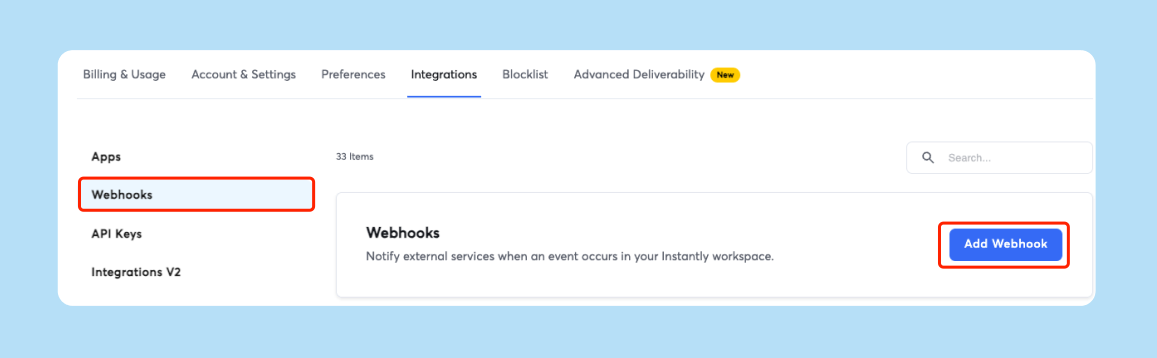
Use webhooks to push events to your systems in real time. The webhook guide lists event types, payloads, and setup steps.
- Common triggers
- Email sent, opened, clicked, bounced.
- Reply received, lead unsubscribed.
- Status updates like Meeting booked or Not interested.
- Delivery model
- Instantly posts a JSON payload to your HTTPS endpoint. Add retries and idempotency on your side and monitor deliveries. If you are new to webhook design, this ByteByteGo overview of retries and idempotency in Top 3 Things You Should Know About Webhooks is useful. You can also follow a practical Instantly walkthrough in How to Use Webhooks for Instantly Email Campaign Automations.
Here's a practical guide on how to use webhooks in your own outreach campaigns:
Unified.to: streamlining multi-platform connections
If you support many CRMs and services with one team, a unified API can simplify auth, field normalization, and versioning across providers. Unified.to offers a real-time unified API, webhooks, and a normalized schema across hundreds of integrations, which can reduce custom adapter work.
Achieving bidirectional CRM sync: beyond native integrations
Native CRM integrations help you push contacts and some outcomes. Activity-level data and status changes often stay one-way, which can break attribution and create messy follow-ups. That is why teams either add OutboundSync or build a two-way sync with API V2 and webhooks.
Native CRM integrations: what they offer
Expect basic contact pushes and some outcome fields into CRM objects. The limitation is activity-level logging and real-time status updates back into Instantly. That leaves reporting gaps when replies and meetings do not land in your CRM timeline.
The challenge of one-way data flow
- Follow-up risk. Reps can send sequenced emails after a meeting is booked if Instantly does not see the CRM stage move.
- Reporting drift. SDR results in Instantly do not reconcile with CRM analytics when reply and meeting events are missing.
Specialized solution: OutboundSync for Salesforce and HubSpot
OutboundSync focuses on activity-level, near-real-time sync between Instantly and major CRMs. It writes sends, replies, opens, clicks, bounces, and status updates as CRM activities or timeline events, and supports block lists to prevent outreach to sensitive contacts.
- Setup pattern
- Connect your CRM via OAuth. 2) Add your Instantly API key. 3) Configure a webhook receiver URL in Instantly. 4) Choose events to sync. 5) Validate in CRM using Instantly’s OutboundSync setup guide.
If you are exploring patterns for near-real-time, two-way syncs in general, see this demo of how to setup OutboundSync with Instantly:
Building your own bidirectional sync with API/webhooks
You can build a custom two-way sync with Instantly API V2, webhooks, and your CRM’s API.
- Define your field map
- Instantly lead.email → CRM Contact.Email
- Instantly lead.first_name → CRM Contact.FirstName
- Instantly campaign_id → CRM Campaign lookup
- Instantly reply_intent → CRM Lead.Status or custom field
- CRM Stage → Instantly custom_variables.stage
- Choose the pattern
- Webhooks for real-time events like replies and interest labels. Scheduled pulls for drift detection and nightly backfills.
- Add safety rails
- Retries with exponential backoff on 429/5xx.
- Idempotency keys to dedupe deliveries.
- Clear ownership rules when CRM and Instantly disagree.
Comparison: CRM integration options for Instantly
| Option | Data flow | Setup effort |
|---|---|---|
| Native integration | Mostly one-way into CRM for contacts/outcomes | Low |
| Zapier or Make (iPaaS) | One-way or partial two-way based on your flows | Medium |
| OutboundSync | Two-way activities, statuses, owners | Medium |
| Custom API build | Fully two-way, aligned to your model | High |
Zapier lists almost 8,000 apps and Make shows 3,000+ integrations.
Powering advanced workflows with automation platforms and AI
You can stitch enrichment, CRM updates, and AI actions with iPaaS tools and Instantly’s API.
Zapier and Make.com: bridging Instantly with thousands of apps
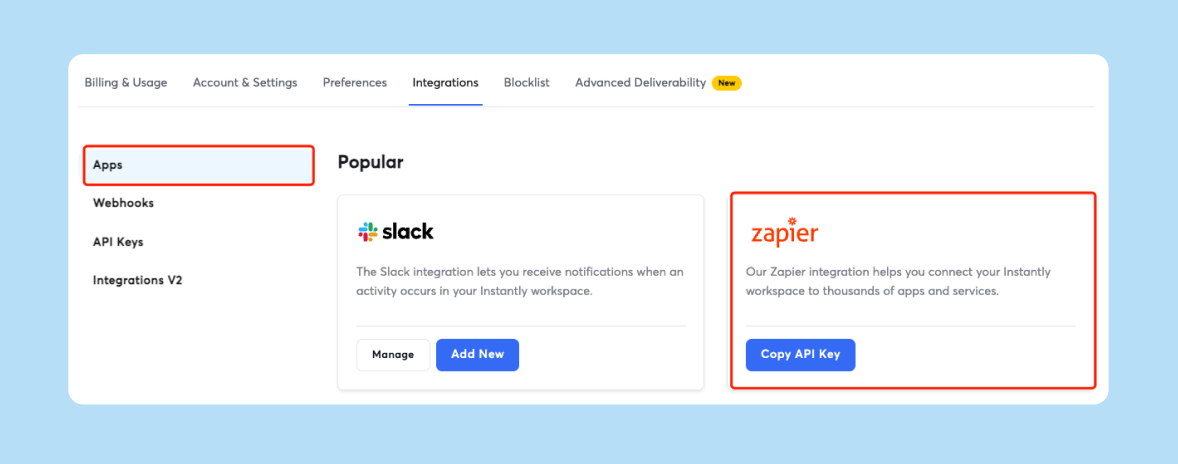
- Zapier
- Almost 8,000 apps for quick recipes that connect Instantly with CRMs, spreadsheets, calendars, and alerting. Pricing is task-based. See the Zapier apps overview.
- Make.com
- 3,000+ integrations, strong routers, and array handling for complex flows. Pricing is operation-based. Browse Make integrations.
Both support catching Instantly webhooks and calling Instantly’s API for actions like adding leads, updating statuses, or pausing a campaign. Make’s Instantly app includes native modules such as Add a Lead, Update Lead Status, and Watch Events in the Make Instantly app guide.
AI-enhanced automation: cut drafting time and improve triage
Three quantified examples you can model now:
- Draft new sequences faster with Copilot
If a rep spends 30 minutes to brief, draft, and QA a two-step sequence, Copilot can reduce hands-on time to about 10 minutes by generating editable templates. That saves roughly 20 minutes per sequence. Explore AI Copilot. - Reply faster with AI Reply Agent
AI Reply Agent responds in under 5 minutes and uses Instantly credits. If a rep triages 50 replies per day at 2 minutes each, adding HITL plus the agent can drop effort to 30–60 seconds per reply. That reclaims 50–75 minutes daily. Read the AI Reply Agent guide. - Smarter routing with iPaaS AI steps
Use Zapier or Make to classify intent from webhook payloads and route to the right owner. If you classify 100 replies at 10 seconds each, automation saves about 16 minutes per day while improving consistency.
Users call out the value of AI and ease of setup:
"Simple and well-designed UX, effective support from both humans and AI for small questions. Additionally, the AI is capable of entering campaign configurations and applying fixes, which is a huge time saver!" - guillaume n. on G2
"It was very straight forward to warm up my email addresses/inboxes as well as start my first campaign!" - Verified User in Computer Software on G2
You can also see Copilot draft a campaign in minutes in Instantly’s short demo, I Spoke to AI and Got a Full Campaign.
Custom lead enrichment and personalization workflows
Pair Instantly with data tools to raise reply rates using verified, relevant context.
Clay: deepening lead intelligence
- Clay
Build enrichment waterfalls, validate emails, and run Claygent to pull last-mile context. Append headcount, tech, funding, and personalized snippets into Instantly custom variables using Clay enrichment workflows. Although you can also do most of this natively with Instantly's SuperSearch.
All-in-one workflow example: discovery to outreach
- Prospecting and enrichment
Use Apollo for net-new contacts. Push to Clay for verification and extra fields. - Segmentation
Tag ICP tiers, buyer roles, and pain themes in Clay. Write fields to Instantly custom_variables. - Personalization drafting
Generate first-line snippets in Claygent or Persana and save to Instantly as a variable. - Deliverability check
Create an inbox placement test for the sending domain via API. If a threshold fails, pause sends. - Send with guardrails
Cap at 30 emails per single inbox per day. Use send windows that match buyer time zones. - Reply triage
Let AI Reply Agent handle quick replies in under 5 minutes. Route edge cases to humans.
Customers frequently highlight these features:
"Few features I like the most about Instantly are as below. 1. Inbox placement test 2. Their email tracking system. 3. Lead reply automatic drafted with the help of AI. 4. AI Spam word checker." - Sakshi S. on G2
"I love that Instantly lets me reach the right people directly... With Instantly, I can contact CEOs, founders, and managers... and they actually reply..." - Victor . on G2
Common use cases for Instantly API and webhooks
- Real-time CRM updates. Write replies and meeting intent as CRM tasks or timeline events.
- Dynamic list management. Move leads between Instantly campaigns when CRM stage changes.
- Custom routing. Assign positive replies to the right rep instantly.
- Placement guardrails. Auto-pause campaigns if an inbox placement test drops below your threshold.
- Attribution. Stream Instantly events to your warehouse for multi-touch models.
- Slack alerts. Notify owners when high-intent keywords appear in replies with the Slack integration.
- Hygiene loops. Auto-verify and suppress risky emails before list adds.
- Governance. Log every API change to a compliance trail.
Prerequisites and best practices for custom integrations
- Access
API V2 is available on Growth and above. Webhooks require Hyper Growth or above. Generate a V2 key and store it as a secret. - Developer skills
Know REST, HTTP, JSON, and your CRM’s API. - Security
Do not hardcode secrets. Use environment variables and a vault. - Throughput and retries
Respect rate limits and add exponential backoff on 429/5xx. - Deliverability safety
- Cap at 30 emails per single inbox per day.
- Use verified contacts and maintain list hygiene.
- Data handling
Review Instantly’s DPA and sub-processor list with your legal team.
Troubleshooting common API and webhook issues
- 401 or 403 errors
Wrong key, scopes, or header format. Use a V2 key with Authorization: Bearer. - 400 Bad Request
Invalid payload or missing fields. Validate JSON against the endpoint schema. - 404 or 5xx
Wrong path or temporary issue. Confirm /api/v2 paths. Retry with backoff. - Webhooks not received
Bad URL, auth, or firewall. Test with curl or Postman. Check Instantly webhook activity for failures and retries in Webhook activity monitoring. - Platform health
If failures spike, check the Instantly status page.
Step-by-step examples
Example A. Configure a webhook to your endpoint
- Go to Settings → Integrations → Webhooks inside Instantly. Done when the Webhooks page is open.
- Click Add Webhook. Paste your HTTPS endpoint URL. Done when the URL validates.
- Choose the campaign scope and event types, such as Reply received. Done when events are selected.
- Save and send a test. Done when your server logs show the POST payload.
Example B. Plan a field map for custom CRM sync
- Required fields
email, first_name, last_name, company_name - Recommended custom_variables
crm_id, owner_id, stage, persona, tier, product_usage_score - Status logic
If CRM Stage becomes Meeting booked, update Instantly custom_variables.stage and remove from the cold campaign.
Example C. Protect deliverability with API checks
- Schedule an inbox placement test per sending domain before daily sends. Done when the test ID is returned.
- If placement falls below your threshold, pause the campaign via API. Done when the campaign status is Paused.
- Alert deliverability owners in Slack and investigate DNS or content. Use the Inbox Placement Tests endpoint.
Build the outreach system you actually want
Your data model and reporting needs are specific. With Instantly’s API V2, webhooks, and the partner ecosystem, you can connect any CRM, data warehouse, or proprietary tool and keep activity data accurate. Start with a clear field map, add real-time triggers, and measure time saved from AI. Then iterate based on your ops scorecard. Start a free Instantly trial today to start automating away the grunt work.
Next steps
- Read Instantly’s API V2 documentation.
- Read our guide on how to use webhooks.
- Pick your CRM sync path: Native, iPaaS, OutboundSync, or Custom.
FAQ
- Can Instantly do two-way sync with Salesforce or HubSpot?
Yes. Use a specialized connector like OutboundSync for activity and status sync, or build a custom integration with API V2 plus webhooks. - How many tools can I connect with Zapier or Make?
Zapier has almost 8,000 apps and Make shows 3,000+ integrations. - How fast does AI Reply Agent respond and how is it billed?
AI Reply Agent responds in under 5 minutes and uses Instantly credits per reply. - What is a safe daily send cap per inbox?
Keep it at or below 30 emails per single inbox per day. Ramp gradually and run placement checks. - What do automation platforms cost?
Zapier is task-based. Make is operation-based. Enrichment tools like Clay and Persana often use credits. Check each vendor’s pricing for your volume.
Terminology
- CRM integration: Connecting Instantly data to CRM objects and activities.
- Bidirectional sync: Data flows into and out of both systems.
- Workflow automation: Rules that move data or trigger actions.
- API: Programmatic interface for reading or writing data.
- Webhooks: Event notifications sent to your URL as HTTP POST.
- Lead enrichment: Adding verified, useful data to contacts.
- Personalization: Tailoring messages to contact or account context.
- AI automation: Using AI to draft, classify, route, or reply.
- Zapier: Automation platform with a large app catalog.
- Make.com: Automation platform with modular routing and arrays.
- Clay: Enrichment and research with waterfalls and Claygent.
- OutboundSync: Bidirectional CRM sync for Instantly.
- Unified.to: Unified API across many SaaS categories.
- Primary inbox: The folder recipients actually read.
- Sender reputation: How mailbox providers score domain trust.
- Warmup: Controlled sends that build trust signals.
- Verified contacts: Emails confirmed deliverable.
- Send windows: Time ranges when emails are sent.
- Spin syntax: Text variations to reduce repeats.
- Reply rate: Replies divided by delivered emails.
- Booked meetings: Meetings created from outreach replies.
- Unified inbox: Centralized view of all replies.
- Credits: Units for AI or data features.
- Throughput: Total sends across connected inboxes.


