


Updated September 20, 2025
TL;DR: Website visitor tracking identifies the companies behind anonymous traffic and shows what they do on your site. Sales gets warm, high‑intent leads. Marketing gets behavior data to improve pages and campaigns. This guide explains the tools, the benefits, which features to evaluate, how to implement visitor tracking, and how to stay privacy‑compliant. Try Instantly free to turn your website visitors into qualified leads.
What is website visitor tracking and why your business needs it
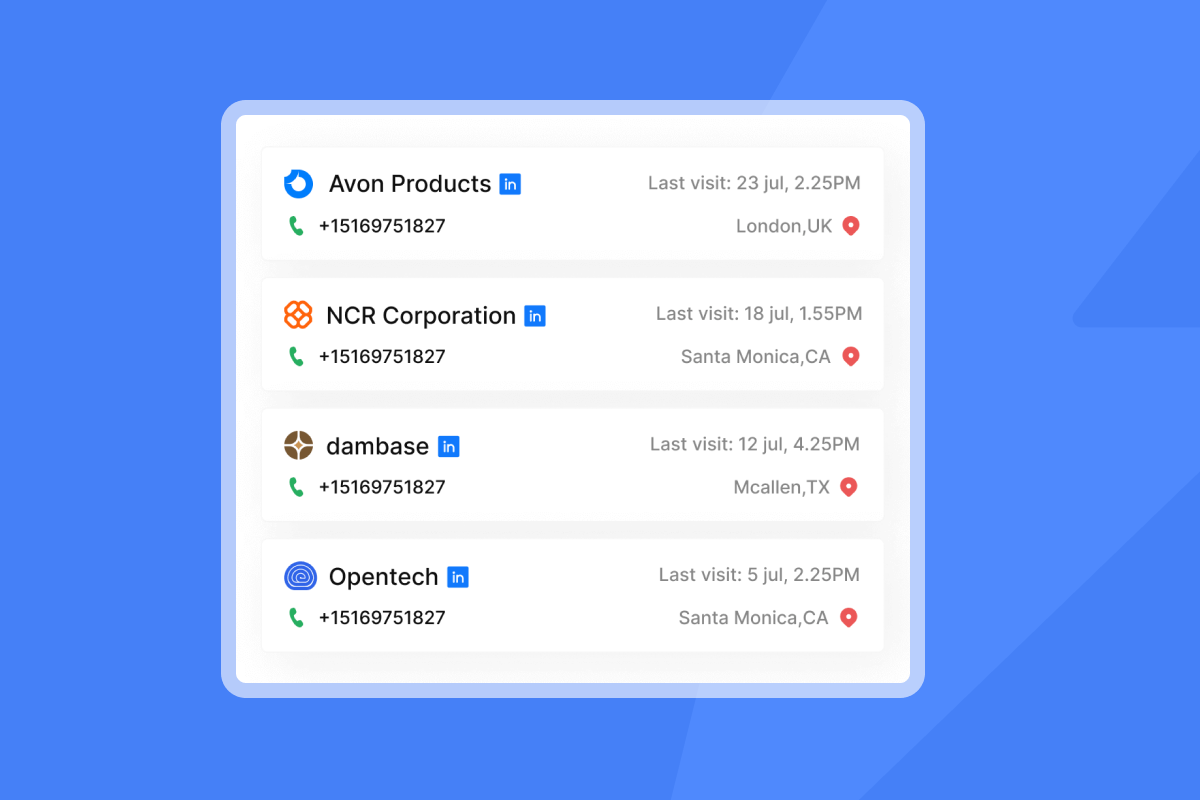
Website visitor tracking is software that identifies who is visiting your site by company and records how they behave. It maps visits to firmographic details, then pushes those insights into your CRM or sales workflows. Result: passive traffic turns into active B2B leads.
Why it matters. Most B2B sites convert a small share of visitors by forms. Benchmarks place typical B2B conversion under 5 percent, even for category leaders. That leaves the vast majority of traffic anonymous unless you identify it and act on intent. At the same time, buyers spend only about 17 percent of their total buying time with all suppliers combined, so timely follow up matters.
Instantly’s Website Visitors feature focuses on US traffic and can push identified visitors to Slack, your CRM, or directly into campaigns.
Understanding website visitor tracking: beyond basic analytics
Analytics shows what happened. Visitor tracking shows who did it and how to convert it into pipeline.
Traditional analytics report pageviews and channels but stop at anonymous behavior. Visitor tracking adds identification. It resolves B2B visits to company names, enriches with firmographics, and attaches intent signals such as repeat pricing views or product depth. This helps sales see which accounts are active today and gives marketing a clear view of which campaigns attract ICP traffic.
Only a small portion of traffic converts by forms. Recovering even a slice of the remaining visitors adds meaningful pipeline for most B2B teams.
Feedback from a real Instantly user:
"It has all the tools needed for cold outbound in one place. Previously, I was running 3 different systems to get a fraction of the results." G2 review by James L.
The strategic value: boosting sales and marketing with visitor insights
Visitor tracking supplies sales with warm, timely leads and gives marketing the behavior data to improve content, funnels, and budgets.
Checklist: benefits for B2B
- Identify high‑intent accounts. See which companies viewed pricing, case studies, and solutions pages.
- Prioritize with context. Sort by actions, frequency, and recency to focus outreach where interest is highest.
- Unify reporting. Sync visits and intent to your CRM for auditable sourcing and funnel analysis.
- Strengthen ABM. Confirm when named accounts show up and coordinate timely follow ups.
- Fix conversion leaks. Use heatmaps and session replay to remove friction on key pages.
- Move faster. Buyers spend about 17 percent of time with suppliers. Fast, relevant follow up wins.
Essential features: what to look for in a tracking solution
Choose tools that identify visitors reliably, show behavior clearly, and integrate with your stack without drama.
Checklist: key features
- Visitor identification. Resolve visits to companies with firmographic data. Validate match rates in a pilot.
- Real‑time alerts. Notify owners in Slack or email when target accounts visit priority pages.
- Session replay. Watch individual journeys to debug UX issues that block conversions.
- Heatmaps and scroll maps. See engagement hot spots and dead zones on key pages.
- Funnel and conversion tracking. Visualize paths to conversion and drop‑offs to target fixes.
- CRM integration. Native sync or webhooks to Salesforce, HubSpot, Pipedrive, plus field mapping and dedupe rules.
- A/B test support. Test headlines, CTAs, and outreach variants to lift conversions.
- Data quality controls. Filter bots and ISPs. Track enrichment and verification hit rates.
- Privacy controls. Consent modes, IP anonymization, and a clear DPA to support GDPR/CCPA.
- Deliverability tooling. If you email identified leads, use warmup, inbox placement tests, and reputation monitoring. See Instantly’s deliverability network. For a quick primer, watch how to improve email deliverability.
Instantly combines Website Visitors with a 450M+ lead database, Outreach, AI Reply Agent, and CRM in a flat‑fee stack. Inbox Placement tests and a private deliverability network are built in.
Sales benefits: from anonymous visitors to warm leads
Visitor tracking creates a reliable feeder funnel with clear next actions for sales.
Checklist: sales benefits
- Automatic record creation. Create or enrich accounts in your CRM when qualified companies visit.
- Intent‑based prioritization. Score by page depth, frequency, and recency. Pricing views and return visits rise to the top.
- Real‑time alerts. Ping owners when target accounts are active so they can act while interest is high.
- ABM validation. Confirm engagement from named accounts and time outreach to those sessions.
- Audit‑friendly tracking. Attribute opportunities to identified visits for predictable forecasting.
"They specialize in getting emails delivered at a much higher rate than our previous email provider, and make it generally easy to find contacts." G2 review by a Verified User
Tip: Resolution rates vary by tool and traffic mix. Validate with a 10 to 30 day pilot. Note that Instantly’s pixel currently tracks US‑based visits by design.
Optimizing marketing: understanding user behavior and campaign performance
Marketers use visitor tracking to double down on what works and fix what does not.
Checklist: marketing benefits
- Channel and campaign ROI. Tie identified accounts back to UTMs and sources to see what truly produces pipeline.
- Content optimization. Use heatmaps and replays to streamline pages that stall.
- A/B testing at speed. Test headlines, offers, and layouts to lift conversion. Keep a simple scorecard.
- Personalization. Surface relevant case studies by industry or company segment.
- Retargeting refinement. Build ad audiences from high‑intent site visitors instead of broad cookies.
- Data quality lens. Track email verification hit rates, bounce rates, and match rates to keep experiments honest.
Scorecard to monitor
- Identified leads per campaign
- Conversion rate from identified lead to meeting
- Cost per identified lead
- Bounce rate on pages with high intent
Getting started: implementation steps and technical considerations
Install the pixel, connect your CRM, define intent signals, and test. Basic setup takes minutes. Deeper integrations take longer.
How to implement
- Install the pixel. Add the JavaScript snippet directly or via Google Tag Manager. Confirm it fires on all pages. Getting started guide. You can also watch the video walkthrough of Website Visitors and a full Instantly tutorial.
- Configure identification and filters. Exclude bots and internal IPs. Enable enrichment where available.
- Connect your CRM. Map fields, set create vs update rules, and define ownership. Native connections exist. Many teams use OutboundSync for full activity sync to HubSpot or Salesforce. OutboundSync overview. See how to sync Instantly into HubSpot and Salesforce. Setup for HubSpot.
- Define high‑intent rules. For example, two pricing visits in seven days from a target account triggers an alert and task.
- Set alerts. Notify owners in Slack or email on hot signals.
- Test end to end. Trigger a visit and verify the CRM record, fields, and alerts.
- Launch and monitor. Review match rates, lead quality, and inbox placement if emailing.
Real Instantly user feedback
"This is our go-to platform to warm up email addresses, and we recommend it to all our clients. It's super easy to use and always does the job." G2 review by Loïc S.
"The platform is super intuitive, and I was able to get up and running in minutes." G2 review by James M.
"Amazing and easy to use UI, even better customer service." Trustpilot review by Shayan
Inbox placement tip. Before emailing identified leads, run inbox placement tests and warm new domains. See Instantly Inbox Placement and deliverability practices. For additional tactics, watch how to avoid cold emails going to spam. For opposing views and real‑world variability, community threads discuss Microsoft spam placement and test differences.
Top website visitor tracking tools: a comparison guide
Choose based on whether you need lead identification, behavior analytics, or a unified outbound stack.
| Tool | Key features | Pricing model |
|---|---|---|
| Instantly | Website Visitors pixel for US traffic, Slack alerts, CRM push, 450M+ lead database, Outreach, AI Reply Agent, CRM, inbox placement tests | Flat-fee modules |
| Hotjar | Heatmaps, session recordings, surveys, strong UX insights, no firmographic lead ID | Freemium tiers |
| Leadfeeder-type tools | IP-to-company resolution, lead scoring, CRM sync | Tiered SaaS |
| Matomo | Privacy-friendly analytics, self-host option, plugins for profiles | Open source + paid cloud |
| FullStory or Crazy Egg | Advanced session replay and path analytics, some A/B | Subscription |
| HubSpot Marketing Hub | Contact tracking integrated with CRM, email and forms | Per-seat + hubs |
Instantly pricing snapshot and fit
Outreach Growth $37 per month. Hypergrowth $97. Light Speed $358 with SISR. Website Visitors $97 or $397 per month. SuperSearch credits from $9/mo on Nano plan. All offer unlimited senders on Outreach.
Navigating data privacy: GDPR, CCPA, and alternatives to Google Analytics
Use consent, minimize data, and pick vendors with signed DPAs and transparent sub‑processors.
Checklist: privacy considerations
- Consent management. Fire non‑essential pixels only after opt‑in where required.
- Data minimization. Avoid over‑collecting. Filter sensitive pages. Respect regional rules.
- DPA and sub‑processors. Get a signed DPA and access to the sub‑processor list. Instantly DPA.
- Regional coverage. Instantly’s Website Visitor ID collects only from US‑located IPs, which limits GDPR exposure by design. Legal onboarding note.
- Analytics alternatives. When GA use is restricted, privacy‑first analytics such as self‑hosted options are common choices. Confirm your legal basis and consent.
Customer perspective on compliance and setup
"Easy setup, AI superpowered, intuitive user interface. Has all the requirements to be legal for Germany." Trustpilot review by Alexander
Tailoring tracking to your role: solutions for marketers, agencies, founders, and sales
Match features and pricing to real constraints by role.
- Growth marketer
- Needs: A/B tests at scale, trustworthy data, clear pricing for experiments.
- What to use: Visitor identification tied to UTM campaigns, on‑page testing, verification hit‑rate reporting, and consent tools.
- With Instantly: A/Z testing in Outreach, verified contacts from SuperSearch, inbox placement testing, flat Outreach pricing without per‑seat surprises.
- Agency operator
- Needs: Flat fees, unlimited accounts, deliverability dashboards, clear off‑ramps.
- What to use: Unlimited domains and mailboxes, warmup automation, audit logs, centralized alerting, team reporting.
- With Instantly: Unlimited senders on Outreach plans, deliverability network, SISR on Light Speed, team reporting in CRM, published add‑ons and plan limits. Plans overview.
- Startup founder
- Needs: All‑in‑one stack, simple ramp plan, ROI clarity.
- ROI sketch: If $97 for Visitors plus your Outreach and lead credits yields 15 identified leads and one $2,500 sale, month one pays back. Track identified leads, booked meetings, and revenue sourced in your CRM.
- With Instantly: Start with Growth Outreach and Growth credits. Add Website Visitors when traffic justifies it. The AI Reply Agent can answer and qualify replies in under five minutes.
- Sales leader and RevOps
- Needs: Standardization, audit‑ready reporting, CRM fidelity, deliverability guardrails.
- What to use: Sequence governance, global blocklists, placement monitoring, and webhook‑based event logging to CRM. OutboundSync adds deep HubSpot and Salesforce activity sync. OutboundSync for Instantly.
- Why this matters: Buyer face time with sellers is limited, so teams need accurate intent data and tight handoffs.
Opposing viewpoints to acknowledge
- Deliverability variance. Community reports show Microsoft inboxes can be hard to land even after warmup and tests. Validate with your domains and volumes.
- TCO drift. Add‑ons and high volumes can raise total cost. Review plan limits and add‑on pricing first.
Transform your traffic into tangible B2B growth
Visitor tracking turns silent visits into qualified conversations. Sales gets timely, high‑intent leads. Marketing gets hard data to improve conversion and spend. When tracking lives inside a unified outbound platform, insights move directly into action, from identification to booked meetings.
Ready to turn anonymous visitors into qualified leads
Try Instantly free to turn your website visitors into qualified leads. Explore how Website Visitors connects to SuperSearch, Outreach, AI Reply Agent, and CRM in one stack.
- Start free: Instantly Website Visitors feature
- See pricing and modules: Instantly pricing
- Learn about the AI Reply Agent: Instantly AI Reply Agent
Frequently asked questions about website visitor tracking
- What does website visitor tracking software do?
It identifies the companies behind visits and records behavior like pages viewed, then syncs that data to your CRM for fast follow up. - How fast can I set it up?
Pixel installs can take minutes. CRM mapping and governance usually take a few hours including QA. Getting started. - How much traffic can be identified?
Match rates vary by tool, region, and traffic. Validate with a pilot. Instantly’s pixel currently tracks US‑based visits. Legal onboarding. - Is this GDPR or CCPA compliant?
Yes, if you use consent mode, minimize data, and have a signed DPA. See the Instantly DPA. - Which tools fit small teams?
Many start with an all‑in‑one like Instantly for lead ID plus outreach. For UX behavior alone, Hotjar is common. Hotjar runs on over 1.2M sites.. - How do I measure ROI?
Track identified leads, meetings, and revenue sourced by the tool in your CRM. Compare to monthly cost and hours saved.
Key terminology in website visitor tracking
- Website visitor tracking: Identifies which companies visit your site and records their behavior.
- Lead identification: Converts anonymous visits into known companies or contacts.
- Session replay: Video‑like recordings of clicks, scrolls, and navigation.
- Heatmaps: Visual maps of click and scroll hotspots.
- Conversion tracking: Measures goal events like demos or signups.
- Deliverability: Rate emails land in primary inboxes, not spam.
- Sender reputation: Trust score for your domain and IP.
- CRM integration: Automatic syncing of visit and lead data to CRM.
- A/B testing: Compare two variants to see which converts better.


