


Updated October 28, 2025
TL;DR: Deliverability drives cold email ROI. Measure ROI and payback with a simple funnel math model, then lift reply rates by protecting sender reputation with automated warmup, list hygiene, inbox placement testing, conservative send windows, and hard caps per inbox. Instantly adds scale and control with unlimited accounts on a flat fee, a private 4.2M+ account deliverability network, SISR on Light Speed, automated Inbox Placement tests, AI Copilot for campaign creation, and AI Reply Agent that answers or triages in under 5 minutes. Start with the calculator below, set health thresholds, and scale only after placement and bounce targets are stable.
For Sales Leaders, Growth Marketers, agency operators, and founders who need consistent meetings and predictable pipeline, this is your practical playbook.
Quantifying your outreach success
Cold email ROI equals attributed revenue minus all costs, divided by those costs. Payback period is months to recover your upfront and monthly spend with net profit. Model revenue from replies with a simple funnel, then improve each stage through deliverability.
Quick formulas:
- ROI = (Attributed revenue − Total cost) ÷ Total cost
- Payback period (months) = Upfront investment ÷ Net monthly profit
- Reply rate to revenue = Sends × Inbox rate × Open rate × Reply rate × Meeting rate × Close rate × Average deal value
B2B buyers spend only about 17% of their buying time meeting suppliers, which makes primary‑inbox placement critical. When buyers compare multiple suppliers, time with any single rep can fall to 5-6%, according to a Gartner insights. That is why every inboxed message must count.
Understanding ROI and payback period in outreach
ROI tells you if outreach turns budget into profit. Payback tells you how fast cash returns.
- Use ROI to choose which motions to scale.
- Use payback to plan budgets and throttle additions when cash is tight.
Separate in your model:
- Top‑of‑funnel drivers: verified data, targeting, deliverability, message relevance.
- Cost centers: platform fees, lead credits, domains and inboxes, verification, operator time.
- Attribution window: first reply to closed‑won.
Deliverability underpins the funnel. If you do not reach the primary inbox, opens and replies collapse, and ROI can round to zero even with strong copy.
Calculating your outreach ROI
Start with a measurable funnel, then connect it to dollars.
The core formulas
- Revenue estimate
Revenue = Sends × Inbox placement rate × Open rate × Reply rate × Meeting rate × Close rate × Average deal value - Total cost
Total cost = Platform fees + Data/credits + Domains/inboxes + Verification + Operator time + Add‑ons - ROI
ROI = (Revenue − Total cost) ÷ Total cost
Example with real numbers
Assume monthly:
- Sends: 20,000
- Inbox rate: 85%
- Open rate: 50%
- Reply rate: 5%
- Meeting rate from replies: 20%
- Close rate from meetings: 25%
- Average deal value: $6,000
Revenue math:
- Delivered: 20,000 × 0.85 = 17,000
- Opens: 8,500
- Replies: 425
- Meetings: 85
- Closed deals: 21.25
- Revenue: 21.25 × $6,000 = $127,500
Costs:
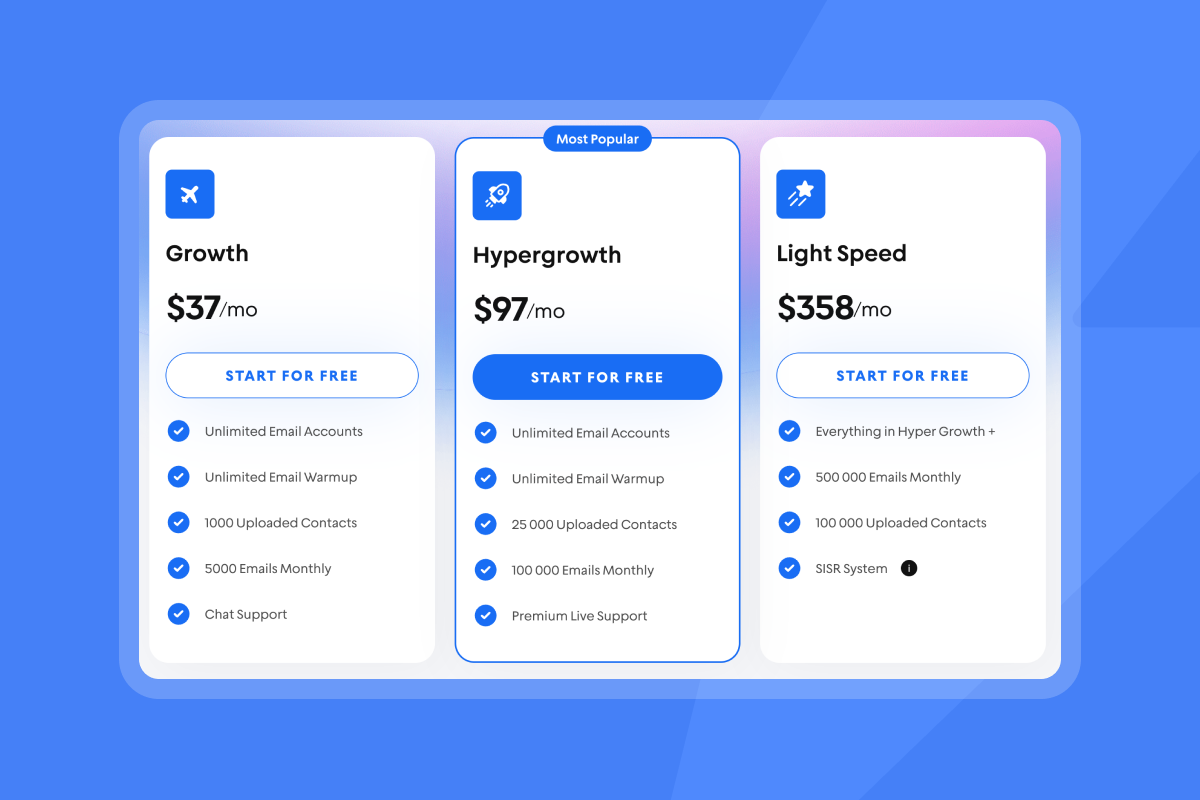
- Instantly Outreach Hypergrowth: $97
- SuperSearch Hyper Credits: $197
- Growth CRM: $47
- Domains, inboxes, DNS: $120
- Operator time: $2,500
- Total monthly cost: $2,961
ROI:
- ($127,500 − $2,961) ÷ $2,961 ≈ 42.0
Deliverability compounding: lifting inbox rate from 75% to 85% increases revenue about 13% at the same send volume with the same funnel.
Reply rate to revenue calculator framework
- Inputs: sends, inbox rate, open rate, reply rate, meeting rate, close rate, average deal value, total cost.
- Outputs: delivered, opens, replies, meetings, deals, revenue, ROI.
ROI and funnel calculator framework
| Input or formula | Value | Notes | Output |
|---|---|---|---|
| Sends | 20,000 | Monthly volume | |
| Inbox rate | 85% | From placement tests | Delivered: 17,000 |
| Open rate | 50% | From analytics | Opens: 8,500 |
| Reply rate | 5% | From analytics | Replies: 425 |
| Meeting rate | 20% | SDR QA | Meetings: 85 |
| Close rate | 25% | From CRM | Deals: 21.25 |
| Avg deal value | $6,000 | From finance | Revenue: $127,500 |
| Total cost | $2,961 | All in | ROI: 42.0 |
Litmus reports email averages near $36 return for every $1 invested, which explains why small lifts in placement and replies move real dollars.
Measuring your outreach payback period
Payback helps you decide when to add inboxes, credits, or staff time.
- Payback (months) = Upfront investment ÷ Net monthly profit
- Net monthly profit = Attributed revenue − Total monthly cost
Illustration:
- Upfront setup: $1,000 for domains, accounts, content.
- Net monthly profit from the example: $127,500 − $2,961 = $124,539.
- Payback: $1,000 ÷ $124,539 ≈ 0.01 months.
Benchmarks vary by motion and ACV. Many SaaS operators target under 12 months as a healthy threshold, with 12-18 months common at scale, per investor benchmarks from Point Nine on CAC payback.
Flat‑fee models with unlimited accounts reduce marginal cost per inbox and usually shorten payback as you add capacity. Instantly’s Outreach plans include unlimited email accounts and warmup on a flat fee.
Deliverability: the foundation of high ROI
If an email does not reach the primary inbox, it cannot be opened or replied to. That makes deliverability the biggest multiplier in your ROI math.
What moves inbox placement:
- Warmup and domain age: Build positive history before scale.
- Authentication: SPF, DKIM, and DMARC aligned on every domain.
- List hygiene: Verified contacts and bounce control.
- Sending behavior: Natural volume, workday send windows, and copy variation.
- Placement tests and health monitoring: Catch issues early.
How Instantly raises deliverability:
- Automated warmup on every Outreach plan, powered by a private deliverability network of 4.2M+ real accounts that generate authentic engagement signals. This builds reputation over time. See our full deliverability playbook for an end to end breakdown on warmup and deliverability.
- Inbox Placement tests and automated alerts let you validate seed inbox results across providers, check blacklists, and gate scale with rules when placement dips. Learn more about Inbox Placement and automated tests.
- SISR on Light Speed routes volume across dedicated private servers and IP pools to protect reputation and keep placement high at scale.
- SuperSearch provides access to 450M+ B2B leads with waterfall enrichment to raise verification rates and reduce bounces.
Watch how to setup warmup on Instantly in just a couple of clicks:
Market reality and risk:
Placement can vary by provider and week. Microsoft and Google apply evolving heuristics. Use recurring placement tests and conservative ramps to manage this risk. The product page outlines automated pausing rules and blacklist monitoring that help you respond fast. See the Inbox Placement feature.
How to implement a deliverability uplift plan
- Warm domains and inboxes for 30 days:
Done when Inbox Placement shows inboxing at or above 80% across major providers. Keep warmup running during campaigns. See how you can test for this automatically with Instantly with our automated placement tests help doc.
- Cap sending per inbox:
Do not exceed 30 new cold emails per inbox per day. Increase throughput by adding warmed inboxes, not by pushing one inbox harder.
- Verify every list before import:
This should be done when hard bounces are at or below 1%. Verification is built in, but if you need a refresher, review the data and verification guidelines.
- Send in workday windows:
Use windows like 8:30–10:30 a.m. local time. Avoid nights and weekends.
- Use spin syntax and 2–3 variants per step:
Done when duplicates drop and reply rate rises after a 1,000‑send sample.
- Run placement tests weekly and before major changes:
Pause scale if inboxing dips below your threshold on key providers. Fix, retest, resume. and use automated tests for this loop.
- Route high volume through SISR when scaling:
Use Light Speed to shard and rotate across private IP pools as inbox count grows.
Note: Gmail and Yahoo require strong authentication and low complaint rates. Gmail has publicly stated an enforcement spam rate threshold of 0.3% for bulk senders, and Yahoo has aligned on similar requirements. Monitor with Google Postmaster Tools.
Boosting ROI with sales engagement platforms and AI
Once placement is stable, speed and accuracy in execution drive returns. AI and workflow automation reduce manual hours and protect consistency.
How Instantly helps:
- AI Reply Agent answers or triages lead replies in under 5 minutes, with Human‑in‑the‑Loop or Autopilot modes. Faster responses convert more interest while intent is high.
- AI Copilot assists with research, targeting, campaign creation, sequence writing, weekly analytics summaries, and recurring tasks. Read more on our Copilot with our help doc.
- Unified Inbox and CRM views help teams classify, follow up, and report outcomes. Integrate with HubSpot or Salesforce via supported connectors and API.
For a walkthrough of core workflows, watch the Instantly AI full tutorial on YouTube and a quick look at CRM workflows in This CRM makes it easy to close more deals.
What customers say:
"Deliverability tools that actually move the needle: warmup, inbox rotation, and smart sending windows help us land in Primary instead of Promotions/Spam." - Anthony V. on G2
"Unlimited Email inbox warmup is included with all the plans, and you get access to the Unibox at all plans too. This saves a ton of time." - Chinmay K. on G2
"Few features I like the most... 1. Inbox placement test 2. Their email tracking system. 3. Lead reply automatic drafted with the help of AI. 4. AI Spam word checker." - Sakshi S. on G2
AI labor effects can be material. BCG reports 30-40% reductions in FTE hours for content workflows when teams redesign processes for GenAI. McKinsey finds large productivity gains in customer operations, with estimates of 30-45% and meaningful gains in marketing and sales productivity.
Pricing models and ROI: flat‑fee vs per‑seat
Per‑seat tools scale cost with headcount. Flat‑fee tools with unlimited accounts scale with outcomes.
Pricing model impact on ROI
| Model | Cost pattern | ROI implications | Best for |
|---|---|---|---|
| Flat‑fee unlimited accounts | Fixed platform fee, add credits as needed | Lower marginal cost per inbox. Faster payback as you add accounts. | Agencies, lean teams, high‑volume senders |
| Per‑seat pricing | Fee per user seat plus add‑ons | Costs expand with headcount. Slower payback if throughput per seat is uneven. | Larger orgs needing seat governance |
Instantly example stack for scale:
- Outreach Hypergrowth: $97 per month
- SuperSearch Hyper Credits: $197 per month
- Growth CRM: $47 per month
Total: about $341 per month for a multi‑inbox engine with unlimited accounts and warmup, 450M+ leads, and Unibox on a flat fee. See all our plans on the pricing page.
As you add inboxes under flat‑fee outreach, per‑inbox cost trends toward zero, which improves cost per meeting and pipeline per dollar.
Tailoring ROI optimization for your role
Sales leaders and RevOps
Scorecard: time‑to‑first‑meeting, meetings per rep, meetings to SQL, SQL to won, cost per meeting, inbox health.
Moves:
- Standardize warmup, ramp plans, and send windows across reps.
- Require placement checks before scale.
- Route replies into Unibox and your CRM with owner rules.
- Use AI Reply Agent for after‑hours coverage to reduce drop‑off.
Growth marketers
Scorecard: pipeline per dollar, influenced revenue, reply rate by segment, variant lift.
Moves:
- Test 2–3 body variants with one clear ask each.
- Use SuperSearch filters to lock ICP and reduce waste. Read how to do this in our best ICP filtering tools guide.
- Reconcile UTM‑to‑CRM to validate funnel math.
Agency operators
Scorecard: cost per meeting per client, inboxes per client, bounce and complaint rates, client payback.
Moves:
- Use unlimited accounts to isolate clients by domains and routing.
- Use Light Speed SISR when scaling client volumes.
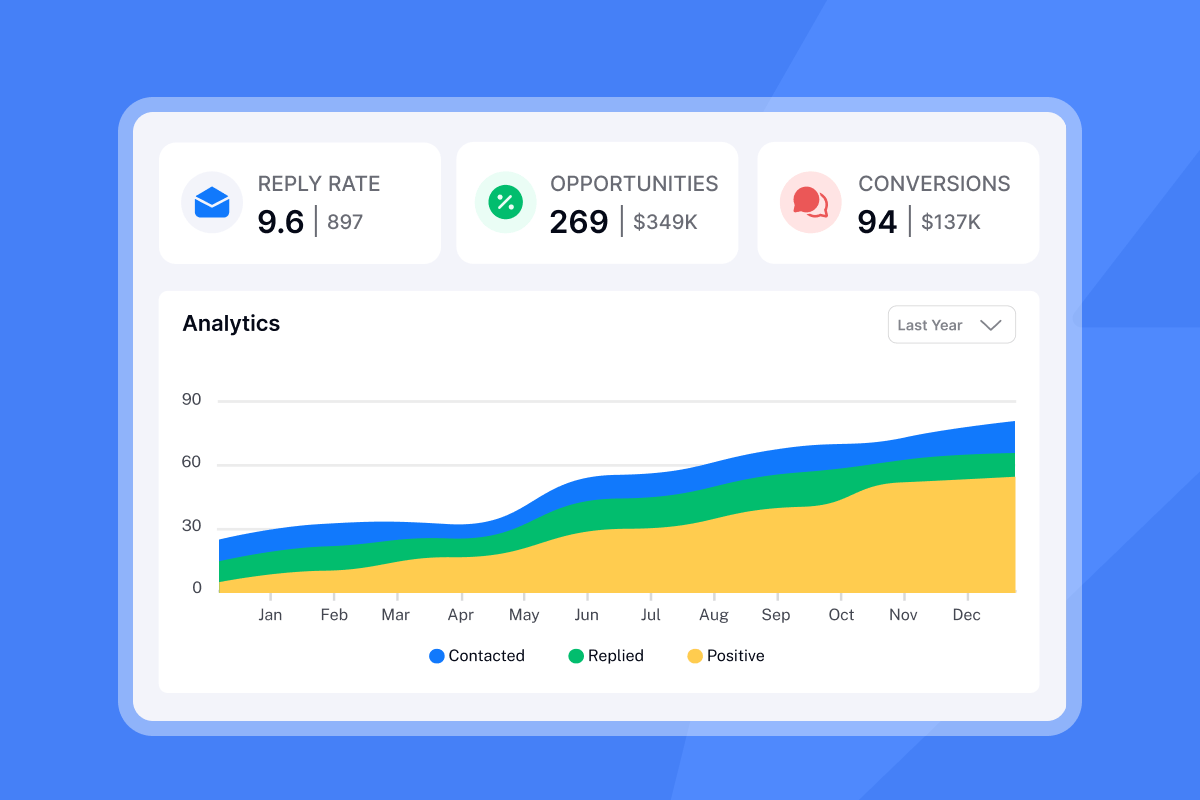
- Share placement screenshots and weekly health metrics for retention.
Founders
Scorecard: CAC from outbound, payback period, meetings per week, owner time saved.
Moves:
- Start with 2–4 inboxes, ramp slow, keep bounces at or below 1%.
- Use Copilot to generate variants and prioritize high‑fit leads.
- Route qualified replies to your calendar with clear rules.
For more hands‑on context, see the personalization workflow in How to personalize 1000 cold emails with AI.
One tool for an easy to track ROI
Instantly gives you everything to run your outreach campaigns in an ROI optimized manner. Customers agree:
"Instantly is the best cold email sequencer. It has many features that have helped in improving the deliverability of my email accounts. They have the best support." - Ronika Kashyap on Trustpilot
"In just the past 180 days, I've been able to book over 100 meetings, close deals worth more than €15,000, and even walk away from my regular 9 to 5 job, all with the help of Instantly." - Dustin Geissinger Gromicho on Trustpilot
One system, not five tools. Model ROI and payback, harden deliverability, then scale volume with unlimited inboxes, AI, and accurate reporting. That is how outbound becomes predictable.
Start a safe, measurable pilot: warm 2-4 inboxes for 30 days, verify a 2,000‑lead list, and aim for replies at or above 5%. Explore flat‑fee pricing, run an Inbox Placement test, try AI Copilot, and enable AI Reply Agent.
FAQ:
How do I calculate cold email ROI?
ROI = (Attributed revenue − Total cost) ÷ Total cost.
Tie revenue to your funnel math: sends → delivered → opens → replies → meetings → won. See the calculator above.
What is a good payback period for sales engagement spend?
Many teams target under 12 months, with 12–18 months common at higher ACVs. For ways to reduce payback with unlimited inboxes and a flat fee.
What inputs go into a reply‑to‑revenue calculator?
Sends, inbox placement rate, open rate, reply rate, meeting rate, close rate, and average deal value. Add total cost to compute ROI and payback.
How many cold emails per inbox per day is safe?
Do not exceed 30 per inbox per day. Add warmed inboxes to scale. Keep hard bounces at or below 1%. See guidance on safe caps.
How do I estimate deliverability uplift ROI?
Hold sends constant. Raise inbox rate 5–10 points in your model. The revenue delta shows uplift value. Validate improvements with recurring placement tests.
Key terminology glossary
- Primary inbox: The folder contacts read most, not Promotions or Spam.
- Sender reputation: Domain and IP trust with mailbox providers.
- Warmup: Gradual engaged sending to build reputation.
- List hygiene: Verify, dedupe, and remove risky or stale contacts.
- Verified contacts: Emails confirmed deliverable by a verifier.
- Send windows: Workday time ranges when campaigns send.
- Spin syntax: Small wording changes that reduce repeats at scale.
- Throughput: Total daily sends across all inboxes.
- Inbox placement: Where your email lands, measured via seed tests.
- Bounce rate: Percent undelivered. Hard bounces signal bad data.
- Complaint rate: Spam reports per send. Keep near 0.1%.
- Reply rate: Replies per delivered emails.
- Meeting rate: Meetings per reply.
- Close rate: Deals won per meeting.
- CAC: Customer Acquisition Cost.
- Payback period: Months to recover spend from profit.
- Pipeline per dollar: Pipeline created divided by program spend.
- Unified Inbox: Central place to manage and route replies.
- SISR: Server and IP sharding and rotation for safe scale.
- Flat fee: Pricing that does not increase with users or inboxes.


