


Updated October 31, 2025
TL;DR: To connect cold email replies to revenue, model three things: costs, conversion rates, and deal value. Use this path: delivered emails → replies → meetings → opportunities → closed‑won. Track cost per meeting, pipeline per dollar, ROI, and payback period. Protect inbox placement, keep bounces low, and do not send more than 30 emails per inbox per day. Use Instantly's flat‑fee unlimited accounts, Inbox Placement, SuperSearch, Copilot, and AI Reply Agent to standardize the math and shorten payback across the team.
Short answer: ROI = (revenue from closed‑won deals attributed to the motion − total outreach costs) ÷ total outreach costs. Payback period = total outreach costs ÷ revenue per month from this motion.
ROI and payback period in outreach
If replies are rising but revenue is unclear, you need a repeatable ROI model tied directly to reply rate. You can calculate it with a few inputs and two simple formulas.
What is ROI in cold email?
- Definition: ROI measures the financial return of outreach after costs.
- Formula: ROI = (Attributed revenue − Total cost) ÷ Total cost.
- Why it matters: Email has strong unit economics when messages reach the primary inbox. Independent research across email programs reports average returns near 36 to 1, which sets a useful benchmark for channel potential when deliverability and list hygiene are solid, according to Litmus.
What is payback period for outreach investments?
- Definition: Payback period is the time it takes for outreach revenue to repay your total costs.
- Formula: Payback period = Total outreach cost ÷ Revenue per period.
- Why it matters: Finance cares about when cash comes back. A shorter payback frees budget and reduces risk in quarters where forecast pressure is high.
The outreach ROI calculator: formulas and inputs
You only need nine inputs to connect reply rate to revenue.
Key metrics for cold email ROI
- Delivered emails: Sent minus bounces. Deliverability drives this input.
- Reply rate: Percent of delivered emails that get a reply. Most broad B2B campaigns see 1 to 5 percent replies, with higher rates on focused segments. Read more on Instantly's data in What's a good cold email reply rate.
- Positive share of replies: Percent of replies that are interested or neutral enough to progress.
- Meetings per positive reply: Booking rate on positive replies.
- Opportunities per meeting: How many meetings create pipeline.
- Win rate: Percent of opportunities that close.
- Average deal value (ADV): Average closed‑won value. Here's the official definition and calculation in Average deal size guidance.
- Cost stack: Outreach platform, data credits, domains, and labor.
- Sales cycle length: Useful for payback and forecasting.
Step‑by‑step ROI calculation
- Emails delivered = Emails sent × delivery rate.
- Total replies = Delivered × reply rate.
- Positive replies = Replies × positive share.
- Meetings = Positive replies × meeting rate.
- Opportunities = Meetings × opportunity rate.
- Closed‑won deals = Opportunities × win rate.
- Revenue = Closed‑won deals × ADV.
- Total cost = Tools + data + domains + labor hours.
- ROI = (Revenue − Total cost) ÷ Total cost.
- Payback period = Total cost ÷ Monthly revenue.
Example: calculating cold email ROI with Instantly
Assume a one month motion using Instantly for sending, data, and reply handling.
Inputs
- Sent: 20,000 across multiple warmed inboxes
- Delivery rate: 95 percent after list hygiene and placement checks
- Reply rate: 3 percent
- Positive share: 40 percent
- Meeting rate on positives: 50 percent
- Opportunity rate on meetings: 40 percent
- Win rate: 20 percent
- ADV: 8,000
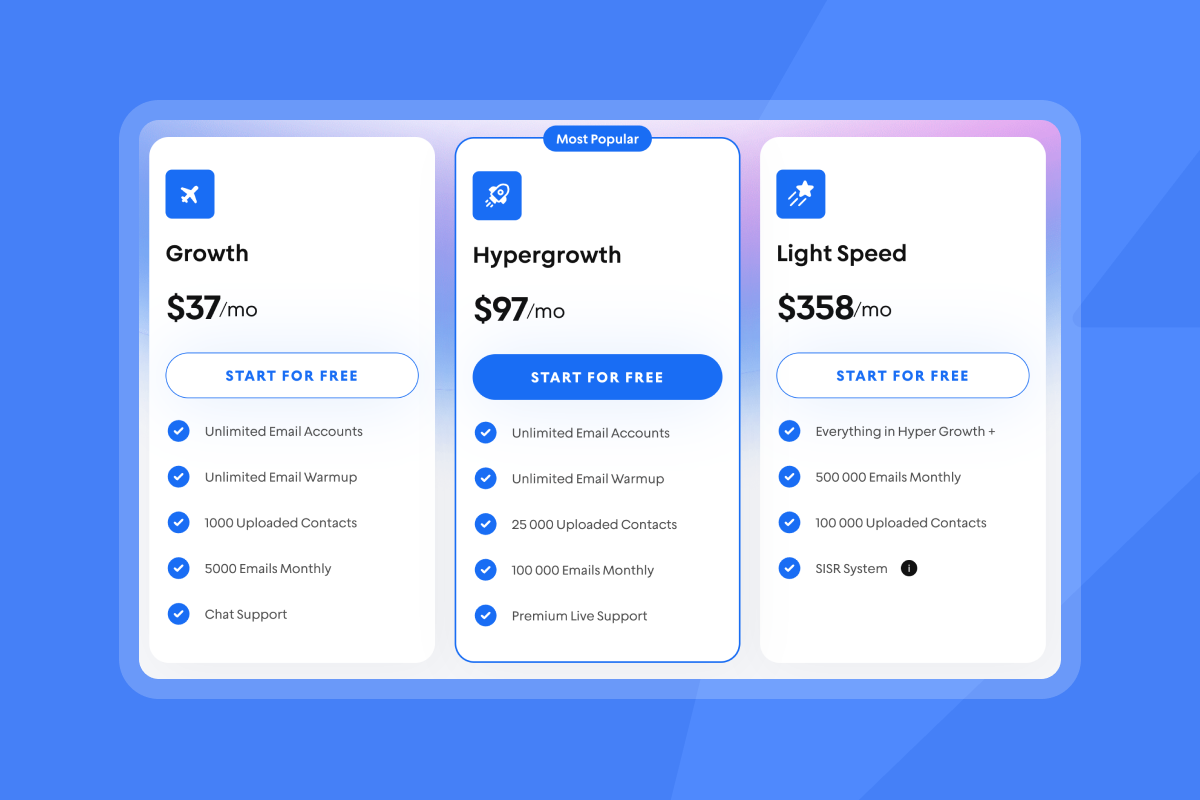
- Costs: Outreach Hypergrowth 97, Hyper Credits 197, assumed domains 200, SDR labor 40 hours at 35 = 1,400. Total cost = 1,894. See plan pricing for Outreach tiers and credit plans.
Math
- Delivered = 20,000 × 0.95 = 19,000
- Replies = 19,000 × 0.03 = 570
- Positive replies = 570 × 0.40 = 228
- Meetings = 228 × 0.50 = 114
- Opportunities = 114 × 0.40 = 46
- Closed‑won = 46 × 0.20 = 9.2 ≈ 9
- Revenue = 9 × 8,000 = 72,000
- ROI = (72,000 − 1,894) ÷ 1,894 ≈ 37.0×
- If closes recognize across two months, monthly revenue allocation is 36,000. Payback period ≈ 1,894 ÷ 36,000 = 0.053 months.
Notes:
The fastest lifts usually come from better inbox placement and higher reply rate. Focus tests on list hygiene, subject relevance, and timing. A range of Instantly testing guides shows how small lifts in booking rates compound through the funnel.
Watch our 2025 deliverability guide to see how Instantly optimizes this for you:
Validate placement before you scale. Instantly's automated Inbox Placement tests show inbox vs spam across providers and can trigger protections on poor results.
ROI and payback period calculator framework
Rolling this all into my scorecard. Here's how I think about measuring ROI in one line depending on the unit of output.
| Item | Definition | Formula | Example |
|---|---|---|---|
| Delivered | Sent minus bounces | Sent × delivery rate | 20,000 × 0.95 = 19,000 |
| Replies | Total responses | Delivered × reply rate | 19,000 × 0.03 = 570 |
| Meetings | Booked calls | Positive replies × meeting rate | 228 × 0.50 = 114 |
| Revenue | Closed‑won value | Closed‑won × ADV | 9 × 8,000 = 72,000 |
Calculating your outreach payback period
Payback shows how fast outreach returns cash. Use the funnel math above, then view revenue by month.
- Model monthly revenue credited to the motion from closed‑won deals in the period.
- Sum monthly costs including software, data, domains, and labor.
- Payback period = Total cost ÷ Monthly revenue.
SaaS CAC payback period
If your product is subscription based, convert deal value to gross profit by multiplying by gross margin. Then use gross profit in the denominator for CAC payback. This aligns spend with contribution margin.
Example: payback for a sending stack
Stack cost for higher throughput: Light Speed 358 plus Hyper Credits 197 equals 555 per month. For more details on credits see SuperSearch credit help docs. Watch how to get leads with Instantly end to end on Youtube:
Monthly revenue credited to this motion: 18,000.
Payback period = 555 ÷ 18,000 = 0.031 months.
Deliverability uplift: the foundation of high ROI
High reply rates start with inbox placement. No placement means no opens or replies.
Why deliverability matters for your bottom line
- If an email does not reach the primary inbox, expected ROI approaches zero.
- Reply rate depends on delivered emails, not sent emails. Even small placement uplifts cascade into more meetings and revenue.
- Large mailbox providers enforce complaint thresholds. Gmail and Yahoo started enforcing sender requirements in 2024, with guidance to keep spam complaint rates near or below 0.1 percent and never at or above 0.3 percent for bulk senders.
Strategies for improving deliverability with Instantly
Warm up with guardrails: Use Instantly's private network to build sender reputation across unlimited inboxes, then maintain warmup in production. Instantly has a 4.2M plus account deliverability network to warmup your accounts.
Placement tests before scale: Run automated Inbox Placement tests. Do not scale if seed placement is poor on Gmail or Microsoft.
SISR for heavy senders: Use Light Speed with SISR to shard and rotate servers and IPs when scale justifies it.
Stay within safe caps: Do not send more than 30 emails per inbox per day in production. Add more warmed inboxes to increase throughput instead of raising per‑inbox volume. Read more on our blog post: 7 quick wins to boost deliverability.
Verified contacts: Pull leads from SuperSearch and verify again if lists are older. Keep hard bounces under 2 to 3 percent to protect sender reputation.
Alignment and DNS: Set SPF, DKIM, and DMARC correctly and monitor domain health.
Complaint control: Monitor complaint rates with mailbox provider tools and keep them below enforcement thresholds noted above.
Deliverability optimization checklist
- DNS alignment set: SPF, DKIM, DMARC published and passing.
- Warmup active: Complete a staggered warmup and keep it on in production.
- Daily cap set: 30 emails per inbox per day.
- List hygiene: Verified contacts, deduped, risky addresses removed.
- Placement gate: Healthy inbox placement on Gmail and Microsoft in tests.
- Send windows: Local business hours with randomized timing.
- Copy variants: Two to three variants per step with light spin syntax to reduce repeats.
- Bounce and complaint control: Hard bounces under 2 to 3 percent. Complaints below 0.3 percent.
- Ramp rules: If health dips, pause sends, fix root cause, then resume at a lower cap.
Sales engagement platforms and AI: improving your ROI
Platforms and AI reduce manual work and standardize the steps between reply and revenue.
How sales engagement platforms drive financial returns
- Orchestration and measurement: Sales engagement platforms centralize outreach and tracking so you can connect replies to meetings, pipeline, and revenue with fewer blind spots.
- Rep productivity: When sequences, data, and reply handling sit in one system, reps spend more time in conversations and less in admin. That shortens time‑to‑first‑meeting and reduces cost per meeting.
Instantly's AI features for improved ROI
- Copilot for targeting and campaigns: Research accounts, build segments, draft variants, and analyze tests so you find reply rate lifts faster. See Instantly Copilot:
- AI Reply Agent for reply handling: Auto‑classify replies, handle back‑and‑forth, and propose meetings in minutes. Configure Human‑in‑the‑Loop or Autopilot and sync outcomes to Slack and CRM.
- Unibox and CRM: Keep replies in one place, standardize triage rules, and connect meetings to opportunities inside Instantly's CRM modules and integrations.
For a guided walkthrough of setup, sequencing, and analytics, watch Instantly AI full tutorial on YouTube:
Pricing models and ROI: flat‑fee vs per‑seat
Pricing structure changes your cost curve at scale.
| Model | Cost behavior | ROI impact |
|---|---|---|
| Flat‑fee | Predictable monthly cost, unlimited inboxes | Cost per meeting falls as you add inboxes and clients |
| Per‑seat | Cost grows with users and mailbox caps | Costs compound as you add reps or mailboxes |
Instantly's Outreach tiers include unlimited email accounts and warmup on all plans, with SISR on Light Speed.
Real‑world impact and success stories
Sales leaders care about deliverability, scale, and ROI. Here are a few users comments on these fronts:
"I've converted several leads into deals using Instantly and it's paid for itself 5x." - Philip Hendrich on Trustpilot. See the review
"Deliverability tools that actually move the needle: warmup, inbox rotation, and smart sending windows help us land in Primary instead of Promotions/Spam." - Anthony V. on G2. See the review
"Unlimited Email inbox warmup is included with all the plans, and you get access to the Unibox at all plans too. This saves a ton of time." - Chinmay K. on G2. See the review
ROI optimization strategies
For growth marketers: quantifying campaign lift
- Track lift by segment: Compare reply and meeting rates by industry, persona, and offer.
- A/Z testing cadence: Run subject and first‑line tests weekly and scale winners.
- Report on pipeline per dollar: Tie campaign tags to CRM opportunities and show pipeline per campaign. Use UTM discipline for click attribution where relevant. See What is an attribution model:
For agency operators: proving client value with cost per meeting
- Client‑ready scorecards: Publish cost per meeting and pipeline per dollar monthly.
- Flat‑fee stack: Keep tool costs stable while adding inboxes per client.
- Audit trail: Sync events to HubSpot or Salesforce via integrations so clients can audit meetings to revenue.
For sales leaders: pipeline health and CFO scrutiny
- Standardize ramp and caps: 30 emails per inbox per day. Expand via more warmed inboxes.
- Deliverability gates: No scale unless inbox placement is healthy on primary providers.
- CRM reconciliation: Use Unibox and integrations to connect replies to opportunities and closed‑won. Reconcile Instantly counts with CRM weekly.
For startup founders: pipeline per dollar and time‑to‑first‑meeting
- Start focused: One ICP, one offer, two sequence variants.
- Measure speed: Track time‑to‑first‑meeting and cost per meeting by week.
- Model payback weekly: Smaller stacks can reach short payback when offer fit and list quality are strong.

Common pitfalls in ROI calculation and optimization
- Counting sent, not delivered: Model on delivered emails, not sent.
- Attribution gaps: Multi‑touch cycles can blur credit. Use campaign IDs and CRM fields to link replies to deals. Read more on the pros and cons across marketing attribution models.
- Hidden costs: Include domains, data, and labor hours, not only software.
- Over‑scaling per inbox: Raising per‑inbox sends hurts placement. Add warmed inboxes instead.
- Dirty data: Poor list hygiene inflates bounces and kills reply rates.
- Slow reply handling: Many meetings come from fast follow‑ups. AI Reply Agent responds in under 5 minutes to maintain intent.
How to run the reply‑to‑revenue model in your next campaign
- Set deliverability gates.
Pass SPF, DKIM, DMARC. Run placement tests. Cap at 30 emails per inbox per day.
Done when Gmail and Microsoft show healthy inbox placement in tests. - Prepare clean data.
Pull leads from SuperSearch and verify again if lists are older.
Done when hard bounces are under 2 to 3 percent in first sends. See Mastering email list hygiene. - Launch two sequence variants.
Use Copilot to draft, set send windows, and add two to three variants per step.
Done when both sequences get 100 plus delivered emails for a fair read. See Instantly Copilot. - Handle replies fast.
Route replies to Unibox. Turn on AI Reply Agent for triage and booking.
Done when time‑to‑first‑response is under 5 minutes during business hours. - Track the funnel.
Monitor delivered, replies, meetings, opportunities, and closed‑won.
Done when CRM and Instantly counts reconcile weekly. - Calculate ROI and payback.
Use the formulas here and publish cost per meeting and pipeline per dollar.
Done when finance can audit attribution from campaign to revenue.
Ready to run the math on your outreach
Set your deliverability gates, run two variants, and track the full path from reply to closed‑won. Use Instantly's flat‑fee unlimited accounts, Inbox Placement, SuperSearch, Copilot, AI Reply Agent, and Unibox to scale safely and shorten payback. Start a free trial today.
Related tutorials:
- Watch how our CRM workflows and reply automation in action, see This CRM makes it easy to close more deals.
- Watch how this AI Agent replaces your sales team.
FAQ:
What reply rate should I target for cold email?
1 to 5 percent is a common range for broad B2B lists. Focused, relevant segments can do better. Your baseline depends on deliverability, offer, and data quality.
How many emails can I safely send per inbox per day?
Cap at 30 per inbox per day. Increase throughput by adding more warmed inboxes rather than raising caps.
What is a good bounce rate and complaint rate?
Keep hard bounces under 2 to 3 percent and complaints below 0.3 percent.
How do I shorten my payback period?
Improve inbox placement, lift reply and meeting rates with targeted tests, and reduce manual work with AI plus a unified inbox. Validate placement before scaling and focus sends on verified contacts.
How do I connect Instantly to my CRM for auditable ROI?
Use native integrations or partners to sync replies, meetings, and deals with campaign IDs so finance can verify attribution.
Key terminology glossary
- Primary inbox: The folder contacts read most often.
- Sender reputation: How mailbox providers score your domain and IP hygiene.
- Warmup: Low‑volume sends that build trust before production.
- List hygiene: Ongoing verification and cleanup of contacts.
- Verified contacts: Emails confirmed deliverable by a verifier.
- Send windows: Local time ranges when campaigns send.
- Reply rate: Replies ÷ delivered emails.
- ADV: Average deal value of closed‑won deals.
- Payback period: Time to recover outreach cost from revenue.
- Pipeline per dollar: Pipeline generated ÷ cost in the same period.


