


Updated March 30, 2026
TL;DR: Basic "Hi {{firstName}}" personalization no longer moves the needle. Advanced personalization using dynamic variables, behavior-based segmentation, and Spintax can double your reply rates from 9% to 18%. The secret is treating personalization as a data management system, not a creative writing challenge. By combining clean list segmentation with tools like Instantly's Spintax generator and AI sequence writer, you can send thousands of unique emails that feel handwritten without slowing down your team. Focus on reply rates over open rates, keep bounces under 2%, and remember that relevance drives both engagement and deliverability.
Your reps are stuck in a trap. Either they spend hours researching prospects to write custom emails, or they blast generic templates and watch their domain reputation tank. The manual research path kills velocity. The template path kills results and burns sending accounts.
There is a third option. Programmatic personalization lets you structure data once and generate thousands of unique, relevant messages. Martal Group's analysis of B2B cold email data shows highly personalized cold emails achieve reply rates up to 18%, compared to just 9% for generic emails. That is a 2x performance improvement driven by data architecture, not writing talent.
Why the "insert first name" strategy is failing your team
The template trap looks harmless at first. You add {{firstName}} to your subject line, drop in {{companyName}} somewhere in the body, and hit send. Five years ago, that worked. Today, it signals laziness.
When you send thousands of identical messages with only the name swapped, spam filters flag you as a mass emailer. Your deliverability drops before prospects even see your message. More importantly, prospects spot a mail merge in two seconds. Woodpecker's study found that personalized messages and subject lines increase reply rates by up to 142%, but basic name insertion does not count as personalization anymore.
"we need to contact many candidate for job opening, interview scheduling, follow ups and feedbacks, instantly allow us to spend emails in bulk while still keeping them personalised which feels more professional." - Raghav S. on G2
Emails tailored to recipients see a 32% higher response rate, while customized subject lines improve open rates by 50%. But true tailoring requires deeper data inputs than first name and company.
Feature | Basic Personalization | Deep Personalization | Result |
|---|---|---|---|
Fields used | First name, company | Role, tech stack, trigger events, pain points | 2x reply rate (9% to 18%) |
Time per email | 30 seconds | 30 seconds (after setup) | Same speed, better results |
Deliverability impact | Negative (repetitive patterns) | Positive (unique variations) | Primary inbox placement |
Scale limit | High volume, low relevance | High volume, high relevance | Scalable without rep burnout |
What is dynamic email sequencing?
Dynamic email sequences use variables and conditional logic to assemble messages from data blocks rather than static text. Think of it as building with components instead of writing from scratch every time.
A static email looks like this: "Hi Sarah, I saw that Acme Corp recently raised a Series B. Congrats on the growth."
A dynamic email pulls from your CSV: "Hi {{firstName}}, I noticed that {{companyName}} recently {{triggerEvent}}. Congrats on the growth."
When you add variation syntax, the system creates dozens of unique messages from one template. Instantly's Spintax feature uses the format {{RANDOM | option1 | option2 | option3}} to randomize text blocks, and you layer custom variables from your lead list on top.
This is composability. You define the structure once, map your data fields, and the system generates personalized output at scale.
Research shows that average cold email response rates hover around 5%, with good performance starting above 5% and top campaigns achieving 8-15% through targeting and personalization.
Step 1: Build segments based on behavior and intent
Start personalization with the list, not the email editor. If you segment by job title alone, you leave 80% of relevance on the table.
Build segments using these five methods:
Method | What It Tracks | Example Use |
|---|---|---|
Firmographics | Company size, revenue, industry, location | Filter for 50-200 employee SaaS companies in North America |
Technographics | Current tech stack, implementation details | Target companies using HubSpot: "I see you use HubSpot for marketing automation" |
Intent signals | Research behavior, trigger events | Reference funding rounds, leadership changes, product launches |
Behavioral data | Engagement level, buyer journey stage | Different messages for pricing guide downloads vs. blog visitors |
Role-based | Job function, lead score, seniority | High-intent VP of Sales gets different copy than early-stage researcher |
Instantly's Lead Finder feature lets you filter by these criteria before you write a single line. You can build a segment of "Series B SaaS companies in the U.S. with 50-200 employees using Salesforce" and craft one sequence that speaks directly to that context.
"Trustworthy technical setup, deliverability tests, and proper workflows allows us to integrates with our CRM, and any other app trough make.com. Also what's convenient that email marketing infrastructure is easy to scale and cheap. And even without lots of technical knowledge it makes easy to implement simple yet profound personalizations." - Deividas S. on G2
Step 2: Clean your data to prevent embarrassing errors
Bad data turns personalization into a liability. Sending "Hi LLC" or "Hi JANE" (all caps from a messy import) destroys credibility faster than a generic blast.
Run this data hygiene checklist before every upload:
- Capitalization and formatting: Standardize how titles, names, and company names appear. "CEO," "Chief Executive Officer," and "ceo" should all map to "CEO."
- Clean name fields: Remove suffixes, titles, and typos. "John Smith, VP" should be "John" in firstName and "Smith" in lastName.
- Validate emails: Use Instantly's built-in verification to catch bad addresses before they hurt your bounce rate. Keep bounces below 2%.
- Remove duplicates: When the same prospect receives your sequence twice, they mark you as spam.
- Standardize company names: "Acme Inc." and "Acme Corporation" should both map to "Acme."
- Check required fields: If you plan to use {{industry}} or {{techStack}}, make sure those columns are populated for at least 90% of your list.
Validate your contacts and remove invalid or fake email addresses from your database. Re-activate inactive subscribers through win-back campaigns and remove those who do not engage.
Step 3: Use Spintax and variables for variety
Spintax, short for "spinning syntax," is a formatting technique used to create multiple variations of text from a single template. The basic format is {{RANDOM | option1 | option2 | option3}}. When the email sends, the system randomly selects one option.
You can nest Spintax throughout an email. Here is a full opening line:
{{RANDOM|Hi|Hello|Hey}} {{firstName}}, I {{RANDOM|saw|noticed|read}} that {{companyName}} recently {{triggerEvent}}. {{RANDOM|Congrats|Impressive work|Well done}} on the {{RANDOM|growth|momentum|progress}}.
That single line generates 3 x 3 x 3 x 3 = 81 unique variations. Add more Spintax blocks across a four-step sequence and you create thousands of unique emails.
Why does this matter for deliverability? Email providers like Gmail look for repetition and large volumes of identical messages. By constantly varying your email content with Spintax, you avoid these red flags. Google and Outlook cannot fingerprint your template because every email looks different.
Instantly includes an AI Spintax Writer that automatically adds Spintax to your copy. In the Sequence Editor, click AI Tools, then AI Spintax Writer. The tool generates variations in seconds.
Custom variables layer on top of Spintax. Instantly's system allows you to easily incorporate custom variables from your lead list. Once uploaded, your custom columns become usable inside Spintax blocks. If you have a "Title" column, it becomes available as {{Title}}.
One user described the impact:
"Good deliverability, easy spin tax, can add in lots of personalization clean and simple UI, one click email responses using tags, smooth Zapier integration, and powerful tracking with subsequences." - Joshua Blacklidge on Trustpilot
For advanced users, Liquid Syntax adds conditional logic: {% if position == "founder" %} As a founder, you have to learn to delegate {% endif %}. This lets you branch copy based on role, company size, or any other variable.
Watch a walkthrough of setting up your first campaign in Instantly to see Spintax in action.
Step 4: Use AI for intent-driven copy
You can use AI to write the parts of an email that require research, like the opening hook or the P.S. line. Instead of having reps spend 20 minutes per prospect reading LinkedIn bios and company blogs, you feed those inputs to an AI model and generate a personalized line at scale.
Instantly's AI Sequence Writer generates emails based on your offer details, target audience, case studies, and the number of steps required. The tool dynamically inserts custom variables like the lead's name, job title, and company info to make each email feel personal and relevant.
The AI Spintax Writer scans your email draft and suggests Spintax variations for key phrases. This removes the manual work of brainstorming synonyms and ensures your copy stays natural while varying sentence structure.
For teams that need even deeper research automation, tools like Clay can scrape LinkedIn profiles and company websites to generate custom opening lines. Export the enriched data and import it into Instantly as a custom variable like {{personalizedLine}}. One workflow I use is ChatGPT with Google Sheets to write personalized openers. You build a formula that feeds the prospect's title, company description, and a recent trigger event into GPT, then import the output as a custom field.
Treat AI as a research assistant, not a replacement for strategy. You still need to define the segment, choose the angle, and map the sequence logic. AI just speeds up the execution layer.
Instantly's blog post on features explains how the AI tools maintain strong sender reputation while improving email deliverability through automated variations.
How personalization impacts deliverability and inbox placement
Personalization and deliverability form a causal chain. Relevant emails drive engagement. Engagement builds sender reputation. Reputation determines inbox placement.
Email engagement has become the primary factor mailbox providers use to determine sender reputation. When recipients consistently open, click, and reply to your emails, providers interpret this as consent and interest. Every open, click, and especially reply acts as a positive signal about your domain's trustworthiness.
The more opens and clicks your emails receive, the better your sender reputation becomes, which directly impacts your inbox placement. Replies carry extra weight. It is a very positive signal to ISPs when your contacts reply to your emails. Even administrative replies count as strong positive signals.
Generic blasts kill this cycle. When you send identical messages to thousands of prospects, engagement drops. Low engagement signals to Gmail and Outlook that your emails are unwanted. Your domain reputation falls, and future emails land in spam.
Personalized emails reverse the spiral. Higher relevance drives higher reply rates. Average cold email response rates hover around 5%, with top campaigns achieving 8-15% through segmentation, dynamic variables, and Spintax.
Instantly provides enterprise-grade email deliverability tools including automated warmup, email verification, and the AI Spam Word Checker to optimize copy before you send.
Measuring success: Metrics that matter more than open rates
Open rates are broken. Apple Mail Privacy Protection rolled out in 2021. Because Apple pre-opens emails through its proxy servers, your tracking pixel fires even when the subscriber never reads the email. This inflates open rates and makes them unreliable for measuring engagement.
Reply rates tell the truth. A reply is one of the clearest signs of engagement. If you want a real read on whether your emails are doing their job, you need to look at metrics beyond opens, like click-through rate, reply rate, conversions, and purchases. These metrics signal subscribers' intentional behavior.
Track these four metrics:
- Reply rate: Total replies divided by total emails sent. Aim for 5% or higher.
- Positive reply rate: Interested replies divided by total emails sent. This filters out "unsubscribe" and "not interested" responses. Target 2-3% minimum.
- Meetings booked: The only metric that directly ties to revenue. Track meetings per 1,000 emails sent.
- Bounce rate: Keep this under 2%. Higher bounces hurt sender reputation and signal bad data.
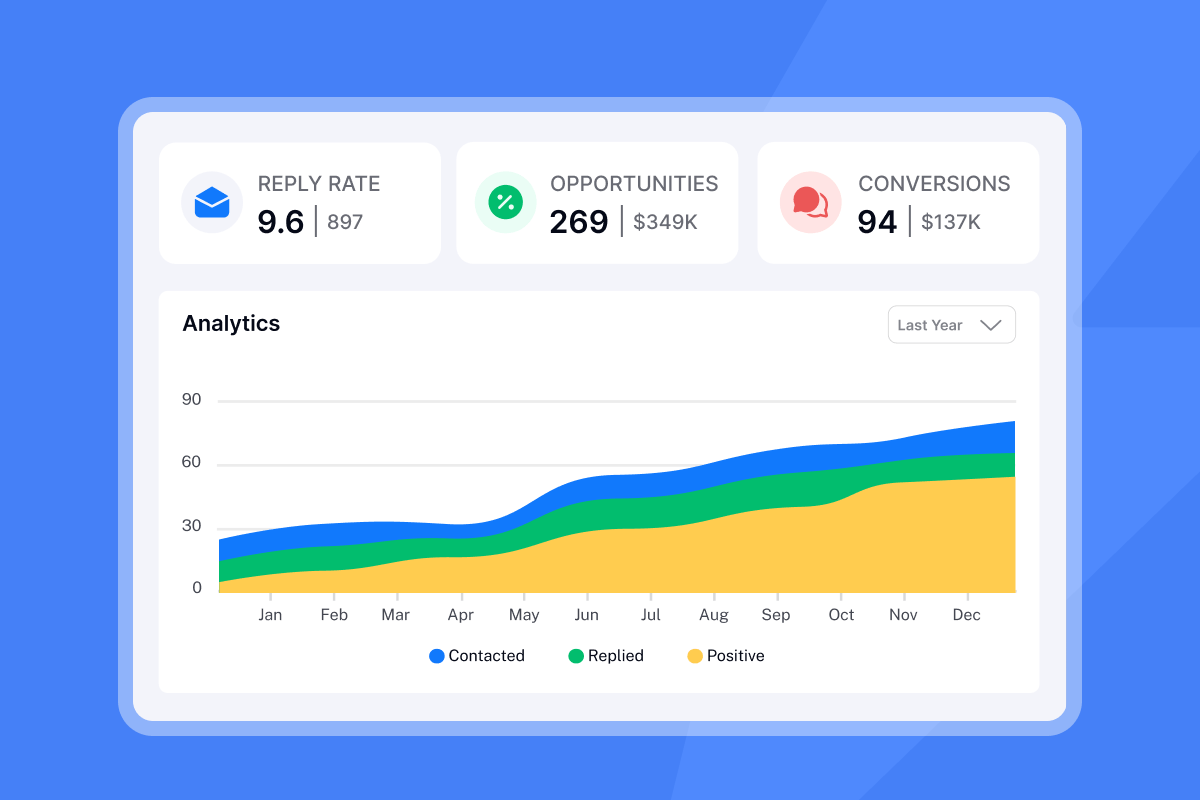
Instantly's Analytics dashboard shows reply rates, positive replies, and opportunities in one view. You can filter by campaign, segment, or sequence step to identify what is working.
"Instantly makes it genuinely easy to run outbound at scale without feeling overwhelmed by complexity. The inbox rotation, sending controls, and campaign setup are all intuitive, which means you can go from idea to live campaign quickly." - Curtis S. on G2
Checklist: Launching your first dynamic sequence
Use this checklist to set up your first programmatic personalization campaign:
- Define the segment: Choose one narrow audience. Example: Series A SaaS companies in North America with 20-50 employees using HubSpot.
- Build or enrich the list: Use Instantly's Lead Finder to filter by firmographics, technographics, and intent signals.
- Clean the CSV: Validate emails, remove duplicates, standardize formatting, check required fields.
- Map variables: Identify which columns from your CSV will become variables in the email. Common fields: firstName, companyName, industry, title, triggerEvent.
- Write the skeleton copy: Draft one email focusing on structure and flow. Do not worry about variations yet.
- Add Spintax: Use the AI Spintax Writer to generate variations for key phrases. Aim for 3-5 options per Spintax block.
- Insert custom variables: Drop in
{{firstName}},{{companyName}}, and any custom fields like{{personalizedLine}}or{{techStack}}. - Test send: Use preview mode to check how the email renders with real data. Look for formatting errors or awkward phrasing.
- Set sending limits: Start with 30 emails per account per day and do not exceed that cap to protect deliverability.
- Monitor for 48 hours: Watch reply rates and bounce rates. If bounces exceed 2%, pause and re-verify the list.
For a full video walkthrough, watch how to set up your first campaign or explore Instantly's cold email system setup guide. If you need templates to start, Instantly offers 600 templates for cold emails that you can customize with your own variables and Spintax.
Scale personalization without sacrificing speed
Programmatic personalization is the system that lets you scale 1-to-1 relevance without slowing down. Build segments based on firmographics, technographics, and intent signals. Clean your data to prevent embarrassing errors. Add Spintax to create thousands of unique variations. Track reply rates instead of open rates.
The teams that master this workflow hit reply rates of 15% or higher while their reps focus on live conversations instead of manual research. You structure the data once, map your variables, and let the system generate personalized output at scale.
Ready to build your first dynamic sequence? Try Instantly free and use the built-in templates and AI tools to launch in under an hour.
FAQs about email personalization at scale
How many variables should I use per email?
Use 3-5 variables per email. More than that risks awkward phrasing if any field is missing.
Does Spintax hurt readability?
No, if you use natural variations. Avoid forced synonyms that change meaning.
How do I handle missing data fields?
Use fallback syntax like {{firstName|there}} so the email reads smoothly even if data is incomplete, or remove leads with missing critical fields before upload.
What is a good reply rate for personalized sequences?
A good cold email reply rate is 5-10% for most B2B teams. Top performers using advanced personalization hit 15% or higher on focused campaigns.
Can I use Spintax in subject lines?
Yes. Subject line personalization improves open rates by 50%. Use Spintax and variables in both subject and body for maximum variation.
Key terminology
Spintax: Short for "spinning syntax," a formatting technique that creates multiple variations of text from a single template using the format {{RANDOM | option1 | option2}}.
Dynamic variable: A placeholder in your email template that pulls data from your lead list, such as {{firstName}} or {{companyName}}.
Liquid Syntax: Advanced templating language that adds conditional logic to email templates, allowing different copy based on lead attributes like role or company size.
Sender reputation: A score assigned by email providers based on your sending history, engagement rates, bounce rates, and spam complaints. Higher reputation improves inbox placement.
Primary inbox: The main inbox tab in Gmail and other providers, as opposed to Promotions or Spam. High engagement and relevance help emails land in the primary inbox.


