


Updated November 10, 2025
TL;DR: GoDaddy's default email settings leave agencies vulnerable to spam folder placement and sender reputation damage, and achieving 90% or higher inbox placement requires configuring three critical settings: SPF, DKIM, and DMARC authentication, strict send limits of up to 30 emails per inbox daily, and rigorous list hygiene. GoDaddy lacks advanced deliverability tools agencies need, such as automated warmup, inbox placement testing, unlimited account scaling, and AI reply management. Instantly provides unlimited accounts on flat-fee pricing, automated warmup through a 4.2 million+ account network, and specialized cold outreach tools. By combining GoDaddy's domain management with Instantly's platform, agencies can protect sender reputation, land in primary inboxes, and book meetings predictably.
Client emails landing in spam, bounce rates creeping past 1 percent, domains flagged before the first meeting books. GoDaddy's default email settings leave agencies exposed to poor cold email deliverability.
While GoDaddy provides reliable domain hosting and basic email services, achieving 90%+ inbox placement for cold outreach requires optimizing three critical settings most agencies miss. Skip them and watch sender reputation tank across every client account.
Why GoDaddy's default email settings fall short for agency outreach

GoDaddy built its email services for small businesses sending newsletters and transactional emails. The platform provides basic templates, simple automation, and straightforward contact management. For agencies managing 10 to 150+ client inboxes and running sophisticated cold outreach campaigns, these foundational tools create friction.
The core challenge: Balancing ease of use with deliverability
GoDaddy prioritizes simplicity. The platform makes it easy to create email accounts and send basic campaigns. This accessibility benefits solo entrepreneurs and small teams. However, the same design choices that reduce complexity also limit advanced deliverability controls.
Agencies often overlook critical authentication settings during GoDaddy setup. Default configurations may not include properly aligned SPF, DKIM, and DMARC records. Send limits remain unclear until you hit them. List hygiene tools exist but require manual intervention.
Watch this deep dive deliverability masterclass to see how Instantly ensures you get top-tier deliverability:
GoDaddy's email marketing: What it offers and its limitations
GoDaddy's Digital Marketing Suite caps at 750,000 monthly sends and 50,000 contacts on the Ultimate plan. These limits work for small campaigns but create friction when scaling multiple client accounts.
GoDaddy's automation features include basic drip campaigns and triggered emails. The platform lacks sophisticated multi-branching workflows, deep behavioral segmentation, and advanced personalization that agencies need for complex client campaigns.
The 3 critical GoDaddy email settings agencies must optimize for high inbox placement
Achieving 90%+ inbox placement requires configuring three settings that GoDaddy does not enable by default. Skip these steps and watch your deliverability collapse.
1. Configure SPF, DKIM, and DMARC for sender authentication
Email authentication verifies your sending authority. Without proper configuration, mailbox providers flag your emails as suspicious or block them entirely.
- SPF (Sender Policy Framework) lists authorized servers that can send email from your domain. Access GoDaddy's DNS management for your client's domain. Add a TXT record with the name "@" or leave it blank. The value should include your sending sources, for example:
v=spf1 include:secureserver.net -allfor GoDaddy's professional email. - Critical detail: A domain can only have one SPF record. If your client uses multiple email services (GoDaddy plus Instantly or another ESP), merge all authorized senders into a single TXT record or risk deliverability conflicts.
- DKIM (DomainKeys Identified Mail) adds a cryptographic signature to outgoing emails. Your email service provider supplies the DKIM record details. Add a new TXT or CNAME record in GoDaddy's DNS section. The host name and value come from your provider's setup instructions. Set the TTL to 3600 seconds (the default).
- DMARC (Domain-based Message Authentication, Reporting & Conformance) instructs mailbox providers how to handle emails that fail authentication checks. Create a TXT record with the name
_dmarc. Start with a monitoring policy:v=DMARC1; p=none;. This approach lets you track authentication without immediately rejecting emails.
DNS updates propagate within 1 to 48 hours. Use online SPF and DMARC checker tools to verify configuration before launching campaigns.

Watch how setup all of the above with Instantly and GoDaddy in just a few clicks:
2. Manage send limits and email volume carefully
GoDaddy's email plans cap at 750,000 monthly sends on the Ultimate plan. These numbers sound generous until you calculate daily volume per inbox.
The 30-email-per-inbox-per-day rule: Never exceed 30 emails from a single inbox in a 24-hour period. This threshold protects sender reputation. Sending more triggers spam filters and risks domain blacklisting.
- Start slow: New inboxes should send 5 to 10 emails daily for the first week.
- Ramp gradually: Increase to 15 emails in week two, 20 in week three, and cap at 30 by week four.
- Distribute across inboxes: If a client needs to send 300 emails daily, use at least 10 warmed inboxes (30 emails each).
- Monitor bounces: Keep bounce rates at or below 1 percent. Exceeding this signals list quality issues.
"Easy to use DFY emails ready to go after a few weeks of email warmup." - G2 review
The warmup period builds sender reputation before production campaigns begin. For agencies managing high volumes, Instantly's platform handles unlimited email accounts with automated warmup. This eliminates the per-seat penalties that make scaling expensive on traditional platforms. Watch how Instantly enables businesses to send thousands of emails per day:
3. Implement consistent list hygiene and bounce management
Dirty lists kill deliverability faster than any other mistake. High bounce rates signal to ISPs that you are sending to purchased lists or outdated data.
- Build opt-in lists only: Every subscriber should explicitly consent to receive emails. GoDaddy emphasizes permission-based marketing. Purchased lists introduce spam traps, invalid addresses, and complainers that damage reputation permanently.
- Clean lists regularly: Remove inactive subscribers, hard bounces, and spam complaints immediately. GoDaddy Email Marketing automatically removes bad addresses and unsubscribes, but agencies should verify this happens consistently.
Segment by engagement:
- Engaged subscribers: Contacts who opened or clicked in the last 90 days receive core campaigns.
- Unengaged subscribers: Contacts with no activity in 90 to 180 days get re-engagement campaigns or reduced frequency.
- Inactive subscribers: Contacts with no activity for 12+ months should be removed to protect sender reputation.
Maintaining clean lists improves deliverability metrics across the board. Bounce rates drop. Spam complaints decrease. Open and click rates increase because you are reaching genuinely interested recipients.
For verification at scale, Instantly's SuperSearch provides access to 450M+ verified B2B leads with waterfall enrichment from 5+ providers. This approach reduces bounces from the start rather than fixing list quality after damage occurs. Watch how this works in practice below:
GoDaddy vs. Instantly: Why agencies need more than basic email marketing
GoDaddy provides reliable domain management and basic email services. For cold outreach at agency scale, you need specialized tools that GoDaddy does not offer.
GoDaddy's strengths and weaknesses for agency cold outreach
| Feature | GoDaddy Email Marketing | Instantly |
|---|---|---|
| Email accounts | Limited by plan tier | Unlimited on all plans |
| Warmup | Manual process required | Automated warmup with 4.2M+ network |
| Send limits | 750,000/month max (Ultimate plan) | No artificial caps beyond safe deliverability thresholds |
| IP management | Shared IPs with mixed reputation | SISR (dedicated/private IP pools) on Light Speed plan |
| Pricing model | Contact-based tiers | Flat-fee unlimited accounts |
| Deliverability tools | Basic authentication support | Inbox placement testing, automated warmup, blacklist monitoring |
| Lead database | Not included | SuperSearch with 450M+ B2B leads |
| AI automation | Basic autoresponders | AI Reply Agent for automated response handling |
| CRM integration | Limited native connections | Native HubSpot and Salesforce integration |
GoDaddy works well for domain registration, DNS management, and basic transactional emails. The platform struggles with:
- No explicit warmup features: New domains need gradual reputation building that GoDaddy does not automate.
- Limited scalability: Contact and send caps force agencies to upgrade plans frequently or manage multiple accounts.
- Basic automation: Simple drip sequences lack the sophistication for complex cold outreach workflows.
- Sparse deliverability monitoring: No automated inbox placement testing or detailed reputation tracking.
How Instantly solves GoDaddy's limitations for agencies
Instantly built its platform specifically for cold outreach at scale. Key differentiators include:
- Unlimited email accounts: Growth plan starts at $37/month with unlimited accounts and warmup. Agencies can onboard new clients without per-seat penalties that destroy margins.
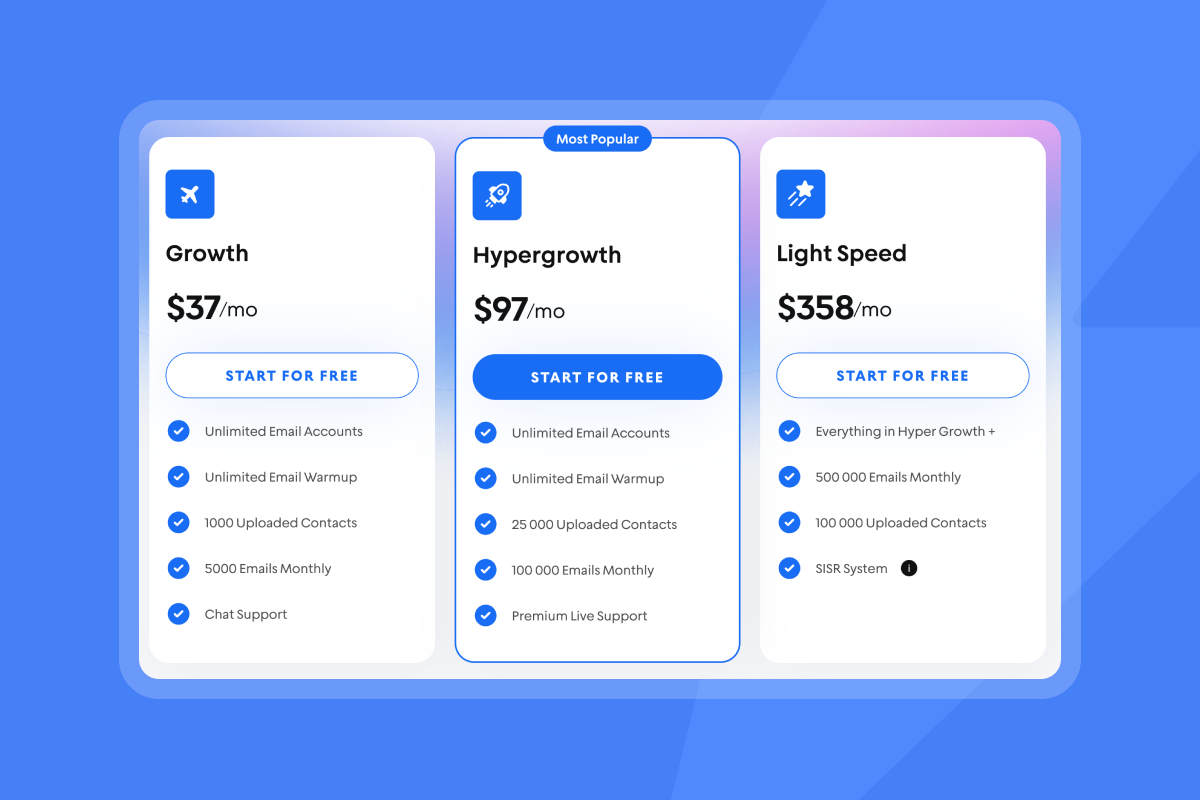
- Automated warmup: New inboxes join Instantly's deliverability network of 4.2M+ accounts. The system gradually increases sending volume while monitoring health metrics. This process builds sender reputation safely over 2 to 4 weeks.
"The platform is super intuitive, easy to set up, and makes it simple to manage multiple domains and inboxes at scale. Deliverability is great and the analytics give us exactly what we need to optimize campaigns quickly." - G2 review
- SISR (Server & IP Sharding & Rotation): The Light Speed plan provides dedicated and private IP pools. This architecture isolates your sending reputation from other users. For agencies managing sensitive client campaigns, SISR eliminates shared IP risks.
- Inbox placement testing: Automated placement tests show exactly where your emails land (primary, promotions, or spam) across major providers. This visibility lets you adjust before deliverability collapses.
- AI-powered efficiency: AI Reply Agent handles reply classification and drafts responses in under 5 minutes. Configure Human-in-the-Loop for team review or Autopilot for instant replies. This feature scales reply management without hiring additional staff.
"I've tried a lot of tools, but Instantly.ai truly stands out. The automated warm-up, unlimited email sending, and smart campaign management saved me hours every week." - TrustPilot review
Integrating GoDaddy domains with Instantly for maximum deliverability and scale
Combining GoDaddy's domain management with Instantly's outreach platform creates a powerful system. Here is how to connect them properly.
Setting up your GoDaddy domain with Instantly
- Purchase and configure professional email: Use GoDaddy to register client domains and set up professional email accounts (Microsoft 365 Email or GoDaddy Business Email powered by Titan). This establishes branded sender identities (name@clientdomain.com).
- Configure DNS records: Follow the authentication steps from section 1 of this guide. Add SPF, DKIM, and DMARC records in GoDaddy's DNS management console. Ensure MX records point to your email hosting provider (these usually auto-configure when you purchase professional email).
- Verify authentication: Use online verification tools to confirm SPF, DKIM, and DMARC records are correct and visible globally.
- Connect to Instantly: Log into your Instantly account and add your GoDaddy-hosted email accounts using IMAP/SMTP credentials. Instantly also offers a done-for-you setup service that handles domain and email configuration if you prefer hands-off implementation.
Leveraging Instantly's features with your GoDaddy-hosted emails
Once connected, Instantly automates warmup, campaign management, and reply handling:
- Automated warmup: Enable warmup for each new inbox. Instantly gradually increases sending volume while engaging with other accounts in its 4.2M+ network. Monitor warmup progress through the dashboard. Wait at least 2 weeks (4 weeks for brand-new domains) before starting production campaigns.
- Campaign sequencing: Build multi-step sequences with personalization, A/B testing, and automated follow-ups. Instantly's campaign features include spin syntax, dynamic fields, and conditional logic that GoDaddy's basic automation cannot match.
- Reply management: Unibox centralizes all replies across client accounts. Use tags, filters, and AI drafts to process responses efficiently. AI Reply Agent can handle qualification and scheduling, reducing manual work by 40+ hours per week according to agency reports. We also released our AI Copilot to generate campaigns end to end for you.
- Analytics and optimization: Track key metrics including reply rates, inbox placement, bounce rates, and cost per meeting. Export data to your CRM for unified reporting across your tech stack.
Real-world impact: How agencies achieve 90%+ inbox placement with Instantly
Theory matters less than results. Here is what happens when agencies combine proper GoDaddy domain setup with Instantly's platform.
Performance benchmarks and agency results
"I really enjoy using Instantly for a variety of reasons. Its simplicity in managing inboxes and campaigns stood out immediately, making it a clear choice over other tools I had used before." - G2 review
Agencies targeting 5 percent+ reply rates achieve this consistently by following proper warmup protocols and maintaining list hygiene. Automated placement tests help agencies maintain 90%+ primary inbox delivery. When placement drops, the system alerts you to pause and diagnose issues before reputation damage spreads.
By using flat-fee unlimited accounts, agencies reduce software costs while scaling. No per-seat penalties mean adding client inboxes does not destroy margins. Calculate your outbound CAC payback to measure efficiency improvements.
Track reply rate (target 5 percent minimum), inbox placement (maintain 90 percent+), and bounce rate (keep below 1 percent) as your core metrics. Instantly's guide to multi-client sales analytics helps agencies track these metrics across multiple client accounts in a single dashboard.
Optimize GoDaddy settings, then scale with Instantly
GoDaddy's domain hosting and basic email services provide a foundation. But achieving 90%+ inbox placement for cold outreach requires more: proper authentication, send limit discipline, and rigorous list hygiene. For agencies scaling multiple client campaigns, Instantly adds the specialized tools GoDaddy lacks.
Unlimited accounts on flat-fee pricing. Automated warmup through a 4.2M+ account network. Inbox placement testing, SISR, and AI-powered reply management. The combination protects sender reputation, lands emails in primary inboxes, and books meetings predictably.
Ready to scale client outreach with confidence? See how Instantly helps agencies transform results with unlimited accounts and advanced deliverability tools that protect sender reputation and book meetings predictably. Start your free 14-day trial now.
FAQs
Can GoDaddy's email marketing handle 100,000+ emails monthly for multiple clients?
Yes, through the Ultimate Digital Marketing Suite plan (750,000 sends, 50,000 contacts). However, agencies face contact limits and per-plan pricing that increases costs as you scale.
How long does DNS propagation take after configuring SPF, DKIM, and DMARC on GoDaddy?
Up to 48 hours globally, though changes often complete within 1 hour. Use online verification tools to confirm records are visible before launching campaigns.
What is the maximum safe sending volume per email inbox per day?
30 emails per inbox per day. Exceeding this threshold increases spam flags and harms sender reputation.
Does Instantly automatically warm up GoDaddy-hosted email accounts?
Yes. Connect your GoDaddy-hosted accounts to Instantly, enable warmup, and the platform gradually increases sending volume through its 4.2M+ account network over 2 to 4 weeks.
How does Instantly's pricing compare to scaling GoDaddy Email Marketing plans?
Instantly charges flat fees with unlimited accounts (Growth plan: $37/month). GoDaddy charges per contact tier.
Key terms glossary
SPF (Sender Policy Framework): A DNS record that lists authorized mail servers for your domain. Prevents spammers from forging your domain in email headers.
DKIM (DomainKeys Identified Mail): Adds a cryptographic signature to outgoing emails, verifying they were not modified in transit and came from an authorized server.
DMARC (Domain-based Message Authentication, Reporting & Conformance): Policy that tells receiving servers how to handle emails that fail SPF or DKIM checks, with options to quarantine or reject suspicious messages.
Sender reputation: A score assigned by mailbox providers based on your sending history, bounce rates, spam complaints, and engagement metrics. Poor reputation sends emails to spam.
Warmup: The process of gradually increasing send volume from a new email account to build positive sender reputation with mailbox providers before production campaigns.
List hygiene: Regular cleaning of email lists to remove invalid addresses, hard bounces, spam traps, and inactive subscribers that harm deliverability.
Bounce rate: Percentage of emails that fail to deliver. Hard bounces (invalid addresses) should stay below 1 percent.
Inbox placement: The percentage of sent emails that land in the primary inbox versus promotions or spam folders. Target 90%+ for effective cold outreach.