


Updated December 05, 2025
TL;DR: Email tracking in Gmail shows when prospects open, click, and reply. Instantly integrates with Gmail through a simple App Password or OAuth connection, letting you track engagement without burning sender reputation. Setup takes 10 minutes: enable two-step verification, generate an App Password, connect your inbox, configure tracking, and launch your campaign. Instantly offers unlimited email accounts, built-in warmup, custom tracking domains, and a 4.2M+ account deliverability network. Track opens, clicks, and replies in one dashboard.
Why email tracking matters for agency operators
You send 500 cold emails for a client. Silence. Did they land in spam? Did prospects open and ignore your CTA? Without tracking, you can't adjust copy, timing, or targeting.
Email tracking removes guesswork. It tells you which subject lines earn opens, which CTAs drive clicks, and which follow-up sequences spark replies. For agency operators managing 10 to 150+ inboxes across client domains, these insights separate campaigns that book meetings from campaigns that waste time.
What insights does email tracking provide?
Email tracking in Gmail captures three core signals: open rates, click-through rates, and reply rates. Open tracking embeds a 1x1 pixel in each email. When a recipient's email client loads images, the pixel fires, registering an open event in Instantly's analytics dashboard. Link click tracking wraps URLs in unique identifiers, logging each click.
Reply tracking is the gold standard. While privacy features like Apple's Mail Privacy Protection can inflate open rates with artificial signals, replies indicate genuine interest.
"Instantly's email tracking system and inbox placement test were standout capabilities for managing multiple client campaigns." - G2 review
How tracking impacts campaign optimization
Tracking data powers A/B tests. Compare two subject lines across 200 sends each. If "Quick question about [pain point]" earns 12% opens and "Noticed [specific trigger]" earns 8%, you know which angle resonates. Test send windows: does 8:30 a.m. outperform 2 p.m.? Track click rates on different CTA placements.
Watch this tutorial to see how to set up campaigns with tracking enabled from day one.
"The simplicity in managing inboxes and campaigns stood out immediately. Analytics helped refine messaging faster." - G2 review
How Instantly's email tracking works with Gmail
Instantly integrates directly with Gmail or Google Workspace to send tracked emails as part of multi-step sequences. Unlike browser extensions that track individual sends, Instantly manages campaigns at scale. You get hundreds of inboxes, automated follow-ups, and unified reply handling through Unibox.
Instantly's approach to deliverability-safe tracking
Traditional tracking harms deliverability when all users share one tracking domain. Instantly solves this with custom tracking domains. You connect your own subdomain (e.g., track.youragency.com), isolating your sender reputation.
Instantly also runs a private deliverability network of 4.2M+ accounts. During warmup, your inbox exchanges emails with real accounts, building engagement history that mailbox providers trust.
"Great deliverability and analytics for quick campaign optimization." - G2 review
For high-volume senders, Instantly's Light Speed plan includes SISR (Server & IP Sharding & Rotation), distributing sends across dedicated IP pools. Automated Inbox Placement tests run continuously, alerting you if placement drops so you can pause and investigate. Watch this in depth tutorial on how to make sure your emails avoid spam with Instantly:
Key tracking features for agencies
Instantly's tracking suite is built for multi-inbox operations:
- Open and click tracking: Enable per campaign. Opens log when recipients load images; clicks log URL visits.
- Reply detection: Automatically surfaces replies in Unibox, tagging leads for follow-up.
- Campaign analytics: Compare open, click, and reply rates across sequences. Export data for client reporting.
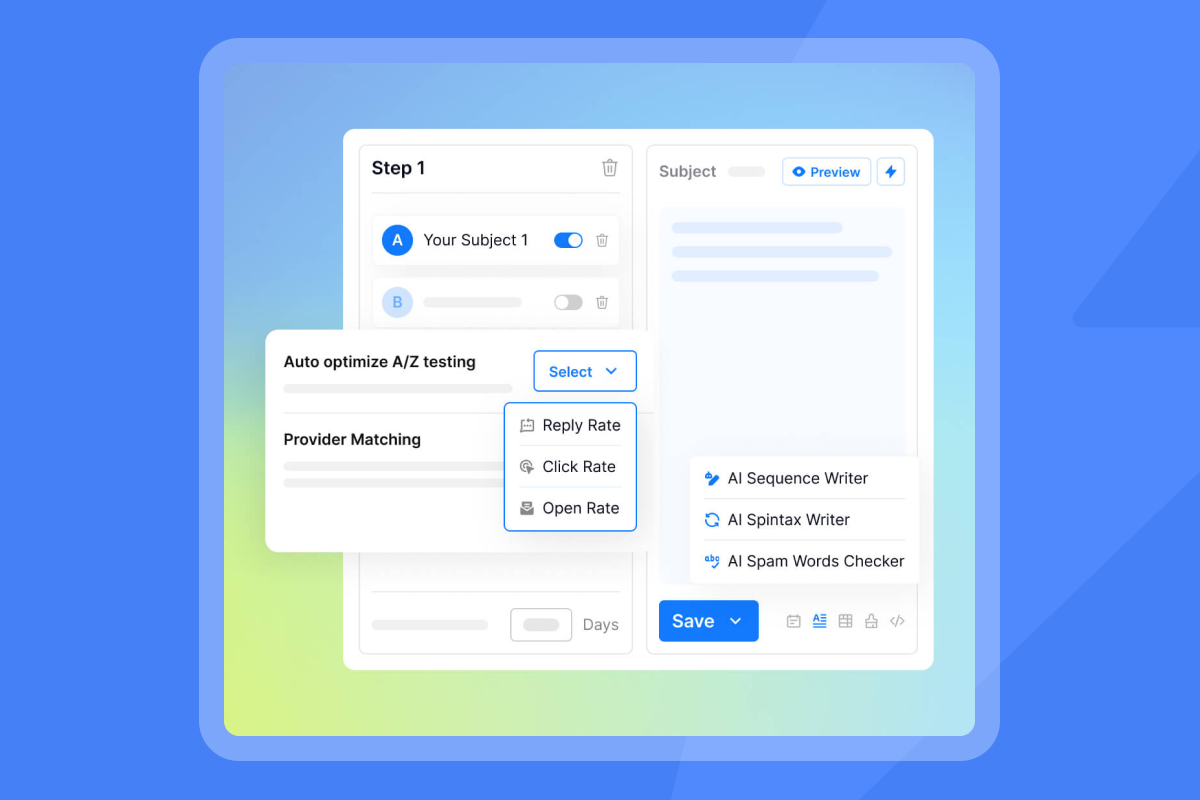
- A/Z testing: Run subject line and body copy variants, track which version drives more replies.
- Custom tracking domains: Protect reputation and improve inbox placement.
"Good deliverability, easy spin tax, clean UI, powerful tracking with subsequences." - TrustPilot review
Step-by-step: Add Instantly email tracking to Gmail
This section walks through connecting a Gmail account to Instantly, configuring tracking settings, and launching your first tracked campaign. Budget 15 minutes for the full setup.
1. Prepare your Gmail account and connect to Instantly
Enable two-step verification in your Google account's Security tab. Select Two-step verification, add your phone number, and confirm the code. Two-step verification is mandatory for generating App Passwords.
Next, generate an App Password:
- In your Google account's Security section, search for "App Password."
- For the App dropdown, select Mail.
- For Device, choose Other (Custom) and enter "Instantly."
- Click Generate to receive a 16-digit password. Copy this password.
Now connect to Instantly:
- Log in to your Instantly Dashboard.
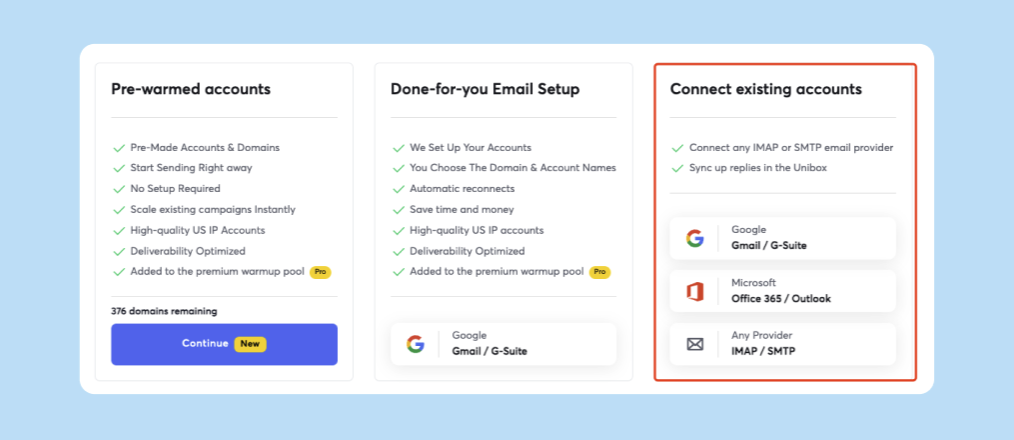
- Go to Email Accounts, click Add New, then Connect existing accounts.
- Select Gmail/GSuite and choose Option 2: App Password.
- Enter your Gmail address and paste the 16-digit App Password.
- Click Connect.
This video walks through the full process for you.
2. Configure tracking settings within Instantly
In the Email Accounts tab:
- Enable warmup: Turn on unlimited email warmup for each connected inbox. Warm for at least 2 to 3 weeks before launching cold campaigns.
- Set daily send limits: Cap campaign sends at 30 per inbox per day. Add 10 warmup emails for 40 total. This prevents spam filter triggers.
- Connect a custom tracking domain: In Settings > Custom Tracking Domain, add a subdomain (e.g., track.youragency.com). Create a CNAME record in your DNS pointing to Instantly's tracking server. Verify the setup in Instantly.
"Easy integration with helpful customer support that always helps quickly during setup." - G2 review
3. Create and send your first tracked campaign
Build a campaign:
- Navigate to Campaigns and click New Campaign.
- Upload leads: Import a CSV with verified emails. Use Instantly's SuperSearch (450M+ B2B leads) or an external list.
- Write your sequence: Draft a subject line under 50 characters, body copy under 100 words, and 2 to 3 follow-up steps. Use merge tags like
{{first_name}}for personalization. Keep the first email plain text. - Enable tracking: Toggle Track Opens and Track Link Clicks. Select your custom tracking domain.
- Set send windows: Schedule sends between 8:30 a.m. and 10:30 a.m. recipient local time.
- Select sending accounts: Choose warmed inboxes. Use tags to rotate accounts.
- Launch: Click Start Campaign.
This full tutorial demonstrates creating a tracked campaign from scratch.
4. Monitor tracking data in Instantly's dashboard
After your campaign sends, monitor performance in Analytics:
- Campaign overview: See total sends, opens, clicks, and replies.
- Account analytics: Review per-inbox health scores (bounce rates, spam complaints). A combined score below 30 with 100+ sends signals trouble.
- Unibox: Centralize all replies. Tag interested leads or hand off to sales.
- Inbox Placement tests: Run automated tests to see if emails land in inbox or spam.
"Instantly just works and does the basics exceptionally well." - G2 review
Best practices for deliverability with email tracking
Tracking pixels and custom links can trigger spam filters if not configured properly. These practices protect your sender reputation.
Authenticate your domain: Set up SPF, DKIM, and DMARC records to prove you own the sending domain. Proper authentication is non-negotiable.
Warm up gradually: Instantly's automated warmup increases daily volume from 5 to 30 emails over 2 to 4 weeks, building engagement history.
"Features that helped improve deliverability." - TrustPilot review
Monitor spam complaints: Keep complaints under 0.3% for Gmail and lower for Outlook. Instantly's deliverability analytics surface complaint spikes in real time.
Verify before sending: Use email verification to catch invalid addresses and spam traps. Instantly's SuperSearch provides pre-verified leads. Aim for under 1% hard bounces.
Respect daily limits: Send no more than 30 campaign emails per inbox per day. Add 10 warmup emails for 40 total. Instantly's slow ramp guide recommends starting at 10 to 15 sends per day for new inboxes.
Use send windows strategically: Schedule emails during regular business hours when recipients are most active. Testing different times—such as mornings or early afternoons—can help identify when your audience is most likely to engage.
Rotate sending accounts: If you need to reach 600 prospects in one day, route 30 sends through each of 20 inboxes. Never hammer one inbox with 600.
Maximize insights from your tracked Gmail campaigns
Tracking data is only valuable if you act on it.
- A/B test subject lines and copy: Instantly's A/Z testing lets you run variants. Split your list 50/50 and send. After 100 opens per variant, compare open and reply rates. Test one variable at a time. This strategy guide walks through systematic testing.
- Analyze open and click rates: If variant A achieves 15% opens and variant B achieves 9%, variant A's subject line resonates better. Click-through rates measure CTA effectiveness. A 5% CTR suggests your link drives action. Sub-2% CTR indicates a weak CTA.
- Use reply rates to refine strategy: Reply rate is the most reliable KPI. Aim for 5 to 10% reply rates for cold outreach. Anything above 10% is strong performance. Low reply rates despite decent opens? Your copy isn't compelling. This guide to improving reply rates recommends shorter emails (under 75 words), personalized openers, and single-question CTAs.
- Use Unibox to categorize replies: positive interest, objections, or opt-outs. Tag interested leads for immediate follow-up. Route objections to sales. Suppress opt-outs instantly.
How Instantly helps agencies scale Gmail outreach
For agency operators managing multiple client domains and dozens of inboxes, Instantly consolidates outreach, deliverability, and tracking into one platform with flat-fee pricing.
Unlimited accounts and flat-fee pricing
Traditional email tools charge per seat, eroding margins as you scale. Instantly's pricing model includes unlimited email accounts and warmup on all plans:
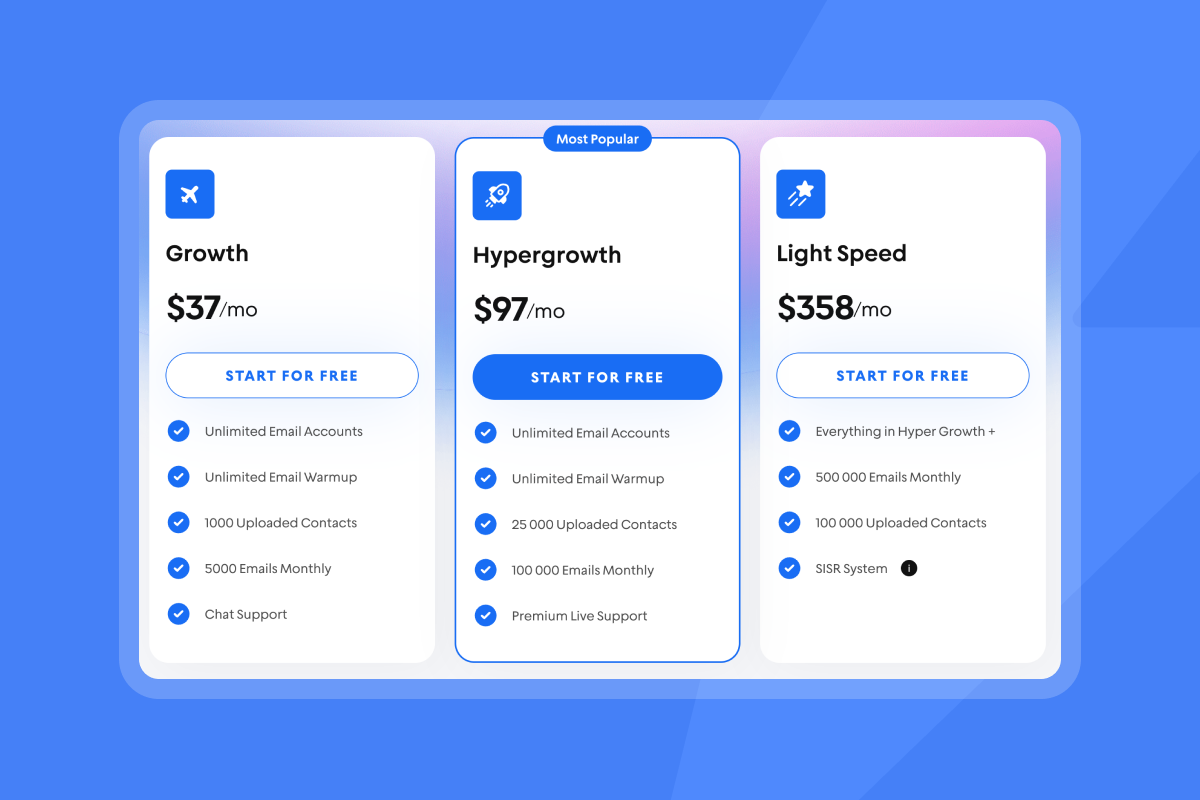
- Growth plan: $37/month
- SuperSearch: $47/month (1,500 to 2,000 credits)
- Growth CRM: $47/month
- Total baseline: $131/month with no per-seat tax
"Easy to use, cheap, with email warm up and auto sequence." - G2 review
Integrated warmup and deliverability
Instantly's deliverability network of 4.2M+ accounts ensures every inbox you connect can warm up safely. No separate warmup tool. Enable warmup in the Email Accounts tab. Automated Inbox Placement tests run continuously.
For high-volume agencies, the Light Speed plan at $358/month (or $286.3/month annual) adds SISR with dedicated IP pools. This distributes sends across multiple IPs, protecting reputation even at 100k+ emails per month.
Unified inbox for reply management
Unibox aggregates all campaign replies into one interface. Tag leads, assign to team members, and draft responses without switching between Gmail tabs. For agencies white-labeling services, Instantly's agency features include client workspaces and team permissions.
Next steps: Turn tracking data into meetings
You have the setup. Now act on the data. Run A/B tests every two weeks. Pause campaigns if bounce rates hit 1.5 percent. Respond to replies within four hours. Track cost per meeting, not just opens.
With Instantly's unlimited accounts and built-in warmup, you can scale client campaigns safely while proving ROI with hard numbers. The key is continuous monitoring. Review account health weekly. Test new angles monthly. Adjust send windows based on engagement patterns. When placement dips, pause and investigate before burning reputation.
Effective tracking isn't about collecting data. It's about building systems that convert cold contacts into booked meetings.
Try Instantly free and use the ramp template inside the app to book more meetings. Connect unlimited Gmail accounts, enable warmup, and launch your first tracked campaign in under 15 minutes.
FAQs
Does Instantly's email tracking work with all Gmail accounts? Yes, Instantly works with personal Gmail and Google Workspace accounts via App Password or OAuth integration.
How does Instantly protect my sender reputation? Instantly includes automated email warmup, custom tracking domains, and Inbox Placement tests to monitor spam folder delivery. SISR on Light Speed plans rotates IPs to prevent flagging.
Can I track replies with Instantly? Yes, all campaign replies appear in Unibox, Instantly's centralized inbox. Tag interested leads or auto-draft responses with AI Reply Agent.
What data does Instantly collect through email tracking? Instantly tracks email opens (via 1x1 pixel), link clicks (via unique URLs), and replies. It does not track click frequency per recipient, only unique clicks. Open rate accuracy can be affected by privacy features like Apple's Mail Privacy Protection.
Key terms glossary
Email tracking: The process of monitoring email engagement metrics like opens, clicks, and replies using embedded pixels and tracked links. Essential for optimizing cold outreach campaigns.
Sender reputation: A score mailbox providers assign based on sending patterns, engagement, and complaint rates. High reputation increases inbox placement; low reputation sends emails to spam.
Deliverability: The ability of an email to reach the recipient's primary inbox, avoiding spam or promotions folders. Influenced by sender reputation, authentication (SPF/DKIM/DMARC), list quality, and content.


