


Updated October 17, 2025
TL;DR: Define a precise Ideal Customer Profile, prep 20–100 seed customer domains, then use an AI company discovery tool to find firms that match on industry, size, revenue, tech stack, and location. Clean lists with verification, sync to your CRM, test inbox placement, and ramp sends safely. Prioritize tools with verified data, transparent pricing, CRM integrations, deliverability protections, and human‑reviewable AI.
Quick start checklist
- Start with a one‑page ICP and a CSV of 20–100 best customer domains.
- Run a lookalike company search, filter by firmographics and technographics, then enrich and verify contacts.
- Push to CRM, tag the cohort, run inbox placement tests, and ramp sends slowly up to 30 per inbox as health permits.
- Track reply rate, meetings, bounces, complaint rate, and primary inbox placement. Improve with sales feedback.
For Sales Leaders, Growth Marketers, agency operators, and founders who need a consistent, auditable pipeline, your best customers already show where growth lives. This guide gives you the repeatable workflow to find more companies like them, evaluate tools, and protect deliverability while you scale.
What are lookalike companies and why are they essential for B2B?
Lookalike companies share the core attributes of your most successful customers. That includes industry and sub‑industry, employee and revenue ranges, tech stack, location, and growth signals. If a segment repeatedly buys and stays, similar firms tend to convert faster and retain longer.
The power of lookalike prospecting
- Higher hit rate: You focus on companies with proven fit instead of a wide net.
- Faster learning: You reuse messaging that already resonates in that segment.
- Better pipeline quality: Fewer, better sends improve reply rate and protect sender reputation.
Benefits for B2B growth
- Predictable pipeline: Repeat proven patterns in lookalike segments.
- Team scale: Standardize targeting, QA, and reporting across reps.
- Lower total cost: Less budget wasted on stale data or unfit accounts.
The AI engine: how machine learning powers lookalike discovery
Modern discovery tools combine machine learning with natural language processing to score similarity from both structured and unstructured signals.
Contextual search and similarity identification
- Firmographic vectors: Industry, headcount, revenue, and geography.
- Technographics: Detected tools and platforms in the stack.
- Language cues: Website and job‑post keywords tied to your use case.
- Velocity signals: Hiring trends, funding, and product launches.
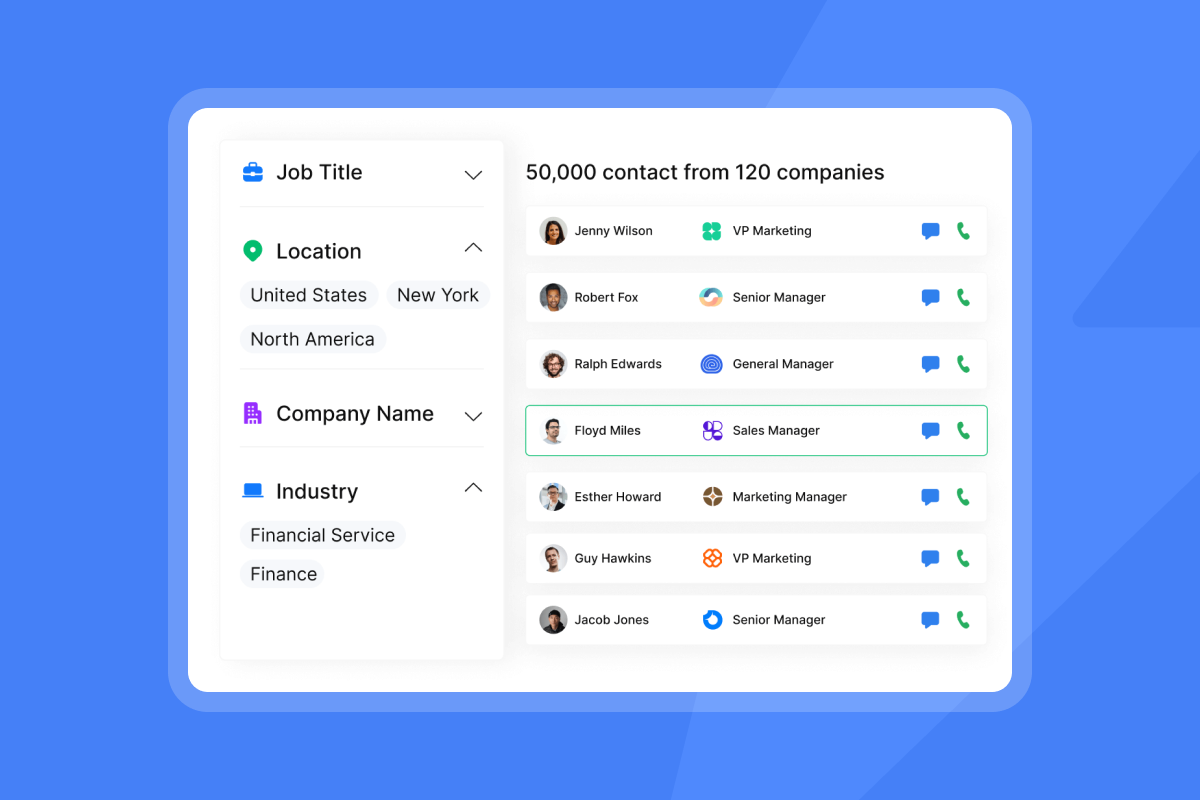
Instantly’s SuperSearch operates on a 450M+ lead graph and uses waterfall enrichment to raise match rates in real time.
AI guardrails and human oversight
AI speeds research, but humans set the standard. Use exclusion filters, sample checks, and a sales feedback loop. Add negative keywords and must‑not tech to avoid lookalikes that match on surface terms but fail your ICP in practice.
Getting started: input requirements for lookalike tools
You move faster when your inputs are crisp.
Defining your Ideal Customer Profile (ICP)
Document one or two ICP variants that already produce revenue and retention.
- Industry and sub‑industry.
- Employee and revenue bands.
- Regions you serve.
- Tech must‑haves and must‑nots.
- Buying committee roles.
- Primary pains and desired outcomes.
Leveraging existing customer data
Prepare a clean list of 20–100 best customers with domains and notes like ACV, sales cycle, and product modules used. The better the seed list, the better the lookalikes.
Key criteria: what defines a lookalike company?
- Industry and niche alignment: Match the vertical and sub‑vertical where you win.
- Company size and revenue: Keep within tested headcount and revenue ranges.
- Technology stack and firmographics: Confirm key systems you integrate with.
- Geographic location and growth stage: Target where you support and where readiness is high.
Step‑by‑step guide: performing your first lookalike company search
The following steps are structured for HowTo schema and team handoff.
Step 1: Define your ICP and seed data
- Deliverable: One‑page ICP and a CSV of 20–100 best customers with domains.
- Done when: Sales and marketing confirm the ICP and seed list.
Step 2: Input data into your lookalike tool
- Deliverable: Seed domains uploaded. ICP fields entered as filters.
- Done when: The tool acknowledges your seed list and shows initial matches.
Tip: In Instantly, SuperSearch accepts domains as seeds, then lets you add firmographic and technographic filters.
Step 3: Apply filters and refine criteria
- Deliverable: Filters set for industry, employee and revenue ranges, geography, required tech, and excludes.
- Done when: Match count is in range and a 10% spot check looks accurate.
Add must‑have and must‑not tech, recent funding rounds, sub‑industries, and growth stage.
Step 4: Generate and review your lookalike list
- Deliverable: Ranked company list with similarity signals, contacts, and verification status.
- Done when: A 10% sample passes manual checks for fit and freshness.
Use waterfall verification to tag deliverable emails. Remove risks before export.
Step 5: Integrate with your outreach workflow
- Deliverable: Verified contacts synced to your CRM and sequences.
- Done when: Records appear with tags, owners, and playbook steps.
Use Instantly’s integrations library to push to HubSpot or Salesforce with field mapping and dedupe rules. Checkout out this end to end tutorial on running the steps above.
Essential features of top lookalike company discovery tools
Advanced filtering and segmentation
- Industry and sub‑industry codes.
- Employee, revenue, and location bands.
- Technographic includes and excludes.
- Funding events and hiring velocity.
Waterfall data enrichment and verification
Good tools enrich from multiple providers and verify emails to reduce bounces. Waterfall approaches drive higher coverage and safer sends.
AI Copilot and message personalization
AI should shorten research time and speed campaign setup. Instantly’s Copilot assists with targeting, list research, campaign creation, and analytics summaries so reps can focus on conversations.
CRM integration and workflow automation
Look for reliable bidirectional sync, field mapping, owner assignment, and webhook support. That keeps ops clean and handoffs smooth.
Evaluating lookalike tools: critical considerations for your business
Use this scorecard to select a platform that scales without surprises.
Data quality and hygiene
- Verification: Target at or below 1% hard bounces. Pause sends if you exceed it.
- Freshness: Ask how often firmographics and technographics refresh.
- Deduping: Company and contact dedupe across workspaces and imports.
Instantly’s verification and enrichment approach emphasizes list hygiene to protect domain health and reply rates - the product's deliverability toolkit includes automated placement testing to catch issues early.
Pricing models and ROI
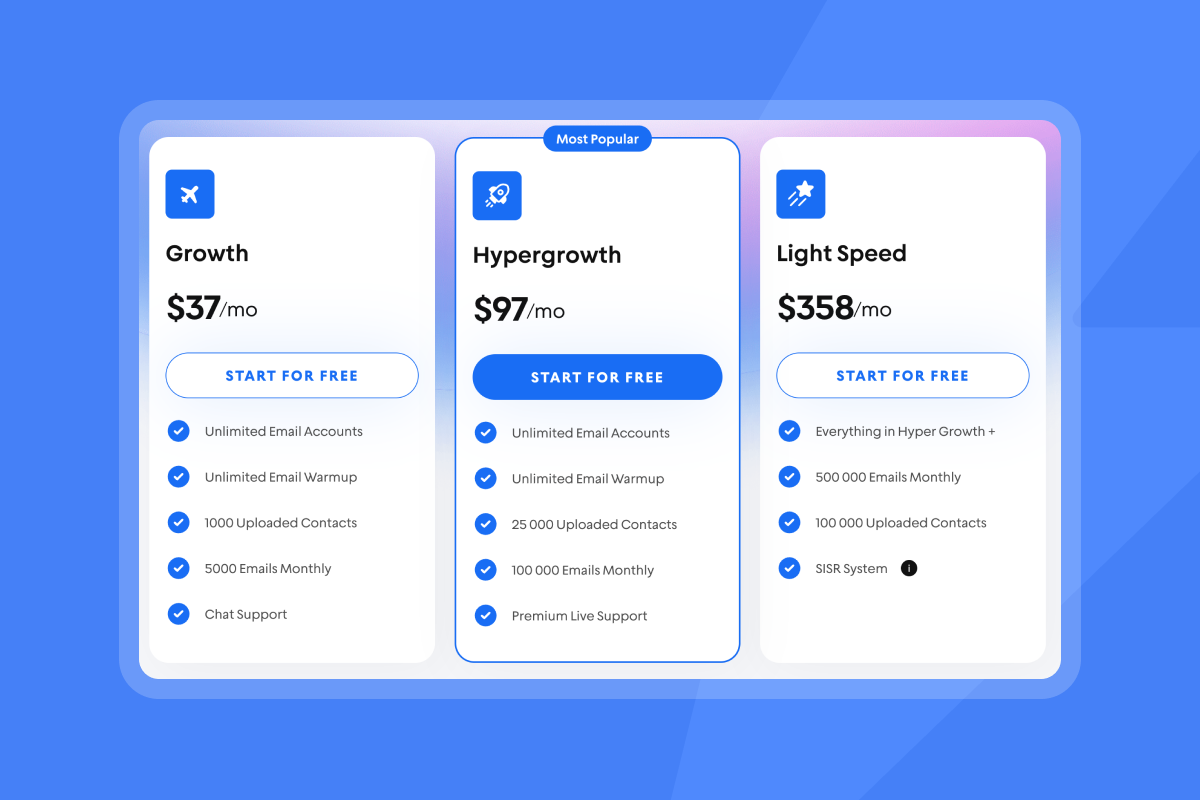
- Model: Flat platform fee plus usage credits keeps TCO predictable as you add inboxes.
- Credits: Know what consumes credits, including data enrich, exports, and AI.
- ROI math: Track cost per meeting and pipeline per dollar by cohort.
Instantly offers a flat‑fee unlimited email accounts reduce per‑seat penalties as you grow.
Measuring success: reporting and analytics
- Inputs: Verified leads, seed size, and filters used.
- Outputs: Reply rate, meetings set, SQLs, ACV, win rate, sales cycle.
- Health: Bounces at or below 1%. Complaint rate at or below 0.3%. Primary inbox placement above 80% on core providers.
Add cohort tags so analytics reconcile with CRM and finance.
Seamless integration and team collaboration
- CRMs: Reliable HubSpot or Salesforce sync with field mapping and owner rules.
- Workspaces: Roles, shared templates, and a global block list.
- Automation: APIs and webhooks to move data without manual exports.
AI capabilities and ethical use
- Explainability: See why an account was matched.
- Controls: Negative keywords, exclusion lists, and human sign‑off for AI actions.
- Reply handling: Options for human‑in‑the‑loop or autopilot.
Instantly’s AI Reply Agent answers in under five minutes and supports Slack review for approvals, as described in the AI Reply Agent Help Center.
Ensuring deliverability and protecting sender reputation
Deliverability is a system, not a switch.
- Warmup: Warm new inboxes before production sends.
- Placement tests: Run inbox placement checks before and during campaigns.
- Ramp plans: Start at low throughput, then throttle up as health holds.
Gmail’s bulk sender guidelines recommend keeping reported spam rates below 0.3% and enabling one‑click unsubscribe, as outlined in Gmail sender guidelines. Monitor spam rates in Google Postmaster Tools. For practical setup and tactics, watch Instantly’s deliverability guide for 2025 and this tutorial on avoiding spam folder placement fast.
Instantly has a private deliverability network of 4.2M+ accounts that underpins warmup and reputation building, as covered on this blog post in more depth.
Scaling capabilities for agencies
- Unlimited accounts: Avoid per‑seat penalties as client count grows.
- Governance: Standardize sequences, send windows, and QA across workspaces.
- Infrastructure: Dedicated or private IP rotation on higher tiers for volume control.
Security and privacy considerations
- Legal posture: Review the vendor DPA and sub‑processor list.
- Data restrictions: Confirm you will not upload restricted data categories.
- Assurance: Request attestations or reports under NDA if required.
Instantly publishes a Data Processing Addendum and a public sub‑processors list.
Lookalike tool evaluation: Instantly vs. general market
| Criterion | Why it matters | Instantly pattern | General market pattern |
|---|---|---|---|
| Pricing | Predictable TCO | Flat fee outreach with unlimited accounts. Credits for data and AI. | Per‑seat licensing with add‑ons that compound. |
| Data | Bounce reduction | Large lead graph, waterfall enrich, in‑app verification. | Single‑source data or unclear verification. |
| Deliverability | Primary inbox placement | Warmup, placement tests, private network, IP controls on higher tiers. | Warmup optional and limited placement testing. |
| Scale & ops | Team workflows | Workspaces, templates, API, CRM sync, AI agents. | Patchwork of tools or heavy iPaaS for basics. |
Real‑world impact: outcomes and success stories
Lookalike discovery raises signal to noise, so reps spend more time in real conversations.
"The platform is super intuitive, easy to set up, and makes it simple to manage multiple domains and inboxes at scale."Shaiel P., in a G2 review
"Instantly.ai has assisted us in creating outbound email systems that reach your ideal buyer's inbox and foster meaningful connections. Also, their customer support is next level, 10/10."Verified User in Investment Banking, in a G2 review
"We increased our revenue by six figures within 4 months of starting with instantly."Alexander, in a Trustpilot review
Want to watch the workflow end to end? See the Instantly tutorial for 2025 and a walkthrough that covers new features and setup step by step.
For deeper deliverability context, our (Instantly's) own guide notes that clean data and verification help protect ROI, citing average email returns near 36:1 in its email verification explainer.
Move into your next growth phase with lookalike companies
Define your ICP with receipts. Feed seed customers into an AI discovery engine. Refine by the criteria that actually predict fit. Sync verified contacts to outreach, test inbox placement, and ramp sends as health allows. Do this consistently and you build a steady, high‑quality pipeline without gambling on deliverability or budget.
Use the Lookalike Tool Evaluation Checklist so you can score data, pricing, integrations, AI, deliverability, and security with one page. Try Instantly SuperSearch for free to find lookalike companies, enrich verified contacts, and push them to outreach.
FAQ:
How many seed customers do I need to start?
Start with 20–100 best customers by domain. More helps, but quality beats quantity.
What bounce rate is acceptable after verification?
Keep hard bounces at or below 1%. If you exceed that threshold, pause and re‑verify.
Which metrics should I track first?
Reply rate, meetings set, bounces, complaint rate, and primary inbox placement. Then add SQLs, win rate, ACV, and sales cycle.
How often should I refresh a lookalike list?
Quarterly for most teams. Monthly if your market shifts fast or you ship major releases.
What daily send caps are safe in week one?
After warmup, cap at 30 per inbox per day, then ramp as placement and complaint rates stay healthy.
Terminology box
- Lookalike companies: Firms that mirror your best customers on core attributes.
- ICP: Ideal Customer Profile that defines target industries, sizes, tech, and pains.
- AI‑driven discovery: Using ML and NLP to find and rank similar companies.
- Waterfall enrichment: Enriching data from multiple sources for higher coverage.
- List hygiene: Ongoing verification and removal of risky or stale contacts.
- Verified contacts: Emails confirmed deliverable by a verifier.
- Deliverability: Likelihood your emails hit the primary inbox.
- Sender reputation: Trust signals mailbox providers assign to your domain and IPs.
- Warmup: Controlled sends that build sender trust before production.
- Send windows: Time ranges when campaigns send to mimic human behavior.
- Spin syntax: Copy variations that reduce repetition.
- Reply rate: Percent of contacts who reply to an email.
- Booked meetings: Scheduled calls or demos from outreach.
- Unified inbox: Central place to manage all replies across accounts.
- Credits: Usage units for data, enrichment, or AI actions.


