


Updated November 23, 2025
TL;DR: Before you connect your first client domain to GoDaddy's Email Marketing Starter Plan, understand its 500-subscriber cap, 5,000 monthly send limit, and missing warmup tools. These constraints create sender reputation risks that agency operators cannot afford. To protect client domains, focus on strict list hygiene, careful ramp-up from 5 to 10 to 20 emails per day over 20 to 30 days, and proactive authentication. For scalable, reputation-safe outreach across unlimited accounts, dedicated platforms like Instantly offer automated warmup, a 4.2M+ account deliverability network, and advanced tools to protect domains while booking meetings.
Before you connect your first client domain to GoDaddy's Email Marketing Starter Plan, understand this: its 500-subscriber cap, shared IP infrastructure, and missing warmup tools create sender reputation risks that agency operators typically can't afford. Here is what you need to protect your clients and when to choose a dedicated outreach platform instead.
GoDaddy designed the Starter Plan for small businesses sending occasional newsletters to stable, opted-in lists. It lacks the deliverability infrastructure, automated warmup, and scalability that agencies need to manage 10 to 150 inboxes safely. Understanding these limits now prevents domain burns later.
What is GoDaddy Email Marketing Starter Plan?

The GoDaddy Email Marketing Starter Plan provides basic tools for small businesses beginning email marketing. The plan supports up to 500 subscribers and 5,000 emails per month, includes professional templates, one signup form, and automated unsubscribe handling.
GoDaddy's help documentation labels Email Marketing as a legacy product, though recent reviews still reference the Starter Plan. For agencies needing actively maintained infrastructure, this legacy status signals risk.
Core features and subscriber limits
The plan includes mobile-friendly templates, basic image storage, and a single signup form that integrates into GoDaddy Website Builder. The system automatically removes opted-out contacts when they unsubscribe. You can schedule emails for specific dates, but automated sequences, A/B testing, and advanced segmentation are not included.
GoDaddy enforces the 500-subscriber and 5,000 monthly send caps with no exceptions. Once you hit 500 subscribers, you cannot add more without upgrading to the Up and Running plan at 2,500 subscribers and $12.99 per month, or Pro at 5,000 subscribers and $24.99 per month.
For a single client targeting a tight niche, 500 contacts might work. For agencies managing multiple clients, this limit becomes a bottleneck within days. Compare this to Instantly's flat-fee pricing that includes unlimited email accounts and no per-inbox penalties as you scale.
GoDaddy also imposes a 500 emails per hour limitation on cPanel email accounts, adding throughput constraints if you use GoDaddy for transactional email alongside marketing sends.
Who should use the Starter Plan
The Starter Plan fits solopreneurs sending one monthly newsletter to a stable, opted-in list. Think local shops or consultants with small, engaged audiences who value simplicity over scale.
It does not fit agencies. Your clients expect deliverability dashboards, domain health monitoring, automated warmup, and the ability to scale from 100 to 1,000 sends per week safely. GoDaddy's Starter Plan lacks all of these.
How does GoDaddy Email Marketing compare to dedicated outreach platforms?
GoDaddy added email marketing as a bundled convenience feature for existing hosting customers. Instantly is a purpose-built email growth engine for agencies focused on cold outreach, deliverability, and booked meetings. The difference shows in pricing structure, deliverability tools, and reply management at scale. Watch how the full Instantly stack works end to end for all your outreach needs:

Key deliverability differences
Deliverability separates tools built for occasional newsletters from platforms designed for high-volume, reputation-safe outreach. GoDaddy offers basic email authentication but no proactive reputation management.
Instantly includes automated warmup across all plans, gradually building trust with inbox providers before your first campaign. Our private deliverability network spans 4.2M+ accounts, creating natural engagement patterns that signal legitimacy to Gmail and Outlook.
Instantly's Inbox Placement tests show exactly where emails land—primary inbox versus promotions versus spam—before you scale. GoDaddy provides no equivalent. You send blind and discover placement issues only after bounce rates spike.
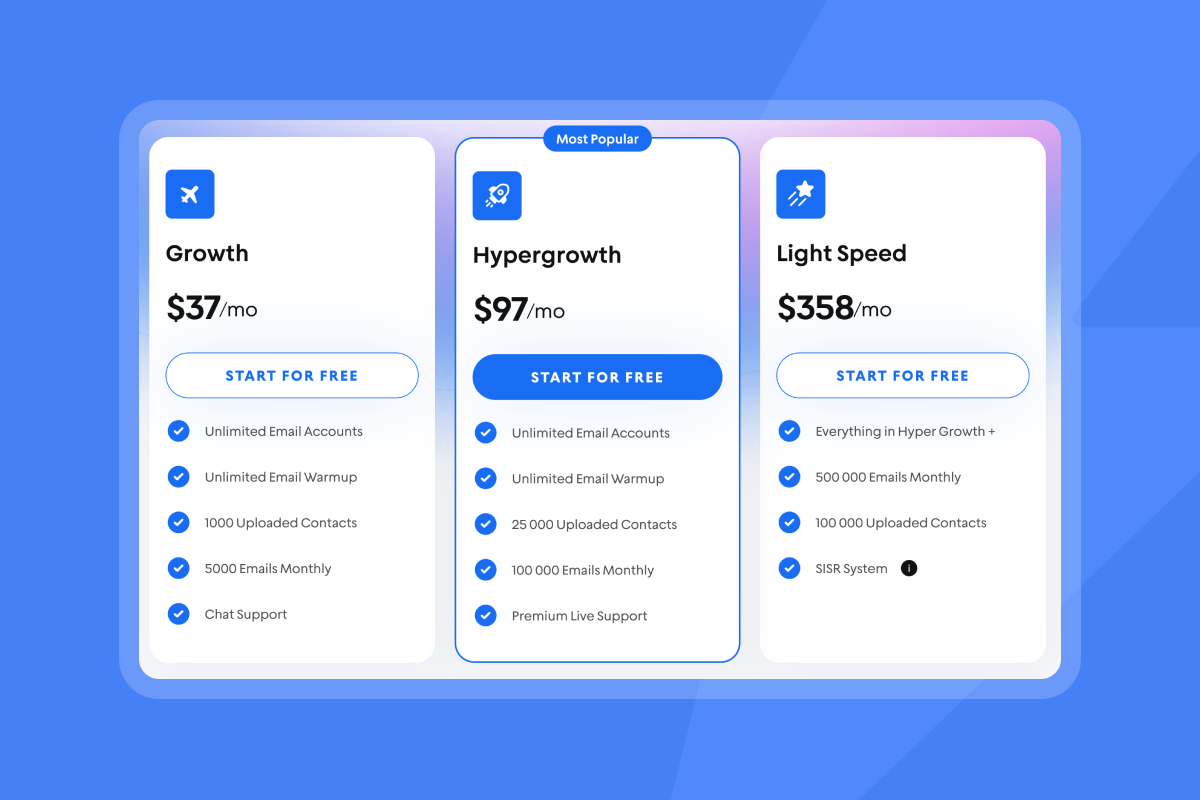
On the Light Speed plan, Instantly adds SISR technology, Server and IP Sharding and Rotation, which distributes sends across dedicated IP pools to protect domain reputation at high volume. GoDaddy shares infrastructure across thousands of users, meaning another user's spam complaints can drag down your deliverability.
Watch how to set up warmup in Instantly in under 5 minutes:
Cost and scalability comparison
GoDaddy's tiered pricing forces upgrades as you grow. Starter at $8.99 per month covers 500 subscribers. Managing three clients requires three separate accounts at $26.97 monthly before adding verification tools or enrichment services.
Instantly's Growth plan starts at $37 per month with unlimited email accounts and built-in warmup. Add one client or 50 clients, your software cost stays flat. Hypergrowth at $97 per month includes 100,000 emails per month and premium support, still with no per-seat fees.
"The platform is super intuitive, easy to set up, and makes it simple to manage multiple domains and inboxes at scale. Deliverability is great and the analytics give us exactly what we need to optimize campaigns quickly." - Shaiel P. on G2
How to prepare your list and content for a GoDaddy campaign
List hygiene and content quality determine inbox placement. GoDaddy's basic tooling means you handle these steps manually before importing contacts.
Essential list hygiene steps
Start with verified, opt-in contacts only. Purchased lists damage deliverability from day one. Use a third-party verification service before import because GoDaddy does not verify addresses. Remove duplicates, role accounts like info@ or support@, and obvious typos.
Keep bounce rates at or below 1 percent to protect sender reputation. Bounce rates above 2 percent signal list quality problems that hurt domain health fast. Regularly removing hard bounces and inactive contacts maintains clean lists.
For agencies using Instantly, SuperSearch delivers verified contacts from 450M+ records with waterfall enrichment across five providers, eliminating manual verification steps.
Crafting content that avoids spam filters
Write subject lines under 50 characters that are specific and relevant. Avoid spam trigger words like "free," "guarantee," or excessive capitalization. Common triggers include misleading subject lines, all-caps text, and excessive punctuation.
Balance images with plain text. Heavy image-to-text ratios trigger spam filters. Include alt text for accessibility and ensure all links work before sending.
Authenticate your domain with SPF, DKIM, and DMARC records. GoDaddy cPanel provides configuration tools, but setup is manual and requires technical knowledge. Missing authentication tells inbox providers your email may be spoofed.
Always include a visible unsubscribe link in the footer. GoDaddy handles unsubscribe requests automatically, meeting CAN-SPAM and GDPR requirements.
Watch this deep dive on how Instantly helps your emails avoid getting labelled as spam:
Step-by-step: Launching your first GoDaddy email campaign
Follow these condensed steps to launch your first campaign while protecting sender reputation.
1. Set up account and import list
Access your GoDaddy product page, navigate to Marketing, then Email Marketing. Verify your sending email address through the confirmation link GoDaddy sends. Set your default "From Name" to your business name and "From Email" to a verified business domain.
Add contacts via CSV upload, manual entry, or copy-paste. Format your CSV with columns for Email, First Name, Last Name, and custom fields. GoDaddy asks how you obtained permission—select the appropriate option. Review the import summary for errors, but run your list through third-party verification first because GoDaddy does not validate deliverability.
2. Design template and write subject lines
Select Compose New Email and choose a pre-designed template. Use the drag-and-drop editor to customize text, add your logo, and insert images under 1MB. Add merge tags like {{First Name}} for personalization and preview on desktop and mobile before sending.
Write two to three subject line variations under 50 characters. The Starter Plan does not include A/B testing, so test manually with small segments. Write a preheader that expands on the subject line—GoDaddy templates include a preheader field, or the first line of body text becomes the preheader by default.
Instantly offers in-depth A/Z testing at scale so you can figure out what really works for your business:
3. Schedule, send, and monitor
Choose recipients from your imported list. For first campaigns, send to a test segment of 50 to 100 contacts to validate deliverability before scaling. Confirm From Name, From Email, and subject line on the Details tab. Schedule for business hours in your audience's time zone—GoDaddy does not offer automatic time zone detection.
After sending, track opens, clicks, bounces, and unsubscribes in the campaign dashboard. Watch bounce rate closely—keep it at or below 1 percent by removing hard bounces immediately. Unsubscribe rate spikes above 0.5 percent signal targeting or content problems. Cold B2B open rates between 15 to 25 percent and click-through rates of 2 to 5 percent are typical benchmarks.
For agencies managing multiple clients, manually tracking metrics across separate GoDaddy accounts becomes a bottleneck. Instantly's unified inbox centralizes all campaigns, replies, and health metrics in one view.
"Easy to use DFY emails ready to go after a few weeks of email warmup." - Verified User on G2
Protecting your sender reputation with GoDaddy Email Marketing
Sender reputation determines inbox placement. GoDaddy provides authentication basics, but reputation management is manual.
Maintaining domain health
Ramp send volumes gradually. Start with 5 to 10 emails per day for week one, then increase by 5 to 10 daily until you reach target volume. Never jump from 0 to 500 sends in one day. GoDaddy does not automate warmup, so you manually control send pacing.
Authenticate your domain with SPF, DKIM, and DMARC through GoDaddy cPanel. These DNS records verify email legitimacy and prevent spoofing. Remove contacts who have not opened or clicked in six months—inbox providers treat consistent lack of engagement as a signal that your emails are unwanted.
Monitor blacklists using MXToolbox weekly. If your domain gets listed, follow each blacklist's delisting process, which often requires proving you fixed underlying issues. GoDaddy uses shared IP pools, so your deliverability can suffer if other users send spam from the same infrastructure.
Troubleshooting deliverability drops
If open rates drop by 30 percent or bounce rates spike above 2 percent, pause all sends immediately. Run full list verification to identify and remove invalid addresses. Check DNS records to ensure SPF, DKIM, and DMARC are configured correctly. Use Google Postmaster Tools to see your reputation score with Gmail.
Reduce send volume by 50 percent and restart warmup. Ramp slowly over two to three weeks while monitoring metrics. Engage high-quality contacts who will open and reply to rebuild positive signals.
Instantly's automated Inbox Placement tests alert you to problems before campaigns launch, and the private deliverability network ensures your sends look natural to inbox providers from day one. Watch how Instantly ensures you get top-level deliverability for your business:
When to consider a more robust email outreach solution
GoDaddy's Starter Plan works for simple, low-volume newsletters. When outreach needs grow beyond 500 subscribers or multiple clients, the gaps become expensive.
Scaling past basic features
Once you reach 500 subscribers or 5,000 monthly sends, you must upgrade. For agencies managing five clients with separate domains, you need five GoDaddy accounts at $44.95 per month before adding verification tools or enrichment services. Cost compounds without delivering agency-grade infrastructure.
Cold outreach at scale requires deliverability infrastructure GoDaddy does not provide. Automated warmup takes 20 to 30 days and requires careful daily send increases of 5 to 10 to 20 emails per day plus engagement from real accounts. GoDaddy forces manual management. Instantly automates the entire process.
Multi-step sequences automate follow-ups based on engagement. GoDaddy's Starter Plan does not support automated sequences, forcing manual scheduling for each follow-up. Instantly's AI Reply Agent reads incoming replies and drafts responses in under five minutes, saving hours weekly for agencies handling hundreds of replies.
How Instantly helps agencies scale safely
Agencies need unlimited accounts to isolate client domains, automated deliverability tools to protect reputation, and unified management to reduce operational overhead. Instantly delivers all three.
Flat-fee pricing with unlimited email accounts means you add clients without compounding software costs. Automated warmup, Inbox Placement tests, and SISR technology on Light Speed plans protect every domain. The unified inbox consolidates replies across all accounts, so you never miss hot leads.
SuperSearch provides 450M+ verified contacts with waterfall enrichment, eliminating separate data vendors. White-label portals let you offer email outreach under your brand. Clients log in to view campaigns, replies, and meetings without seeing the Instantly name.
"It's ease of use and simple structure, weather it's pricing, emails, campaigns, warmups, everting is easy and clean" - Grihith Bhoir B. on G2
Ready to protect client domains and book meetings at scale? Try Instantly free and launch your first campaign with automated warmup, verified data, and the deliverability tools agency operators need.
FAQs
What is the subscriber limit for GoDaddy Email Marketing Starter Plan?
The Starter Plan supports up to 500 subscribers and 5,000 emails per month. Exceeding these limits requires an upgrade to Up and Running at 2,500 subscribers or Pro at 5,000 subscribers.
Can I warm up my email accounts with GoDaddy Email Marketing?
No. GoDaddy provides no warmup tools. You must manually ramp send volumes from 5 to 10 to 20 emails per day over 20 to 30 days before scaling campaigns.
How do I avoid spam filters when using GoDaddy?
Authenticate your domain with SPF, DKIM, and DMARC records, clean your list regularly, avoid spam trigger words, and ramp send volumes gradually. GoDaddy provides authentication tools but no automated reputation monitoring.
Is GoDaddy Email Marketing suitable for cold outreach?
No. Cold outreach requires multi-step sequences, sender reputation management, and advanced deliverability tools that GoDaddy's Starter Plan does not provide. Use dedicated platforms like Instantly for cold email.
Key terms glossary
Sender Reputation
A score assigned by inbox providers like Gmail and Outlook based on engagement, complaint rates, and authentication. High reputation means primary inbox placement, low reputation means spam folders or blocks.
List Hygiene
The process of regularly cleaning your email list by removing invalid addresses, hard bounces, unengaged contacts, and duplicates to improve deliverability and protect sender reputation.
Deliverability
The ability of an email to reach the recipient's primary inbox rather than being routed to promotions or spam. Deliverability depends on sender reputation, authentication, content quality, and list hygiene.


