


Updated December 03, 2025
TL;DR: Your sales team closes calls every day. The difference between deals and dead leads comes down to what happens in the 48 hours after. Most follow-up emails never reach the primary inbox. The ones that do often lack the personalization, timing, or clear next steps that convert interest into meetings. For Sales Leaders managing 3-15 reps, the real challenge is building a system that ensures consistent primary inbox placement, standardizes execution across the team. Instantly provides that system: unlimited email accounts with automated warmup through a private deliverability network of 4.2M+ accounts, AI-powered reply handling, and transparent flat-fee pricing so you can scale follow-up without the billing traps or scrambled data that burned you before.
Why sales follow-up emails are essential for closing deals
Your sales team just had a great call. The next 48 hours determine whether it converts to a deal or becomes a forgotten lead. Most follow-ups fail not because of bad writing, but because they never reach the primary inbox.
Your follow-up email competes for attention in a crowded inbox during that narrow window. Most sales reps give up after one or two follow-up attempts, yet persistence is what separates closed deals from forgotten leads.
This gap between what works and what actually happens represents lost pipeline and missed quota.
Reinforce value and address objections
A follow-up email after a sales call creates a written record of the conversation and your proposed solution. It gives prospects something concrete to review with their team and reference when making decisions.
This matters because buying committees often include people who were not on the original call. Your follow-up becomes the artifact they review in internal discussions.
The best follow-ups recap specific pain points the prospect mentioned. They connect those challenges directly to how your solution solves them. For example, if a prospect worried about onboarding complexity, your follow-up should include a case study addressing that exact concern.
Maintain momentum and engagement
Deals stall when communication stops. A systematic follow-up process prevents leads from going cold by maintaining consistent touchpoints without being pushy.
The key is providing value at each touchpoint rather than simply asking "Did you review my proposal?" Each follow-up should introduce new information, address a different angle of the problem, or offer a specific next step. This approach keeps prospects engaged and demonstrates your commitment to their success.
This spacing works because it maintains presence during the typical 2-4 week B2B decision window without triggering annoyance. Each touchpoint should provide new value, not just ask the same question.
Build trust and credibility
Professional, timely follow-up signals reliability. When you do what you said you'd do (send information, schedule the next call, introduce a technical resource), you build trust.
This matters especially in complex B2B sales where relationships drive decisions. Consistent communication also keeps your solution top-of-mind. Even if a prospect isn't ready to buy today, regular value-driven follow-ups position you as the natural choice when their timing changes.
To dig further into what works and what doesn't in your email copy watch our 1M+ email study walkthrough below:
What are the key components of an effective sales follow-up email?
Not all follow-up emails drive results. The difference between an email that gets ignored and one that books a meeting comes down to a few critical elements.
Clarity and conciseness
Your prospect is busy. Your follow-up email should get to the point quickly.
Lead with the most important information in the first two sentences. State why you're writing and what you want the prospect to do. Cut unnecessary words. Compare these two approaches:
- Weak: "I wanted to reach out and circle back to see if you had a chance to review the proposal we discussed and determine if it might be a good fit for your team's needs."
- Strong: "Did the proposal address your onboarding concerns? I can walk through the implementation timeline Thursday at 2pm."
The second version respects the prospect's time and makes responding easy. Shorter, focused messages also perform better with spam filters.
Structure your email with short paragraphs and bullet points when listing benefits or next steps. This makes the content scannable. Busy executives often skim emails on mobile devices, so format accordingly.
Personalization and relevance
Generic "just checking in" emails get deleted. Effective follow-ups reference specific details from your conversation.
Mention the prospect's challenges, their goals, or something unique about their business. For example, if a prospect mentioned they're expanding to a new region, your follow-up might include a case study of a similar company that successfully scaled using your solution.
This level of relevance significantly increases engagement and response rates. Personalized subject lines drive higher open rates, and emails with personalized content increase click-through rates.
Use Instantly to personalize your emails at scale, watch how to personalize cold emails with AI below:
Clear call to action
Every follow-up email needs a specific, easy-to-complete next step. Vague requests like "Let me know your thoughts" create friction.
Instead, propose concrete actions: "Are you available for a 15-minute call Thursday at 2pm EST to discuss the implementation timeline?"
Make the CTA about solving their problem, not about your sales process. Frame it as "Let's review how this reduces your onboarding time by 40%" rather than "Can we schedule a product demo?" This subtle shift puts the prospect's needs first.
Limit your email to one primary CTA. Multiple competing asks confuse the reader and reduce response rates.
When and how often should you send follow-up emails?
When you send follow-ups matters as much as what you send. Send the first follow-up 2-3 days after the initial call.
This gives prospects time to digest the conversation without losing momentum. Subsequent follow-ups should follow a staggered cadence: day 4, day 7, day 14, day 30.
Pay attention to send windows. For B2B, this typically means Tuesday through Thursday, between 8:30-10:30am or 1:00-3:00pm in the prospect's local time zone.
Scaling follow-up without compromising deliverability
Individual contributors can manually send personalized follow-ups to a small list. Sales Leaders managing teams of 3-15 reps face a different challenge.
How do you standardize the follow-up process, ensure emails actually reach the primary inbox, and get reliable data on what's working across the team?
Ensuring primary inbox placement
The best-written follow-up email is worthless if it lands in spam. Deliverability is the foundation of any successful email strategy.
Yet many Sales Leaders struggle with inbox placement, especially when scaling to multiple accounts and higher send volumes. New domains need careful warmup. Established domains need continuous monitoring to catch problems before they impact campaigns.
The technical complexity of deliverability requires careful attention:
- SPF (Sender Policy Framework): Authorizes which servers can send from your domain
- DKIM (DomainKeys Identified Mail): Cryptographic authentication of message integrity
- DMARC (Domain-based Message Authentication): Policy framework combining SPF and DKIM
- IP reputation: Trustworthiness score of sending IP addresses
- Domain health: Overall standing with mailbox providers
You need tools that handle this infrastructure automatically while providing visibility into placement rates and health metrics. Slow ramp warmup strategies are essential for new accounts. This means gradually increasing daily send volume over 2-4 weeks while monitoring engagement signals.
Watch how to avoid your emails going to spam fast with Instantly:
"Instantly has been a game changer for my vertical in merchant service where email marketing is key. I've converted several leads into deals using Instantly and it's paid for itself 5x." - Philip Hendrich, Trustpilot
Reliable reporting and analytics
Many Sales Leaders struggle with analytics that don't reconcile with CRM data. Misleading open rates, missing reply tracking, or conversion attribution gaps make it impossible to accurately calculate metrics like cost per meeting or pipeline contribution from email outreach.
You need reporting that tracks the metrics that matter: primary inbox placement rate, reply rate, meeting booked rate, and progression to SQL. These metrics should be visible at both the campaign and rep level so you can identify high performers and coach those who need help.
Avoiding hidden costs and complexity
Sales Leaders at growing companies are risk-averse when it comes to vendor lock-in, unexpected charges, and billing run-arounds. Many have been burned by legacy suites that promised simplicity but delivered annual lock-ins, per-seat pricing that compounds with growth, and clunky UIs that slow down reps.
The total cost of ownership includes software fees, implementation time, training overhead, and opportunity cost from tools that don't work together. A focused email platform with transparent pricing often delivers better ROI than a sprawling suite with features you'll never use.
"Very efficient system for outreach. Amazing customer support." - Synteria, Trustpilot
How Instantly helps Sales Leaders master follow-up emails
Instantly provides a reliable, auditable system for sales follow-up that addresses the core challenges Sales Leaders face: deliverability, standardization, automation, and transparent reporting.
Unlimited accounts and built-in warmup for safe scaling
- Unlike platforms that charge per seat or cap the number of sending accounts, Instantly includes unlimited email accounts on all plans. This architecture matters for Sales Leaders who need to distribute volume across multiple accounts to maintain healthy sender reputation and avoid mailbox provider limits.
- Each account includes automated warmup through Instantly's private deliverability network of 4.2M+ accounts. This network generates authentic engagement signals (opens, replies, folder movements) that build trust with mailbox providers.
- The warmup process follows slow ramp best practices, gradually increasing sends from 30 to 50 to 100+ per day over 2-4 weeks.
- For teams running campaigns at scale, the Light Speed plan adds SISR (Server & IP Sharding & Rotation) with dedicated IP pools. This means your sending reputation is isolated from shared IP risks, giving you additional control when sending 500+ emails per day across multiple accounts.
Watch the video below for a more detailed insight on how to set up an email warm-up with AI:
"The email warmup feature was a lifesaver, literally freeing up 40hrs of our staff members' time every day." - Verified User in Computer Software, G2
Automated inbox placement tests and private deliverability network
- Deliverability isn't set-it-and-forget-it. Mailbox providers constantly adjust their filtering algorithms.
- A campaign that performed well last month might hit spam today if you don't monitor placement continuously. Instantly's Inbox Placement feature runs automated tests that show exactly where your emails land across major providers (Gmail, Outlook, Yahoo).
- The platform sends test messages to seed accounts and reports back with placement percentages: primary inbox, promotions tab, or spam folder. This proactive monitoring lets you catch problems early.
- TLDR on maintaining deliverability: keep hard bounces below 2%, spam complaints below 0.3% (ideally below 0.1%), and primary inbox placement above 80-85%. These benchmarks give Sales Leaders concrete targets to monitor and discuss with their teams.
Find out more with the Cold Email deliverability guide:
Unified inbox (Unibox) and AI Reply Agent for efficient reply management
- When your team manages 5, 10, or 20 sending accounts across multiple campaigns, replies get scattered. Reps waste time checking each inbox separately.
- Interested prospects fall through the cracks when responses sit unread. Instantly's Unibox centralizes all replies in one interface. Reps can view, respond to, and track conversations from all their accounts without switching between mailboxes.
- The AI Reply Agent takes this further by automatically handling lead replies in under 5 minutes. The AI classifies responses (interested, not interested, questions, objections) and can either draft suggested replies for human review (Human-in-the-Loop mode) or send responses automatically (Autopilot mode).
- For Sales Leaders, this standardizes response quality while accelerating speed-to-lead.
See how we tested out AI reply agents for 30 days:
"I appreciate the guidance Instantly offers for the warm-up stage of cold email campaigns, which was entirely new to me. This feature is vital, guiding me according to my needs and current understanding of cold email outreach." - Cyril T., G2
Comprehensive analytics and reporting
Instantly provides analytics designed for the metrics Sales Leaders need to defend budget and optimize performance. The platform tracks primary inbox placement, send volume, open rates, reply rates, click rates, and bounce rates at both the campaign and account level.
Track these metrics with clear thresholds:
- Primary inbox placement: Target 85%+ for active campaigns
- Reply rate: Target 5-10% baseline, strong campaigns achieve 10%+
- Reply-to-meeting conversion: Target 15-20% of interested replies booking meetings
- Bounce rate: Keep below 2% (pause and investigate if exceeded)
- Spam complaint rate: Keep below 0.3%, ideally below 0.1%
The platform supports A/Z testing with unlimited variations, allowing you to test different subject lines, opening hooks, CTAs, and personalization approaches. Statistical significance indicators help you identify winning variants quickly and scale them across your campaigns.
Transparent pricing
Instantly's pricing model is built for predictability. Here's how the core Outreach plans compare:
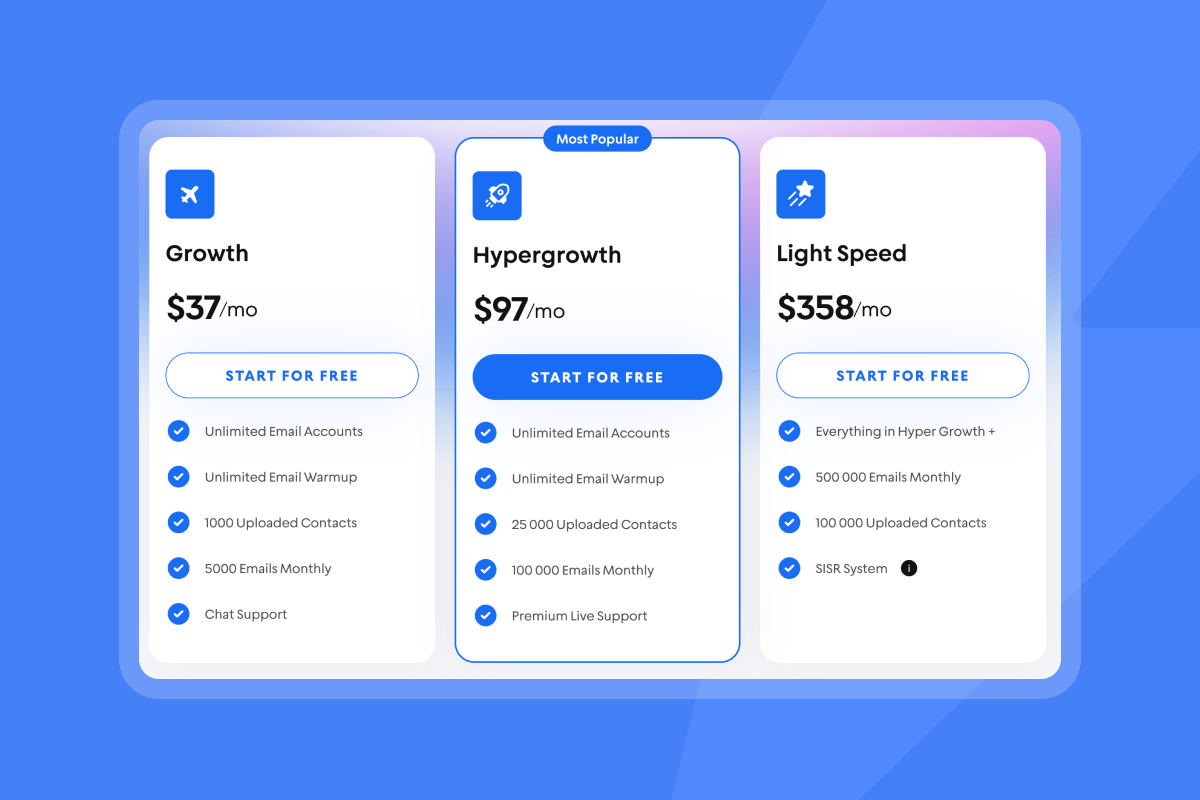
All plans include unlimited email accounts, warmup, A/Z testing, analytics, and API access. Higher tiers add increased sending capacity (100k+ emails/month), premium support, and dedicated IP pools.
Build a follow-up system that scales with your team
The difference between sales teams that consistently hit quota and those that scramble each quarter often comes down to systems, not talent.
When every promising conversation automatically progresses through a proven sequence, lands in the primary inbox, and gets tracked in reliable reports, you transform email from a rep-by-rep gamble into a predictable pipeline.
This requires purpose-built tools, not generic email platforms or sprawling suites that create more complexity than they solve. Instantly provides the infrastructure Sales Leaders need: unlimited accounts with automated warmup, continuous deliverability monitoring, AI-powered reply handling, comprehensive analytics, and transparent pricing that scales without per-seat penalties.
Start building your sales follow-up system
Ready to implement a reliable follow-up system for your sales team? Start your free Instantly trial and access unlimited email accounts, built-in warmup, and the deliverability infrastructure you need to scale without compromising inbox placement.
For a complete walkthrough of setting up your first campaign, watch the full Instantly AI tutorial for 2025 on YouTube.
Frequently asked questions
How many follow-up emails should I send after a sales call?
Send 3-5 follow-up emails over 2-4 weeks using a staggered cadence (days 2-3, 4, 7, 14, 30). Consistent follow-up is essential for closing deals, as most prospects need multiple touchpoints before making a decision. Stop immediately if a prospect explicitly asks you to, unsubscribes, or responds with clear disinterest. If you get no response after 5 touches, move them to a nurture sequence with monthly value-driven content.
What's a good reply rate for sales follow-up emails?
Aim for 5-10% reply rates as a baseline. Strong campaigns achieve 10%+ replies. Track interested replies separately from out-of-office or unsubscribe responses. Focus on reply-to-meeting conversion (target 15-20% of replies booking meetings) as the metric that matters most for pipeline.
How do I ensure my follow-up emails reach the primary inbox?
Use proper email authentication (SPF, DKIM, DMARC), warm up new domains gradually over 2-4 weeks, send from multiple accounts to distribute volume, keep bounce rates below 2%, avoid spam trigger words, and use tools like Instantly's Inbox Placement tests to monitor where emails land across providers.
How does AI improve sales follow-up emails?
AI personalizes emails at scale by analyzing prospect data and generating relevant content, classifies replies automatically (interested vs. objection vs. out-of-office), drafts suggested responses to common questions, and identifies optimal send times based on engagement patterns. This automation standardizes quality while reducing manual work.
Key terms
Primary inbox: The main inbox folder (not promotions, updates, or spam) where emails have the highest visibility and open rates. Landing in primary inbox is the goal for all outbound email campaigns.
Sender reputation: A score mailbox providers assign to your sending domain and IP address based on engagement, bounces, spam complaints, and authentication. Higher reputation improves inbox placement.
Warmup: The process of gradually increasing email send volume from a new or cold account while generating positive engagement signals to build sender reputation with mailbox providers.
Reply rate: The percentage of sent emails that receive a response. Calculate by dividing total replies by emails delivered (sent minus bounces), excluding out-of-office and unsubscribe responses.
Unified inbox (Unibox): A centralized interface that displays replies from all connected email accounts in one view, eliminating the need to check multiple inboxes separately.
Throughput: The volume of emails sent per day per account or across all accounts. Managing throughput (typically 50-100 per account per day for cold outreach) protects sender reputation.


