


TL;DR: Use Instantly as your outbound engine and plug in AI enrichment to raise reply rates. Instantly connects to CRMs, Zapier or Make, and lead intelligence tools like Clay and Persana AI. Combine Instantly SuperSearch for verified leads, waterfall enrichment, and AI-generated one-liners to run hyper-personalized sequences that land in the primary inbox, track outcomes to your CRM, and cut manual work. This guide shows the stack, trade-offs, and setup options to get there.
Updated October 19, 2025.
If your cold emails still use basic merge tags while buyers skim, you need clean data, fast automation, and deliverability discipline. When Instantly sits at the center and your enrichment tools feed it with context, every message feels specific, and you see more positive replies.
This deep dive maps how Instantly integrates with Clay, as well as others tools like Persana AI, Zapier, Make, and your CRM to build a repeatable, hyper-personalized outreach engine. You will see where native syncs stop, how to get bidirectional tracking, which AI steps to automate, and how to control costs without hurting lead quality.
What this covers
Native and partner CRM connections: HubSpot, Salesforce, Pipedrive, plus OutboundSync for bidirectional tracking.
Workflow platforms: Zapier connects 8000+ apps and Make connects 2500+ apps to orchestrate data flow and QA checks.
Lead enrichment and personalization: Clay for waterfall enrichment and AI research, Persana AI for intent and dynamic openers, Linked Helper for LinkedIn context, and of course Instantly SuperSearch for verified contacts without forgetting that Instantly's AI Prompts can be used to research prospects and generate personalized emails.
Developers: Instantly API V2 and webhooks for real-time actions, Unified.to for a single API across many CRMs.
Why this matters
- Two-way data, not silos: Tie opens, replies, meetings, and revenue back to the CRM.
- Personalization at scale: Use AI to write specific lines based on live context, not just job title.
- Deliverability discipline: Keep list hygiene, warmup, and placement checks inside the same engine.
Achieving bidirectional sync for sales leaders
Native CRM syncs pull basics but often miss activity details. If you need replies, statuses, and block lists to roll up in your CRM, use a specialized connector.
Comparison table: CRM integration options
| Option | Data flow | Activity tracking | Ease of setup |
|---|---|---|---|
| Native HubSpot or Salesforce | One-way most fields | Limited campaign activity in CRM | Fast |
| Zapier or Make | One-way triggers | Custom events via rules, basic logging | Moderate |
| OutboundSync + Instantly | Bidirectional | Full activity logging and block lists | Guided, partner |
Key benefits of OutboundSync
- Bidirectional sync with HubSpot and Salesforce: Replies, bounces, interest labels, and status changes write back to CRM records, which means better attribution and cleaner handoffs to AEs. OutboundSync provides bidirectional CRM sync.
- Centralized block lists: Stop contacting current customers or do-not-contact domains from inside your CRM.
- Reporting that reconciles: Campaign activity ties to pipeline, which reduces the delta between Instantly analytics and CRM dashboards.
Automate & scale: workflow platforms with AI Answer first Use Zapier or Make to move data between tools, trigger AI classification, and enforce QA guardrails. This removes manual steps and shortens time to first conversation.
Watch the full integration guide with OutboundSync here:
What to connect
- Zapier: Recipes span more than 8000 apps. Good for quick wins and SDR-friendly automations.
- Make: The apps library lists more than 2500 apps and a visual builder with granular controls for loops, routers, and error handling.
- Pabbly and Integrately: Useful for cost-sensitive tasks with basic triggers and actions.
Here's a walkthrough on how to connect Clay and Instantly:
AI-enhanced automation examples
- Reply triage to CRM: When Instantly classifies a reply as "Interested," create or update a CRM deal, assign the owner, and post a Slack alert with the email thread. Use Instantly's AI Reply Agent for fast first passes on common objections. It responds in under 5 minutes and supports Human-in-the-Loop review.
- Lead QA before sending: A Make scenario verifies email status, checks domain risk, and blocks contacts missing critical fields. If clean, push to the Instantly campaign.
- AI drafting and research assist: Use Zapier AI or Make AI steps to summarize a lead's "About" page and pass a 1-sentence context tag into a custom variable. For complex research, offload to Claygent inside Clay rather than the iPaaS.
Admin tips
- Throttling: Add delays and volume caps in iPaaS. Keep sends at or below 30 emails per inbox per day during ramp.
- Retries: Use Make's error handlers for transient API errors. Do not silently drop failed contacts.
- Audit: Store a copy of payloads in a warehouse or Google Sheet for spot checks.
Enrich & personalize: lead intelligence integrations with Clay.com and Persana AI Answer first Clay.com and Persana AI add the live context your templates need. Feed Instantly with verified contacts, intent signals, and AI-written openers so each email reads like it was written by hand.
Clay deep dive
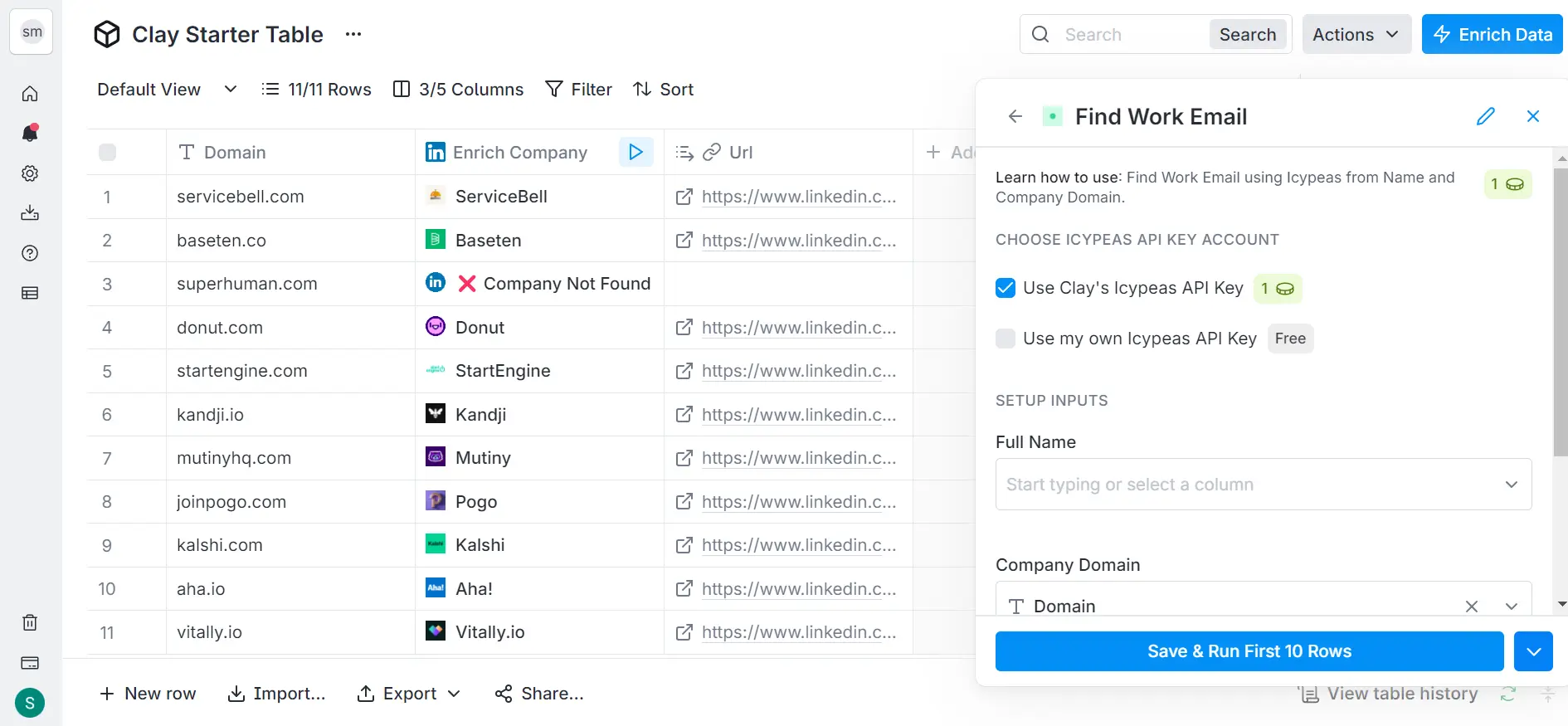
- Waterfall enrichment: Clay queries many sources in sequence to fill missing fields and reduce bounces. Use it to pull titles, LinkedIn URLs, technographics, funding, news, and more.
- Claygent for research: AI web research on company sites, press, and social to find unique hooks. Instantly's AI Prompts have similar capabilities.
- Direct push to Instantly: Map Clay columns to Instantly fields, including custom variables for subject lines or full first paragraphs.
Concrete variable ideas to pass from Clay
- Company event: {{recent_funding_round}} or {{new_hire_title}}.
- Technographics: {{uses_competitor_tool}} or {{shop_platform}}.
- AI opener: {{icebreaker_line}} with 1 to 2 sentences tied to a verified fact.
- Step-based copy: {{email1_body}} and {{email2_ps}} so follow-ups stay specific.
Checklist: lead enrichment and personalization benefits
- Verified emails: Lower hard bounces and protect domains.
- Firmographic fit: Match industry, size, and region to your ICP.
- Intent and timing: Prioritize triggers that raise buying odds.
- AI one-liners: Use specific, factual openers tied to the prospect.
- Sequence coverage: Prepare personalized data for multiple steps, not just email one.
Developer & custom options
API, webhooks & unified APIs for advanced workflows Answer first If your ops team codes, Instantly's API V2 and webhooks let you build real-time flows, create campaigns programmatically, and run custom QA.
- Instantly API V2 Inbox Placement API: Automate sending operations, manage campaigns, and trigger placement tests on schedule through the Instantly API V2 Inbox Placement API.
- Webhooks: Receive events such as "reply received" or "status changed" to update your CRM or data warehouse in real time. Guidance is in the integrations help center.
- Unified.to: One API that connects Instantly to dozens of CRM and HRIS ecosystems for faster internal tooling.
Advanced use cases
- Predictive send eligibility: Combine Inbox Placement scores with custom risk rules to halt sends when thresholds dip.
- AI copilots: Use Instantly's AI Copilot to set up targeting and draft campaigns, then enrich prompts with custom context from your data store.
- Attribution pipeline: Push per-contact sending logs to your warehouse. Join Instantly events to CRM revenue for cohort analysis.
Cost implications of an integrated outreach stack Answer first Instantly is a flat-fee core. Most add-on costs come from enrichment and automation volume.
How to build an all-in-one lead-to-meeting workflow
Follow these steps to stand up a measurable, hyper-personalized engine.
1. Protect deliverability first
- Warmup for 30 days per domain: Keep sends at or below 30 per inbox per day during ramp.
- Run placement tests: Use Instantly Inbox Placement before and after each change to confirm primary inbox rates.
- List hygiene: Verify contacts and remove risky domains.
2. Source and enrich targets
- Start in Instantly SuperSearch for lead discovery: Pull a segment aligned to your ICP and export with verified emails.
- Enrich in Clay: Add titles, LinkedIn URLs, tech stack, and triggers. Use Claygent to find one unique, factual hook.
3. Create personalized content
- AI openers: In Clay or Persana AI, generate a 1 to 2 sentence opener per lead tied to a recent event.
- Map variables: Prepare {{icebreaker_line}}, {{recent_event}}, {{uses_tool}}, and step-specific body fields.
4. Connect the stack
- Push to Instantly: Use Clay's Instantly action and map columns to standard and custom variables. Enable "skip if lead is in workspace."
- Set sequences: In Instantly, insert your custom variables in subject and body fields. Keep copy simple, one ask per email.
5. Automate QA and handoffs
- iPaaS rules: If reply contains "interested," create a CRM task, attach the email thread, and post a Slack alert.
- Bidirectional CRM: Use OutboundSync for HubSpot or Salesforce so replies and statuses update contact records.
6. Measure and adjust
- Scorecard: Aim for hard bounces at or below 1%, replies at or above 5%. Track meetings and SQLs by segment.
- Refine prompts: Improve AI prompts in Clay or Persana when certain hooks underperform.
- Throttle sends: If placement drops, pause, re-verify the last batch, and re-test with Inbox Placement.
What customers say
"It is the Inbox placement feature which i like the most as it help us to get to know the spam score and the mails that are placed in the inbox so by this we can manage the mail ids accordingly."
- G2 review from a Verified User in IT services. Read the full G2 review.
"Deliverability is great and the analytics give us exactly what we need to optimize campaigns quickly."
- Shaiel P. on G2, as seen in this G2 review.
"Simple and well-designed UX, effective support from both humans and AI for small questions. Additionally, the AI is capable of entering campaign configurations and applying fixes, which is a huge time saver!"
- Guillaume N. on G2. The full G2 review is available.
"In just the past 180 days, I've been able to book over 100 meetings, close deals worth more than €15,000, and even walk away from my regular 9 to 5 job, all with the help of Instantly."
- Dustin Geissinger Gromicho on Trustpilot. Read the full Trustpilot review.
"Instantly has been an excellent and important part of my marketing for my accounting firm. I rely heavily on cold email, and it does not disappoint."
- Alan Bramson on Trustpilot. Read the Trustpilot review.
Trade-offs to consider
- Cost vs. signal quality: Deep enrichment increases credits but improves reply quality. For low ACV deals, rely more on Instantly SuperSearch and light personalization.
- Speed vs. accuracy: AI can draft fast, but use Human-in-the-Loop for new segments until you trust patterns.
- Native vs. partner sync: Native CRM integrations are quick but one-way for many fields. OutboundSync costs more but standardizes attribution and block lists.
Building your hyper-personalized outreach engine
When Instantly runs the send, enrichment tools supply context, and your CRM closes the loop, you move from generic outreach to timely, specific conversations. Start with verified data, add one AI opener that references a real event, and keep activity logging tight so results show up in your pipeline reports. What is the one data point you can add this week that would make your opener unmistakably relevant?
Ready to transform your outreach? Explore Instantly's integration capabilities and start building your hyper-personalized workflows today. Start a free trial to set up your first campaign, explore Instantly SuperSearch for lead discovery and try Instantly's AI Copilot.
More resources:
- A full platform walkthrough is available on YouTube.
- A hands-on demo of the Clay workflow is available in the video Integrate Instantly with Clay.
- Full list and guides on Instantly integrations.
FAQ:
Does Instantly support bidirectional sync with HubSpot or Salesforce?
Use OutboundSync for bidirectional updates of replies, statuses, and block lists. Native connections are one-way for many fields.
How does Clay.com connect to Instantly?
In Clay, use the Instantly action to add a lead to a campaign. Map columns to Instantly fields and custom variables, then run the enrichment.
What volume should I send per inbox?
Do not exceed 30 emails per inbox per day during ramp. Run Inbox Placement tests before scaling.
Which iPaaS should I pick?
Use Zapier for fast recipes across 8000+ apps. Use Make for complex branching and error handling across 2500+ apps.
How do I handle replies at scale?
Use Instantly's AI Reply Agent to triage and draft responses in under 5 minutes, with Human-in-the-Loop for final approval on sensitive threads.
Key terminology glossary
- CRM integration: Connecting Instantly to your CRM to sync contacts and activities.
- Bidirectional sync: Data moves both ways, updating both systems.
- Workflow automation: Rules that move data between tools without manual work.
- API: A programmatic interface to create, read, or update data.
- Webhooks: Real-time event notifications pushed to your endpoint.
- Lead enrichment: Adding firmographic, technographic, and intent data to leads.
- Personalization: Custom content based on verified facts for each prospect.
- AI automation: Using AI to draft, classify, or research steps in a workflow.


