


Updated October 02, 2025
TL;DR: If your agency depends on cold email, pick a system that scales mailboxes and deliverability, not seats. Instantly runs on flat‑fee pricing with unlimited email accounts, placement testing, and client workspaces, so you can add inboxes without compounding costs. You also get a 450M lead database and AI that helps you find lookalike companies, write campaigns, and triage replies.
What are lookalike companies and why are they essential for B2B?
Lookalike companies are organizations that share measurable traits with your best customers. Typical traits include sub‑industry, headcount, revenue band, technology used, geography, and recent growth signals. The goal is simple: You want more accounts like the ones that already buy and renew.
Why teams use lookalike company search:
- Higher hit rate. You focus on probable fit, which tends to improve reply rates and meetings.
- Faster market expansion. You tap adjacent segments without guesswork.
- Lower cost per meeting. Less waste from poor fit and stale data improves unit economics.
Trade‑offs to plan for:
- Data drift. Industries change. Refresh filters and re‑verify contacts before each send.
- Over‑narrow seeds. If seeds are too tight, you miss new pockets of demand. Use varied seed inputs.
- Deliverability at scale. Ramp sends gradually and run inbox placement tests before stepping up volume.
For a walkthrough on how to find lookalike leads with Instantly checkout this tutorial:
The AI engine: How machine learning powers lookalike discovery
Modern lookalike discovery uses machine learning and natural language processing to score similarity between companies. Models read websites, job pages, and public signals to map:
- Product language and category terms.
- Tech stack clues from tags, docs, and postings.
- Headcount, revenue bands, locations, and hiring velocity.
- Funding and news events that hint at readiness.
In Instantly, AI does the heavy lifting. It expands seed inputs, enriches records through a waterfall of providers, and turns patterns into usable filters you can audit. If you want a co‑pilot for targeting, campaign creation, or analytics summaries, review Instantly’s AI Copilot for examples. This AI agents overview provides setup patterns for reply triage and handoff.
Guardrails matter. You define the attributes that count, review lists before sending, and decide when AI handles reply triage with human‑in‑the‑loop. Instantly’s AI Reply Agent can respond in under five minutes and costs 5 Instantly credits per handled reply, with Autopilot or Review modes documented in the AI Reply Agent guide along with credit behavior and controls.
Getting started: Input requirements for lookalike tools
Come prepared with a tight seed set and clear inclusion and exclusion rules.
Checklist: inputs to prepare
- Best customers. 25 to 100 accounts with strong LTV or fast time‑to‑close.
- Company URLs. 10 to 30 websites that reflect your ICP sweet spot.
- Firmographics. Industry and sub‑industry, headcount, revenue bands, and regions.
- Technographics. Core systems your ICP tends to use, such as CRM, cloud, or data tools.
- Negative filters. Segments you cannot serve due to product, pricing, or compliance.
Tip: Use at least two seed types. For example, split enterprise SaaS and mid‑market SaaS if both are viable. It widens your search without losing precision.
Key criteria: What defines a lookalike company?
Most engines weight a mix of attributes. Prioritize these:
- Industry and subcategory. Map to buyer language and pain.
- Company size. Employee count and revenue shape your motion and ACV.
- Tech stack. Shared systems increase relevance and reduce onboarding risk.
- Location. Regions drive legal posture, opt‑out rules, and scheduling.
- Growth signals. Hiring spikes, funding events, and product launches indicate timing.
- Trigger events. New leadership or rebrands often open a window for change.
Add negatives to avoid edge cases that burn cycles, such as agencies when you sell only to in‑house teams.
Step‑by‑step guide: Performing your first lookalike company search
- Define your Ideal Customer Profile
- Write one screen with industry, size bands, buyer roles, pains, and excluded segments.
- Include conversion proof such as fastest time‑to‑close customers or top LTV cohort.
Done when a new rep can read it in two minutes and act.
- Input your seed data
- Upload 25 to 100 high‑fit customer domains or URLs.
- Add keyword hints for your niche, like “usage‑based billing” or “RevOps.”
Done when seeds upload cleanly and basic enrichment fields appear.
- Apply advanced filters
- Filter by industry taxonomy, headcount, revenue ranges, tech used, and geography.
- Add negative filters for low‑fit sectors or regions you cannot serve.
Done when the candidate pool is sized for 2 to 4 weeks of sending.
- Generate and refine your lookalike list
- Sort by similarity score, growth signals, and title coverage for decision makers.
- Manually inspect a 20‑record sample for website language and tech indicators.
- Run waterfall verification and remove risky or unknown addresses before upload.
Done when hard bounces stay at or below 1 percent on a test batch.
- Integrate with your outreach engine
- Push the list to your sales engagement platform and map fields to CRM.
- Warm inboxes, set send windows, and run inbox placement tests before launch.
- Use two or three sequence variants with spin syntax and track reply reasons.
Done when placement shows primary inbox coverage on major providers and reply classification is on. You can schedule automated checks and alerts using Inbox Placement tests, which can run on a recurring schedule.
For a end to end walkthrough on how to find lookalike leads with Instantly watch this tutorial:
Essential features of top lookalike company discovery tools
Data quality and hygiene
- Verification hit rates. Use multi‑provider verification to keep bounces low.
- Bounce reduction. Aim for hard bounces at or below 1 percent in production.
- Deduping and suppression. Prevent cross‑client collisions and respect global block lists.
- Waterfall enrichment. Pull from multiple sources to improve coverage and accuracy.
- Periodic re‑verification. Recheck contacts before each send cycle.
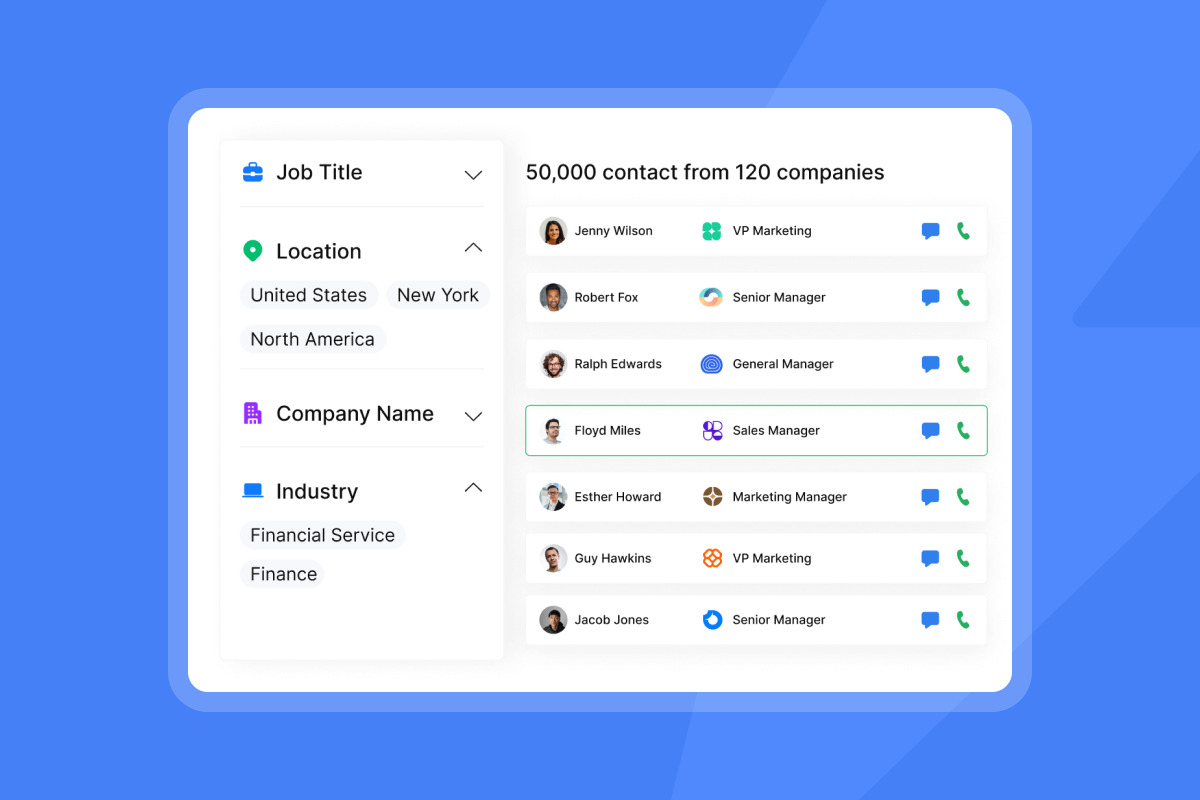
If you want in‑product data, the SuperSearch module lists a 450M+ B2B lead database, waterfall work email enrichment with 5+ providers, and lookalike filters on the pricing page, along with plan eligibility.
Efficient integration and team collaboration
- CRM integrations. Confirm field mapping, dedupe rules, and object coverage.
- Workspaces and roles. Standardize templates, suppression lists, and QA reviews.
- Unified inbox. Centralize replies with audit trails for team review.
Browse supported connections in the integrations collection, which covers Zapier, webhooks, and API. For deeper HubSpot and Salesforce sync, Instantly documents a partner approach through OutboundSync, which handles bidirectional sync patterns.
Measuring success: Reporting and analytics
- Reply and meeting rates. Track reply rate, meeting conversion, and sourced pipeline.
- A/Z testing. Test multiple variants at once to get signal faster.
- Client‑level rollups. Report by workspace for clean client-facing dashboards.
Ensuring deliverability and protecting sender reputation
- Warmup and health checks. Warm domains and inboxes to build trust signals.
- Placement testing. Run seed‑list placement tests and fix issues before scaling.
- Blacklist monitoring. Catch IP or domain listings early and remediate.
- SpamAssassin content checks. Identify likely content triggers before you hit send.
Instantly offers unlimited and automated placement tests with blacklist and content checks, so you can validate before scaling. For warmup scale, Instantly states its network includes over 4,200,000 real email accounts and recommends ongoing warmup. For another perspective on avoiding spam, see the Instantly tutorial How to avoid cold emails going to spam fast, which demonstrates common pitfalls.
AI capabilities and ethical use
- AI Copilot. Target segments, write sequences, and summarize analytics with oversight. See the AI Copilot page for an overview.
- AI reply handling. Triage and answer common replies with human‑in‑the‑loop or Autopilot. Replies are sent in under five minutes and cost 5 credits, according to the AI Reply Agent docs, which also cover Autopilot versus Review modes.
- Controls. Use role approvals, credit limits, and logging to keep outputs on brand.
Scaling capabilities for agencies
- Unlimited email accounts. Flat‑fee pricing avoids per‑seat penalties as you add inboxes.
- Throughput controls. Use send windows, pacing, A/Z testing, and automatic pauses on health dips.
- Client isolation. Give each client a workspace and suppression lists to avoid overlap.
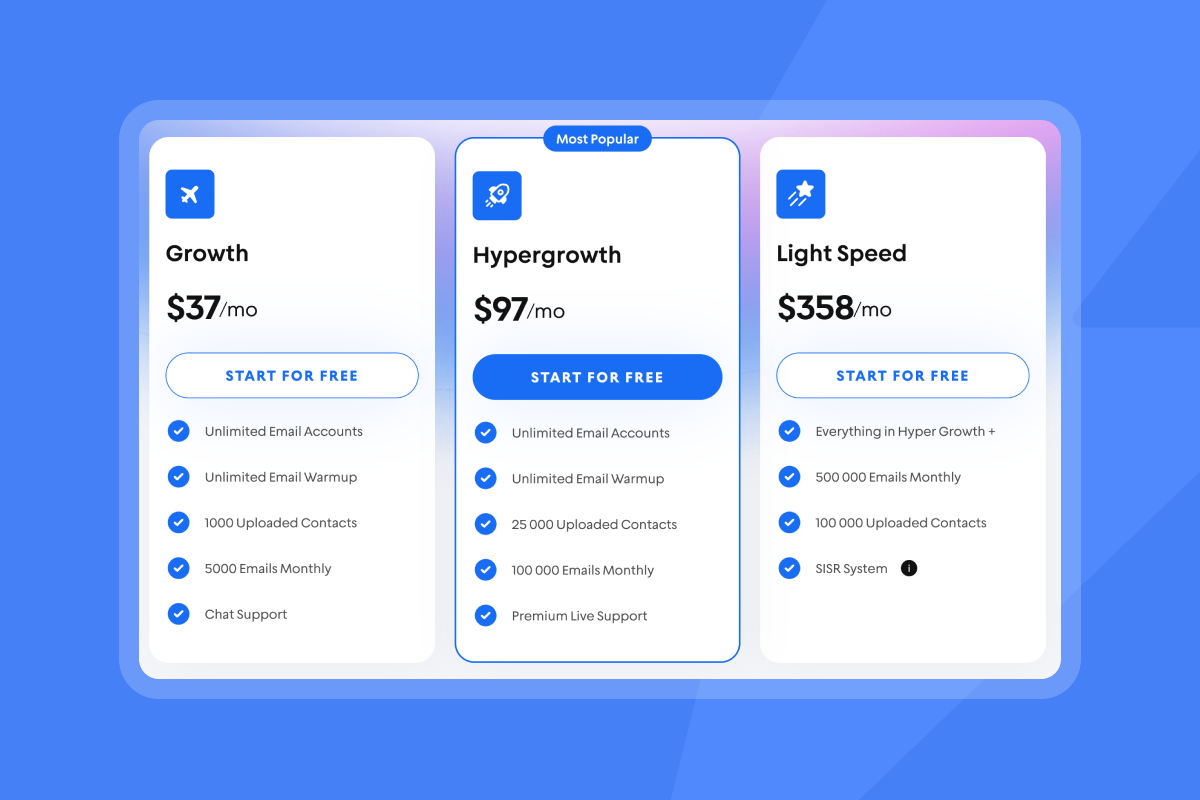
The pricing grid calls out unlimited email accounts across outreach tiers and SISR on Light Speed for private server and IP rotation at scale, detailed on Instantly’s pricing page, including current tiers and limits.
Evaluating lookalike tools: Critical considerations for your business
Start with outcomes and constraints. You want predictable meetings per month at a cost your finance team can defend, without risking domain health or creating admin overhead.
Comparison table
| Criteria | Instantly | Typical market tools |
|---|---|---|
| Data quality | 450M+ database, waterfall enrichment, lookalikes | Single-source data or add-on enrichment |
| Pricing model | Flat fee with unlimited senders, transparent credits for data and AI | Per seat plus add-ons |
| Deliverability | Warmup (4.2M network), inbox placement tests, blacklist and content checks, SISR on higher plan | Basic or third-party warmup and testing |
| Team and integrations | Workspaces, unified inbox, CRM via native and partner routes | Varies by vendor and tier |
Pricing and ROI
- Common models. Per seat feels simple until you scale across clients and inboxes. Flat monthly pricing plus credits for data and AI keeps cost predictable as you add senders.
- Show the math. Cost per meeting = total monthly platform and data cost divided by meetings booked. If you spend 197 dollars on data credits and 97 dollars on outreach and book 25 meetings, cost per meeting is 11.76 dollars before labor. Add labor and overhead, then compare to ACV and expected close rates.
- Ramp plans. Start at low throughput, validate bounces and placement, then step up. This avoids domain damage that can sideline a month of pipeline.
- Terms. Favor transparent pricing and month‑to‑month until your model is proven. Plan for add‑ons when reply volume or reporting needs increase.
Security and privacy considerations
- Data processing. Review the Data Processing Addendum, including prohibited data categories and sub‑processor notice terms in the Instantly DPA, which governs processing and responsibilities.
- Sub‑processors. Ask for the current roster and change notification process on the sub‑processors page, updated as vendors change.
- Consent posture. Align with counsel on regional requirements for B2B outreach and opt‑outs. The FTC CAN‑SPAM guide covers sender identification, unsubscribe handling, and enforcement.
- Data lineage. Ask how often data is re‑verified and what sources are used for enrichment.
Checklist: evaluation criteria for lookalike tools
- Data quality. Multi‑source enrichment, verification, dedupe, suppression.
- Deliverability. Warmup, placement tests, blacklist monitoring, content checks, safe ramp controls.
- Pricing clarity. Flat fee vs per seat, credit math, overage behavior, cancellation policy.
- Integrations. CRM mapping, bidirectional options, webhooks, API, partner routes.
- Team controls. Roles, workspaces, templates, approval flows, audit logs.
- AI safeguards. Human review modes, credit caps, logging, reply handling rules.
- Support. Live chat availability, response times, and help center depth.
Real‑world impact: demonstrated outcomes and success stories
A Verified User on G2 said:
It was very straight forward to warm up my email addresses/inboxes as well as start my first campaign!
According to Shaiel P. on G2,
The platform is super intuitive, easy to set up, and makes it simple to manage multiple domains and inboxes at scale. Deliverability is great and the analytics give us exactly what we need to optimize campaigns quickly.
James M. on G2 added:
Deliverability has been excellent, and the automation features save a ton of time.
On Trustpilot, Alexander Johansen commented,
Instantly has become my go‑to tool for cold outreach. It’s simple to use, packed with all the features I actually need, and it just works.
Powering your pipeline with precision
Lookalike company search is a repeatable way to expand your ICP, keep data quality high, and scale outreach safely. When discovery, data, AI, and deliverability run in one system, you reduce bounce risk, speed testing, and give finance clean numbers on cost per meeting. Flat‑fee unlimited senders protect margins as you add client accounts.
Start a free trial of Instantly to generate lookalike leads and scale client pipelines.
More resources:
- Watch a full Instantly.ai tutorial (2025) for a step‑by‑step walkthrough. You can also watch an Instantly AI full tutorial or a creator’s review in LeadSwift’s Instantly.ai full tutorial & review to see common setup patterns.
- For a tactical walkthrough on staying out of spam, watch the Instantly channel’s Ultimate guide to cold email deliverability in 2025, which shows placement testing and quick fixes.
FAQs
- How big should my first lookalike list be?
500 to 2,000 verified contacts per segment. That supports valid A/Z tests while keeping list hygiene tight. - What are the top deliverability checks before scaling?
Warm inboxes 2 to 4 weeks, confirm SPF, DKIM, DMARC, run automated inbox placement tests, keep bounces at or below 1 percent, and throttle sends if placement dips. See the Inbox Placement help guide for details on automated checks. - Does Instantly offer lookalike filtering inside the database?
Yes. SuperSearch lists 13 filters including keywords and lookalikes on the pricing page, along with current plan coverage. - Can AI safely handle replies?
Yes. You can require human‑in‑the‑loop or use Autopilot, and replies go out in under five minutes. Costs are 5 credits per AI reply, explained in the AI Reply Agent docs, including mode behavior. - Does Instantly integrate with my CRM?
Yes. There are help guides for HubSpot and Salesforce via a partner route, plus webhooks, Zapier, and API. Review the integrations collection and the OutboundSync article for setup options. - What is Instantly’s stance on privacy and sub‑processors?
Instantly publishes a Data Processing Addendum and a public list of sub‑processors. Review both on the DPA page and the sub‑processors page, then share with your security team.
Key terms
- Lookalike companies: Firms that mirror your best customers by measurable traits.
- ICP: Ideal Customer Profile. The segment most likely to buy and renew.
- Waterfall enrichment: Using multiple data providers to improve coverage and accuracy.
- Deliverability: Likelihood emails reach the primary inbox.
- Sender reputation: Trust signals mailbox providers assign to your domain and IP.
- Warmup: Gradual sends that build a positive sending history.
- List hygiene: Ongoing verification and removal of risky contacts.
- Verified contacts: Emails confirmed deliverable by a verifier.
- Send windows: Time ranges for safe, consistent sending.
- Throughput: Total sends across connected inboxes per time unit.


