


TL;DR: Sales Leaders can significantly increase follow-up email conversion rates by implementing data-driven personalization and strategic CTAs. Effective personalization goes beyond basic merge tags, requiring deep prospect insights, call-specific references, and value-aligned messaging. Strategic CTAs are clear, low-friction, and matched to the buyer's stage. Instantly provides the integrated tools from lead data in SuperSearch to AI Reply Agent and deliverability systems, to execute personalized follow-up strategies at scale, ensuring consistent inbox placement and measurable results.
Updated December o3, 2025
Your sales team just wrapped a promising call. The prospect engaged, asked good questions, and seemed interested. What happens next often determines whether that conversation becomes a closed deal or another lost opportunity. For most sales teams, the follow-up is where deals die. Generic templates that could have been sent to anyone. Vague next steps. CTAs that demand too much commitment.
Sales Leaders need follow-up emails that consistently convert, not just get opened.
Why do personalized follow-up emails matter for sales leaders?
Personalized follow-up emails directly impact your pipeline and revenue in ways that generic templates never can. When you customize messages to each prospect's specific situation, you demonstrate understanding, build trust, and create urgency around the next conversation.
The numbers tell the story:
- Reply rates: Email personalization strategies consistently show significantly improved click-through rates compared to generic blasts.
- Engagement metrics: Personalized email marketing reveals that tailored content increases engagement by creating individual connections that feel like one-on-one conversations.
- Sender reputation: Low engagement from generic emails signals mailbox providers to route future messages toward spam folders, even when your technical setup is correct.
The cost of generic follow-ups
Generic follow-ups waste the momentum you built during the sales call. When a prospect receives a templated message that could have been sent to anyone, it signals that you don't truly understand their business or care about their specific challenges.
Your sender reputation takes a direct hit when prospects ignore or delete your emails. Mailbox providers track engagement signals continuously. Low interaction rates from generic campaigns can push future messages toward spam folders, undermining even your most carefully personalized efforts.
The impact on pipeline and revenue
Personalized follow-ups accelerate deals through your pipeline by keeping conversations relevant and timely. When you reference specific pain points discussed on the call and tie them to concrete solutions, prospects see immediate value in continuing the dialogue.
The correlation between email engagement and deal size is well-documented. Leads that engage with personalized follow-up sequences convert at higher rates and often close larger deals because the personalization demonstrates a deeper understanding of their needs.
For Sales Leaders managing teams, personalization also creates a repeatable system. When reps follow a structured approach to gathering data and customizing messages, you get consistent results across the team rather than relying on individual creativity or luck.
How to gather data for deep email personalization
Advanced personalization requires going beyond first name and company name. You need rich, verified data that reveals what matters to each prospect and lets you craft messages that resonate with their specific situation.
Beyond basic merge tags: What data points truly matter?
Effective personalization draws on multiple data layers:
- Firmographic data: Industry, company size, revenue range, growth stage
- Technographic details: Current tools, tech stack, integration needs
- Trigger events: Funding rounds, leadership changes, product launches, expansion announcements
- Behavioral signals: Content views, site visits, call questions, objections raised
Combining contextual external data with behavioral insights creates the most compelling messages. For example, referencing both a recent company announcement and a specific concern the prospect mentioned during your call creates a bridge between their broader business context and your solution.
Custom variables let you capture these nuanced data points. Create columns in your lead list for fields like {{PainPoint}}, {{CurrentTool}}, {{CallDate}}, or {{SpecificGoal}} so you can inject highly relevant details into every message.
| Element | Basic Personalization | Advanced Personalization |
|---|---|---|
| Data points | First name, company name | Firmographics, technographics, behavioral data, call notes, pain points, trigger events |
| Effort level | Low (automated merge) | Medium (requires data gathering and analysis) |
| Impact on reply rate | 2-3% baseline | 5-8% when executed well |
| Example | "Hi {{firstName}}, hope you're well" | "Thanks for walking me through your 15-hour weekly lead scoring process on Tuesday" |
Using Instantly SuperSearch for enriched data
Instantly's SuperSearch provides access to over 450 million B2B contacts with deep enrichment that goes far beyond basic contact information. The platform enriches contacts with AI to provide context including work email, job title, company details, location, LinkedIn profile, contact summary, headline, sub-industry, company size, description, recent news, and funding information.
This enrichment capability means you can build highly segmented lead lists using advanced filters. Target prospects by specific technologies they use, recent funding events, company growth signals, or industry-specific triggers. For instance, if you sell integration tools, you can filter for companies using specific CRM platforms and personalize your message around those integrations.
The AI enrichment in SuperSearch can generate custom content based on prospect data. As detailed in Instantly's AI-powered personalization guide, you can create prompts that use company context to write tailored outreach, such as generating company-specific compliments or identifying how your solution addresses their tech stack challenges.
Watch how to use SuperSearch to generate qualified leads on demand:
Integrating with CRM and other tools
Your CRM contains conversation history, opportunity stage, and interaction timeline data that should inform every follow-up. Instantly integrates with major CRMs like HubSpot and Salesforce, allowing you to sync prospect data and maintain clean handoffs between outreach and your sales pipeline.
CRM integration ensures that personalization draws on the full context of your relationship with each prospect. When a rep can see previous email exchanges, call notes, and stakeholder involvement, they can craft follow-ups that acknowledge the entire journey rather than treating each message as isolated.
API and webhook capabilities let you build custom workflows. For example, you can trigger personalized follow-up sequences automatically when a prospect takes a specific action, such as viewing a proposal or attending a webinar.
For a comprehensive walkthrough of setting up these integrations, watch this tutorial on how to connect HubSpot and Salesforce to Instantly in just a few minutes:
What are advanced personalization techniques for follow-up emails?
Moving beyond basic personalization requires strategic approaches that demonstrate genuine understanding and create specific value for each prospect. These techniques transform generic follow-ups into compelling, conversion-driving messages.
1. Reference the sales call
Start your follow-up by anchoring to the specific conversation you just had. Mention a particular challenge the prospect described, a question they asked, or a goal they shared.
Build your opening this way:
- Include the date and time: "Following up on our Tuesday morning conversation..."
- Quote their words: "You mentioned the manual process is consuming about 15 hours per week..."
- Tie to specific outcomes: Call-specific details build immediate credibility and show you were actively listening during the conversation.
For example: "Thanks for walking me through how your team currently handles lead scoring. I know you mentioned the manual process is consuming about 15 hours per week from your SDR manager."
This immediate context proves you were listening and positions your message as a continuation of the dialogue rather than automated outreach.
2. Value-driven personalization
Frame your personalization around the specific value you can deliver to this prospect's situation. Connect their pain point directly to a measurable outcome they can achieve.
Compare these two approaches:
- Generic approach: "I know lead quality is important to your team."
- Value-driven approach: "Based on your mention that 40% of your current leads are unqualified, implementing automated scoring could recover those 6 SDR hours per day you described and redirect them toward your highest-potential prospects."
This second approach uses their data, your conversation, and specific outcomes. Research on email personalization impact shows that value-aligned personalization drives substantially higher engagement because it shifts the focus from your product to their results.
3. Problem-solution framing
Structure your follow-up around the problem-solution narrative that emerged during your call. Use this four-step framework:
- Problem acknowledgment: "You mentioned that coordinating across three regional sales teams creates reporting delays and inconsistent data."
- Impact validation: "That 48-hour lag in pipeline visibility makes it hard to forecast accurately or identify at-risk deals early enough."
- Solution connection: "The unified dashboard we discussed consolidates all regional data in real-time, giving you same-day visibility across all teams."
- Next step: "I'd like to show you how two other distributed sales orgs set this up and cut their reporting cycle from two days to two hours."
This framework works because it follows the natural logic of your conversation while moving toward action.
4. Social proof and relevant case studies
Reference case studies or customer examples that closely match the prospect's situation. The more specific the match, the more compelling the social proof.
Relevant social proof significantly increases conversion rates because it reduces perceived risk and demonstrates proven results in familiar contexts.
Avoid generic claims and get specific:
- Weak example: "Many companies see great results with our platform."
- Strong example: "I mentioned on our call that we work with three other SaaS companies in the HR tech space with similar team sizes to yours. One reduced their sales cycle by 22 days after implementing the workflow automation we discussed. I can share their specific approach if it would be helpful."
"Instantly has been a game changer for my vertical in merchant service where email marketing is key. I've converted several leads into deals using Instantly and it's paid for itself 5x." - Trustpilot Review
5. Leveraging spin syntax for unique messages
Spin syntax creates variations of your message to ensure each email is unique while maintaining your core personalization strategy. This technique helps deliverability by preventing emails from appearing identical to spam filters.
In Instantly, you can use spin syntax to vary phrases, sentences, or even entire paragraphs while keeping your personalized variables consistent. This is especially valuable when sending follow-ups to prospects in similar roles or industries.
For example: {Hi|Hello|Hey} {{firstName}}, {Following up on|Continuing} our {discussion|conversation|call} about {{PainPoint}}.
Instantly's personalized email platform provides sophisticated spin syntax capabilities that maintain a natural, conversational tone while ensuring each message is unique for optimal deliverability.
Watch Instantly's AI personalization workflow for a detailed demonstration of combining custom variables with spin syntax.
How to craft compelling CTAs that convert
Your Call-to-Action determines whether your personalized follow-up generates a reply or gets filed away. Strategic CTAs are specific, low-friction, and aligned with where the prospect is in their buying journey.
Clarity and single focus
Each follow-up email should have one clear CTA. Multiple asks create decision paralysis and reduce conversion rates. Focus on the single next step that makes sense based on your previous conversation.
Compare these approaches:
- Weak: "Let me know if you'd like to schedule a demo, receive more information, or discuss pricing."
- Strong: "Would Tuesday or Wednesday afternoon work for a 15-minute walkthrough of the automated scoring setup we discussed?"
The strong version is specific about what will happen, how long it will take, and offers concrete options. Specificity significantly increases conversion rates by removing ambiguity and making the next step crystal clear.
Low-friction asks
Minimize the effort required from your prospect. Instead of asking them to suggest times, offer specific slots. Instead of requesting they "reach out when ready," provide a direct scheduling link.
Structure your CTAs this way:
- High-friction example: "Let me know what times work for you next week and I'll send a calendar invite."
- Low-friction example: "Grab a time that works for you: [scheduling link]. I've opened up Tuesday through Thursday afternoons specifically for these conversations."
Instantly's AI Reply Agent can handle reply management efficiently, but reducing initial friction still matters. The easier you make the next step, the more likely prospects are to take it.
Value-aligned CTAs
Connect your CTA directly to value the prospect will receive by taking action. This isn't about your product features—it's about what they'll learn, gain, or be able to do.
Compare these two CTAs:
- Feature-focused: "Schedule a demo to see our platform."
- Value-aligned: "Let's schedule 20 minutes for me to show you the exact workflow that helped [similar company] reduce their lead response time from 4 hours to 15 minutes."
This approach works because it frames the meeting itself as valuable, not just as a step toward an eventual purchase. The correlation between value-aligned CTAs and conversion rates is substantial.
Tiered CTAs for different stages
Not every prospect is ready for the same level of commitment. Match your CTA to their buying stage:
- Early stage: "I can send you the 2-page case study showing how [similar company] addressed the [specific challenge] you mentioned. Would that be helpful?"
- Mid stage: "Based on our discussion about your Q1 goals, would it make sense to see how the reporting dashboard addresses the visibility issues you described?"
- Late stage: "You mentioned wanting to move forward if we could accommodate your team structure. Let's schedule 30 minutes to walk through the setup for your specific use case."
| Stage | Prospect Readiness | Example CTA | Friction Level |
|---|---|---|---|
| Early | Information gathering | "I can send the 2-page case study on [specific challenge]. Helpful?" | Very low |
| Mid | Evaluating solutions | "Would Tuesday or Wednesday work for a 15-minute walkthrough?" | Low to medium |
| Late | Ready to move forward | "Let's schedule 30 minutes to walk through setup for your team structure" | Medium |
Creating tiered CTAs lets you maintain momentum without pushing prospects faster than they're ready to move. As detailed in follow-up email best practices, matching your ask to the prospect's readiness significantly improves response rates.
Using Instantly's unified inbox for efficient reply handling
When your personalized follow-ups generate replies, you need a system to manage those conversations efficiently. Instantly's Unibox centralizes all replies in one interface, allowing your team to respond quickly without switching between multiple email clients.
The AI Reply Agent can automatically handle lead replies in under 5 minutes, either in autopilot mode or with human-in-the-loop review. This ensures consistent, timely responses even when your team is managing multiple campaigns.
"I love that Instantly just works and does the basics exceptionally well, focusing on the 'simple things that actually matter'. The interface is intuitive, making the setup process smooth and straightforward." - G2 Review
For teams managing high volumes of personalized outreach, efficient reply handling is critical. Watch how to use AI for inbox management to see the full workflow in action.
How Instantly helps scale personalized follow-up emails
Executing personalized follow-ups at scale requires more than good intentions. You need a platform that combines data, deliverability, automation, and analytics to make personalization systematic rather than heroic.
Unlimited accounts and built-in warmup
Instantly's flat-fee pricing model includes unlimited email accounts and built-in warmup across all plans. This removes the per-seat cost barrier that prevents many teams from scaling their personalized outreach.
The platform's deliverability network of 4.2 million accounts provides the foundation for email warmup, gradually building sender reputation through authentic engagement. This automated warmup process is critical for ensuring your personalized messages actually reach the primary inbox.
The Light Speed plan adds SISR (Server & IP Sharding & Rotation) with dedicated and private IP pools, further protecting deliverability as you scale. Inbox Placement tests run automatically to monitor where your emails land across major providers like Gmail, Outlook, and Yahoo.
"I like that instantly can handle large scale email campaigns without worrying about deliverability. The automation for inbox rotation, warm up and sending limits makes outreach very smooth and saves a lot of manual work." - G2 Review
Automated sequences with A/Z testing
Create multi-step follow-up sequences that automatically adjust based on prospect behavior. If someone opens but doesn't reply, they enter a different path than someone who doesn't engage at all. This behavioral branching maintains relevance throughout the sequence.
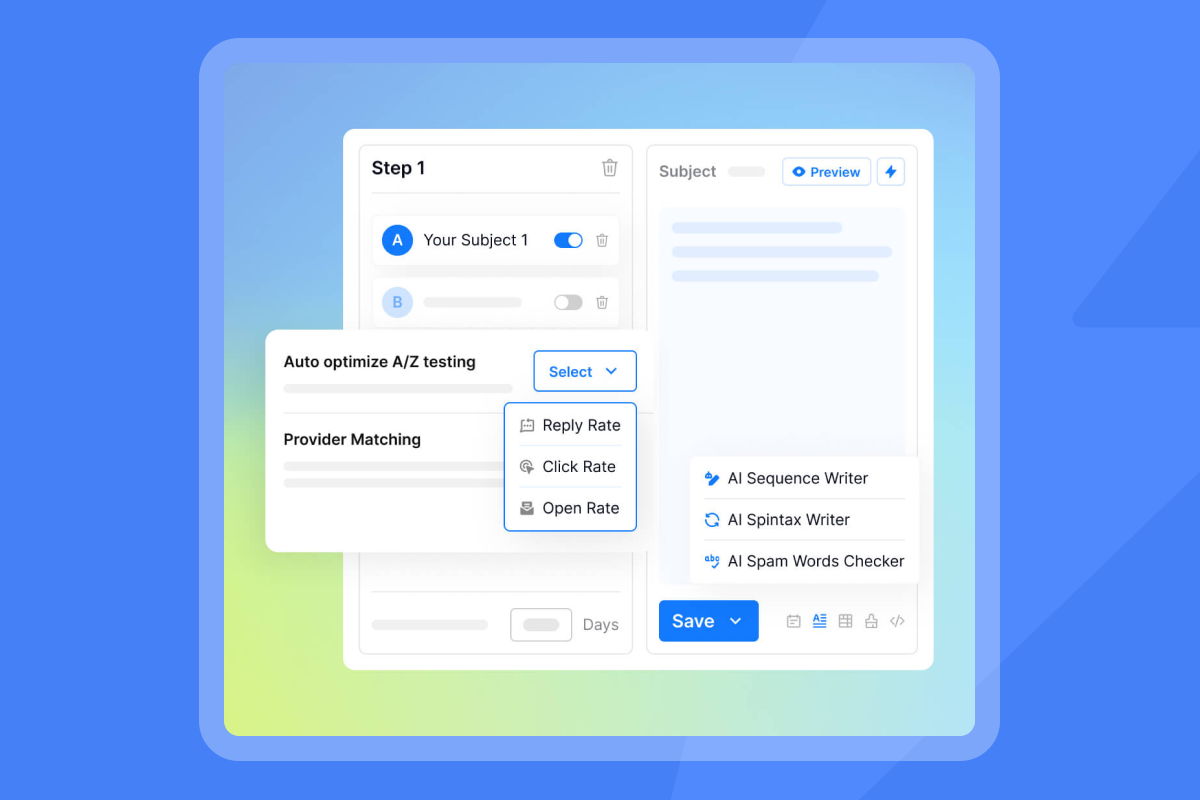
A/Z testing with unlimited variations lets you continuously optimize your personalized approaches. Test subject lines, opening sentences, value propositions, or CTAs across 5, 10, or 20 variations to identify what drives 2x or 3x higher reply rates with each segment.
Instantly's AI can automatically optimize campaigns based on test results, scaling the best-performing variations. This data-driven iteration ensures your personalization strategies improve over time rather than remaining static.
AI Reply Agent for consistent engagement
The AI Reply Agent handles replies automatically, maintaining consistent engagement even as volume scales. Configure it to run in autopilot mode or with human approval, depending on your quality standards and compliance requirements.
The agent processes replies in under 5 minutes, ensuring prospects receive timely responses. It integrates with Slack for easy review and approval workflows, allowing sales leaders to maintain oversight without creating bottlenecks.
This capability is particularly valuable for managing multiple campaigns across different segments. Your personalized follow-ups can generate high reply volumes, and the AI Reply Agent ensures those conversations continue productively without overwhelming your team.
Watch Instantly's AI Reply Agent in action to see how it handles real prospect conversations.
Transparent analytics and reporting
Measure what matters. Instantly's analytics dashboard tracks inbox placement rates, reply rates, and conversion metrics rather than vanity metrics like opens that don't correlate with revenue.
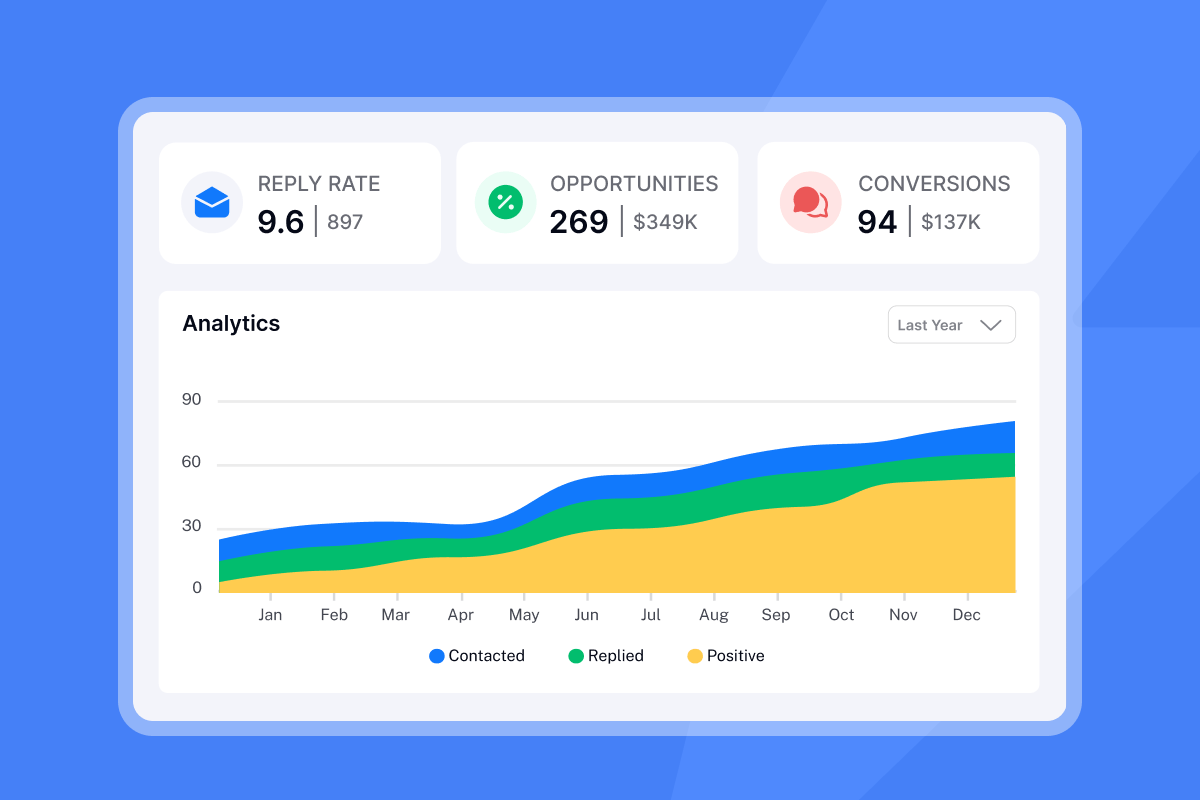
The platform monitors sender reputation, bounce rates, and spam complaint rates, giving you early warning of deliverability issues before they impact campaign performance. This proactive monitoring is essential when running personalized campaigns at scale.
Track performance by segment, sequence, and individual message to understand which personalization approaches drive the best results:
- Inbox placement: Aim for 95% or higher primary inbox placement
- Reply rates: Target 5-8% for well-executed personalization
- Meeting conversion: Track at least 1% of sends converting to meetings
- Bounce rates: Keep below 1% to protect sender reputation
Use these insights to refine your targeting, copy, and CTAs for continuous improvement.
Drive higher conversions with strategic follow-up personalization
Personalized follow-up emails move deals forward when they demonstrate genuine understanding, deliver specific value, and make the next step clear and easy. Sales Leaders who master this approach consistently see higher reply rates, shorter sales cycles, and improved conversion rates.
Treat personalization as a system, not a one-off effort. Gather rich prospect data through tools like SuperSearch. Craft messages that reference specific conversations and pain points from your sales calls. Design CTAs that match the buyer's stage and offer clear, low-friction next steps. Continuously test and refine your approach based on results from A/Z testing and analytics.
Ready to transform your sales follow-ups into a conversion engine? Start with Instantly and implement data-driven personalization and high-impact CTAs with a platform built for scale and deliverability.
FAQs
What if a prospect doesn't reply to my personalized follow-up?
If a prospect doesn't reply after 3 to 5 personalized follow-ups over 2 to 3 weeks, pause outreach and try a different channel or wait 60 to 90 days before re-engaging. Non-response often means timing is wrong rather than lack of interest. Before stopping the sequence, send a "breakup email" that offers value without asking for anything and gives them an easy way to re-engage when ready. This final message often generates replies from prospects who were interested but overwhelmed. If still no response, move them to a longer-term nurture campaign with quarterly touchpoints.
How do I personalize follow-ups when selling to multiple stakeholders in the same account?
Map personalization by role: CFOs get ROI and cost-saving benefits, IT leaders receive technical integration details about your compatibility with their tech stack, and end-users see productivity improvements relevant to their daily workflows. Use Instantly's custom variables like {{StakeholderRole}} and {{SharedPainPoint}} to track interactions across the account. Reference other conversations strategically: "Following up on my discussion with your CFO about budget considerations." Coordinate sequences so stakeholders receive complementary messages that reinforce your value from their unique angle. If engagement varies across the team, identify your champion (usually whoever engaged first) and personalize deeper around their ability to influence the buying committee and drive internal consensus.
How many follow-up emails should I send after a sales call?
Send 3 to 5 follow-up emails over 2 to 3 weeks after a sales call. The first follow-up should go within 24 hours, referencing specific conversation points. Space subsequent messages 3 to 5 days apart, varying your value proposition and CTA with each touch. Research on automated follow-up strategy shows that multi-step sequences consistently outperform single follow-ups, with the fourth or fifth touch often generating replies from prospects who needed more time. Stop the sequence if the prospect requests no further contact or after you've provided value without response for 3 weeks.
What is the best time to send a follow-up email?
Send your first follow-up within 24 hours of your sales call, preferably during the prospect's working hours between 8:30 to 10:30 a.m. in their local time zone. Research on email send windows shows Tuesday through Thursday mornings generate the highest reply rates for B2B sales follow-ups. Avoid Monday mornings when inboxes are flooded and Friday afternoons when attention shifts to the weekend. Use Instantly's automated scheduling to optimize send times based on recipient time zones and engagement patterns.
How can I track the effectiveness of my follow-up emails?
Track inbox placement rate, reply rate, and meeting booking rate rather than open rates. Aim for 95% inbox placement, 5% or higher reply rates, and at least 1% meeting conversion. Instantly's analytics tracks these metrics in real-time, showing performance by segment, sequence step, and personalization approach. Monitor bounce rates (keep below 1%), spam complaint rates, and sender reputation scores as leading indicators. Set up A/B tests to compare different personalization strategies and CTAs. For example, if Sequence A gets 7% replies and Sequence B gets 4%, scale A and test variations of B to identify winning patterns.


