


TL;DR: Per‑user, flat‑fee, and usage‑based models shift costs in different ways. Your real number is total cost of ownership (TCO), not the price you see on the pricing page. Budget for onboarding, integrations, data, AI credits, and deliverability tooling to keep pipeline and cash predictable.
Updated October 22, 2025
If you own revenue, two things matter most with outbound tools: Do emails land in the primary inbox and can you predict spend as you scale? This guide compares pricing models, exposes hidden costs, and shows where the real TCO lives so you can choose the best value for your team size and growth targets.
- For agencies and lean teams, flat‑fee tools with unlimited inboxes protect margins as you add domains and clients. Instantly includes unlimited senders and warmup on every Outreach tier, plus automated inbox placement tests and a 450M+ lead database.
- For orgs that need multichannel governance, training centers and have flexible budget ($15,000+) tolerance, per‑user suites like Outreach and Salesloft fit. Expect annual contracts, onboarding fees, and paid add‑ons.
- Keep delivery safe. Warm new domains and cap at 30 emails per inbox per day during early ramp. Scale by adding inboxes, not by spiking volume on a single account.
Understanding sales engagement pricing models
You will see three models, sometimes mixed. Each affects TCO differently.
Per‑user pricing: scalability and cost per rep
What it is: Price grows linearly with seats. Often annual‑only with minimums.
Best for: Enterprise teams that need role hierarchies, audit, call QA, and centralized governance.
Watch for:
- Implementation fees in year one. Outreach implementations typically range from $1,000 to 8,000 based on scope.
- Add‑ons for dialers, advanced analytics, or AI packages.
- Admin seats priced like full users.
Market signal: Third‑party sources place Outreach “Standard” around 100 - 160 per user per month on annual terms.
Flat‑fee pricing: predictability for agencies and high volume
- What it is: Fixed monthly price. No per‑seat penalties.
- Best for: Agencies, founders, and lean sales teams that scale with more domains and inboxes.
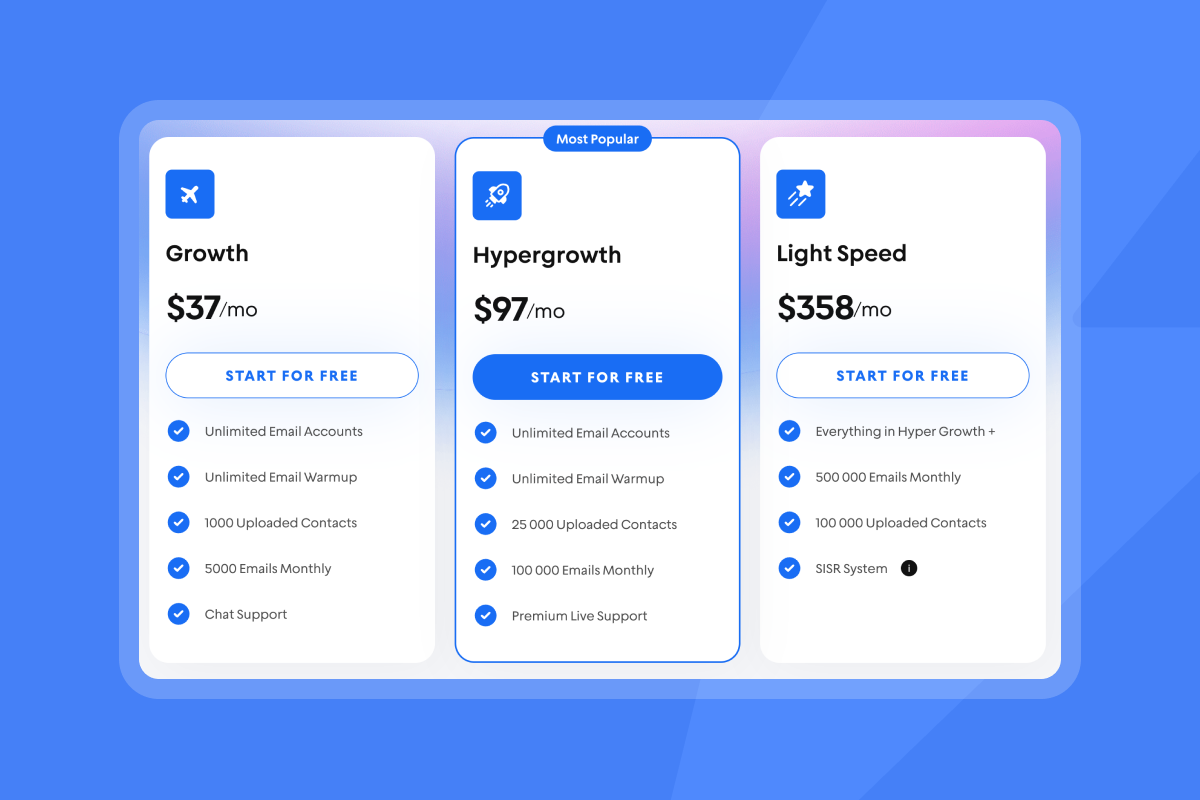
- Example: Instantly Outreach plans include unlimited email accounts and unlimited warmup on all tiers.
Watch for:
- Deliverability guardrails: Require warmup, placement testing, bounce detection, and pause rules.
- Limits and add‑ons: Confirm uploaded contacts and monthly send caps.
Usage‑based pricing: credits and AI features
What it is: Pay for consumption such as data reveals, AI replies, and exports.
Best for: Teams with spiky usage or data‑heavy workflows.
Watch for:
- Credit overages and breakage: Unused credits may expire each cycle. Heavy usage can add thousands per year.
- Voice minutes: Some vendors sell calling as packages with per‑block overages. Model this in your TCO alongside credits and data usage.
Watch how Instantly's AI Copilot can write entire campaigns for you end to end:
Annual commitments versus monthly flexibility
- Annual often reduces list price 10 to 20 percent across SaaS, with less agility.
- Monthly protects cash and helps during testing or seasonal swings.
- Fit rule. If headcount and process are stable, annual can work. If you are still proving motion or client mix, stay monthly.
Total cost of ownership (TCO): beyond subscription fees
The monthly fee is the starting line. These costs and all the final add ons decide your real spend.
Unmasking hidden costs and add‑ons
- Implementation and onboarding: Enterprise rollouts often bill setup and training as a one‑time fee. Outreach implementations typically fall between $1,000 and 8,000.
- Feature add‑ons: Dialers, conversation intelligence, SSO, advanced analytics, and some AI features live behind higher tiers or extras. Ask for itemized quotes.
- Deliverability extras: If warmup and placement testing are not included, you will buy them separately or risk sender reputation.
Integration, training, and support costs
- CRM integration: Complex Salesforce or HubSpot mappings often require paid services or middleware, which commonly runs to thousands based on scope.
- Premium support: Dedicated CSMs, enterprise support, and custom training are paid packages for many suites. Model this in year‑one and renewal.
"I had the pleasure of working with Andrea from the Instantly support team, and I could not be more impressed. She was extremely professional, patient, and efficient in resolving my issue." - Jibin D. on G2
Instantly has a whole range of integrations supported which can be setup in a matter of minutes. See how Instantly's CRM helps you get more leads:
Deliverability tools and data hygiene
- Placement testing: Instantly includes automated Inbox placement tests in the product, so you can pause sends if inbox placement drops.
- Warmup at scale: Instantly has a deliverability network of 4.2M+ accounts powering warmup and engagement.
- Verification: Budget for list verification if your stack does not include verified contacts. Bounces above 1 percent risk domain health.
"Unlimited email inbox warmup is included with all the plans, and you get access to the Unibox at all plans too. This saves a ton of time." - Chinmay K. on G2
AI feature credits and usage limits
- Reply handling: Instantly AI Reply Agent auto‑responds in under 5 minutes and costs 5 Instantly credits per AI reply.
- Research and enrichment: SuperSearch credits cover verified emails and AI enrichment inside Instantly. Plans range from 1,500 to 200,000+ monthly credits.
"Simple and well‑designed UX, effective support from both humans and AI for small questions. Additionally, the AI is capable of entering campaign configurations and applying fixes, which is a huge time saver!" — guillaume n. on G2
TCO evaluation checklist
- Scope: Users, inboxes, countries, channels, CRM objects.
- Deliverability: Warmup, placement testing, domain health alerts, safe send windows, pause rules.
- Data: Verified contacts, enrichment depth, database scale, export rules.
- AI: Credit model, per‑task cost, review queues, human‑in‑the‑loop.
- Integrations: Native depth, middleware fees, webhooks, field mapping.
- Support: SLAs, CSM access, training, status page.
- Contracts: Term, price protections, seat minimums, add‑on pricing.
Leading platforms: a pricing comparison
Instantly: flat‑fee for unlimited scale
- Model: Flat‑fee Outreach tiers. Modular SuperSearch (leads), CRM, and Website Visitors.
- What is included: Unlimited email accounts and warmup on all Outreach tiers, automated inbox placement tests, AI Copilot and AI Reply Agent, and access to a 450M+ B2B lead database.
- Deliverability design: Private warmup and placement network of 4.2M+ accounts, plus SISR on Light Speed for server and IP sharding.
- Fit: Agencies and lean teams needing predictable cost per meeting without per‑seat penalties.
- See it in action: For a product walkthrough of warmup, inbox setup, and AI features, watch the Instantly AI full tutorial.
Enterprise‑grade offerings: Outreach and Salesloft
Model: Per‑user, often annual with seat minimums and onboarding packages.
Strengths: Multichannel breadth, enterprise governance, analytics, role hierarchies.
Cost patterns:
- Third‑party sources cite Outreach around $100 - 160 per user per month on annual terms.
- Note per‑user licensing plus professional services for onboarding will likely cost you extra.
- Many suites package global calling with included minutes and overage blocks that impact TCO.
Fit: RevOps‑led teams that need deep controls and standardized workflows across larger SDR orgs.
Choosing the right tool for your needs
The best value maps price to outcomes you can measure. Use these patterns.
For agency operators: scaling client campaigns
- Pick a flat‑fee core: Per‑seat pricing punishes growth when you add inboxes and client workspaces. Unlimited accounts with warmup protect margins.
- Make deliverability non‑negotiable: Require automated inbox placement tests and domain health alerts.
- Cap sends safely: Do not send more than 30 emails per inbox per day during early ramp. Raise throughput by adding inboxes across more warmed domains.
- Budget data and AI: If you prospect in‑app, estimate monthly credits for verified contacts and enrichment. SuperSearch starts small and scales to Hyper Credits for high volume.
- Track cost per meeting: Blend seats, credits, add‑ons, and domains into a cost‑per‑meeting target. Kill anything that cannot beat it.
"Instantly has transformed my outreach process. The platform is intuitive, has a ton of cool features and delivers great results." - Jon M. on G2
Example agency pod
- Outreach Hypergrowth 97 dollars + Hyper Credits 197 dollars + Hyper CRM 97 dollars ≈ 391 dollars per month. Add Website Visitors LightSpeed 397 dollars if you want visitor identification with Slack alerts.
For playbooks and real setups, see this step‑by‑step breakdown of scaling with Instantly in the Full Instantly tutorial 2025.
For startup founders: maximizing pipeline per dollar
- Prioritize predictable spend: Start with Outreach Growth 37 dollars, SuperSearch Growth 47 dollars, and add Growth CRM 47 dollars when reply volume justifies a unified inbox. Baseline ≈ 131 dollars per month.
- Protect domain health: Keep hard bounces at or below 1 percent with verified contacts and placement checks.
- Use AI where it saves hours: Copilot for campaign build and AI reply agent for triage trade credits for time and faster follow‑through.
- Run a safe ramp: Warm 30 days, then cap at 30 emails per inbox per day. Expand inbox count to grow throughput.
Unlimited email inbox warmup is included with all the plans, and you get access to the Unibox at all plans too. This saves a ton of time." - Chinmay K. on G2
New to the product. Watch this beginner‑friendly walkthrough: Instantly AI beginners guide.
For growth marketers: predictable costs for A/B testing
- Avoid per‑seat spread: If you run experiments across brands or markets, flat‑fee plus unlimited inboxes avoids headcount friction.
- Test fast, test safely: Two subject variants and two body variants. Use send windows and automatic pause rules if placement dips.
- Measure outcomes, not opens: Connect replies to meetings and pipeline. Validate CRM field mapping before campaigns.
- Set a credit budget: Track credits for AI personalization and reply handling, then compare to hours saved.
For sales leaders: budgeting and team standardization
- Standardize deliverability safeguards: Warmup, placement tests, bounce detection, and sequence governance keep reps in guardrails.
- Pick contracts that match RevOps: If you need SSO, advanced permissions, and call QA, enterprise suites make sense. If cold email is your core, flat‑fee and unlimited inboxes map better to throughput economics.
- Demand auditable analytics: Dashboards must reconcile with CRM meetings, SQLs, and revenue.
- Model TCO by quarter: Add onboarding, integrations, training, AI credits, data, and support. Include a contingency for mailbox suspensions and domain replacements.
Watch our tutorial on how to leverage Instantly to get more leads in 2025:
Bottom line
Pricing models change how costs behave. Per‑user fits enterprise control. Flat‑fee fits inbox‑driven scale. Usage‑based fits spiky work. Your TCO includes onboarding, integrations, credits, data, deliverability, and support. If cold email drives pipeline, unlimited inboxes with built‑in deliverability keep spend predictable and sender reputation healthy.
Compare your current stack against the TCO checklist. If you want predictable scale without per‑seat penalties, review Instantly plans and start a free trial now.
Related resources
- See plans and build your stack: Instantly pricing
- Validate inbox placement in minutes: Inbox placement
- Instantly's overview of the latest AI SDR & BDR tools
- Read: Instantly vs Apollo what real users say
- Pull verified leads from 450M+ records: SuperSearch overview
- Learn the pricing logic that protects margins: Instantly pricing explainer
- Product walkthrough: Instantly AI full tutorial
- Feature tour: Full Instantly.ai tutorial 2025
FAQ:
What is the average cost of sales engagement software?
Per-user suites typically range around $100 to $160 per user per month on annual terms, with additional costs for onboarding and add-ons. On the other hand, flat-fee tools are more affordable, with entry plans often starting under $50 per month without seat multipliers.
How do AI outreach platforms charge for credits?
They typically use a per-action model, where credits are consumed for tasks such as AI replies, enrichment, and verified emails. For example, Instantly’s AI reply agent charges 5 credits for each handled reply.
Are there hidden costs in email outreach tools?
Yes. These often include fees for onboarding, CRM integration, premium support, dialers, and AI modules. Outreach implementations can range from $1,000 to $8,000, and many suites also package calling with included minutes and additional overage charges.
How does per‑user pricing compare to flat‑fee models?
Per-user pricing scales with headcount and generally requires annual contracts. In contrast, flat-fee pricing keeps costs steady as you add inboxes and domains, making it especially suitable for agencies and high-volume senders.
What is a ramp plan and how does it affect costs?
A ramp plan is a controlled increase in daily sends that helps build a sender’s reputation. This approach prevents domain damage, suspended inboxes, and costly downtime. A safe ramp usually involves warming for 30 days and then capping at 30 emails per inbox per day.


