


Updated October 23, 2025
TL;DR: LinkedIn Sales Navigator identifies buyer intent through engagement signals like company page visits, content interactions, and website activity tracked by the LinkedIn Insight Tag. Sales Leaders can turn these signals into predictable pipeline by building intent-driven prospect lists, crafting personalized messaging, and executing campaigns through a reliable cold email engine. Instantly provides the unlimited accounts, deliverability network, and AI tools to scale these targeted campaigns without per-seat costs or deliverability crashes. Target 80%+ inbox placement, 5%+ reply rates, and track cost per meeting to validate ROI.
Are your reps spending hours prospecting, only to send generic emails that get ignored? The secret to hitting quota is not more outreach. It's smarter outreach, starting with buyer intent.
Sales Navigator surfaces prospects who are actively researching your solution category. But translating these signals into booked meetings requires a reliable system. This guide shows you how to identify buyer intent signals within LinkedIn Sales Navigator, then execute hyper-targeted cold email campaigns at scale with Instantly's deliverability-first platform.
Why buyer intent matters for Sales Leaders
The cost of untargeted prospecting
Untargeted cold email burns resources and damages sender reputation. When reps blast generic messages to cold lists, bounce rates climb, spam complaints rise, and domain health crashes. One bad quarter can blacklist your sending infrastructure for months.
The math is simple. If your team sends 10,000 emails per month at a 1% reply rate, you get 100 replies. Target high-intent prospects at 5% reply rate, and 2,000 sends yield the same 100 replies. You save 8,000 sends, reduce deliverability risk, and free up rep time for live conversations.
How intent data improves pipeline health
Intent data shifts prospecting from guesswork to signal-driven targeting. When you know a prospect visited your pricing page three times this week, your outreach becomes a timely follow-up instead of an interruption.
You'll see three immediate benefits.
- Reply rates improve because messaging aligns with the prospect's current research stage.
- Sales cycles shorten when you engage buyers who are already evaluating solutions.
- Pipeline quality increases because intent signals pre-qualify accounts before reps invest time.
Intent-driven prospecting also protects deliverability. Smaller, verified lists with higher engagement rates train mailbox providers that your emails are wanted. This creates a positive feedback loop where better targeting improves inbox placement, which drives more replies, which further improves sender reputation.
What is buyer intent data in LinkedIn Sales Navigator?
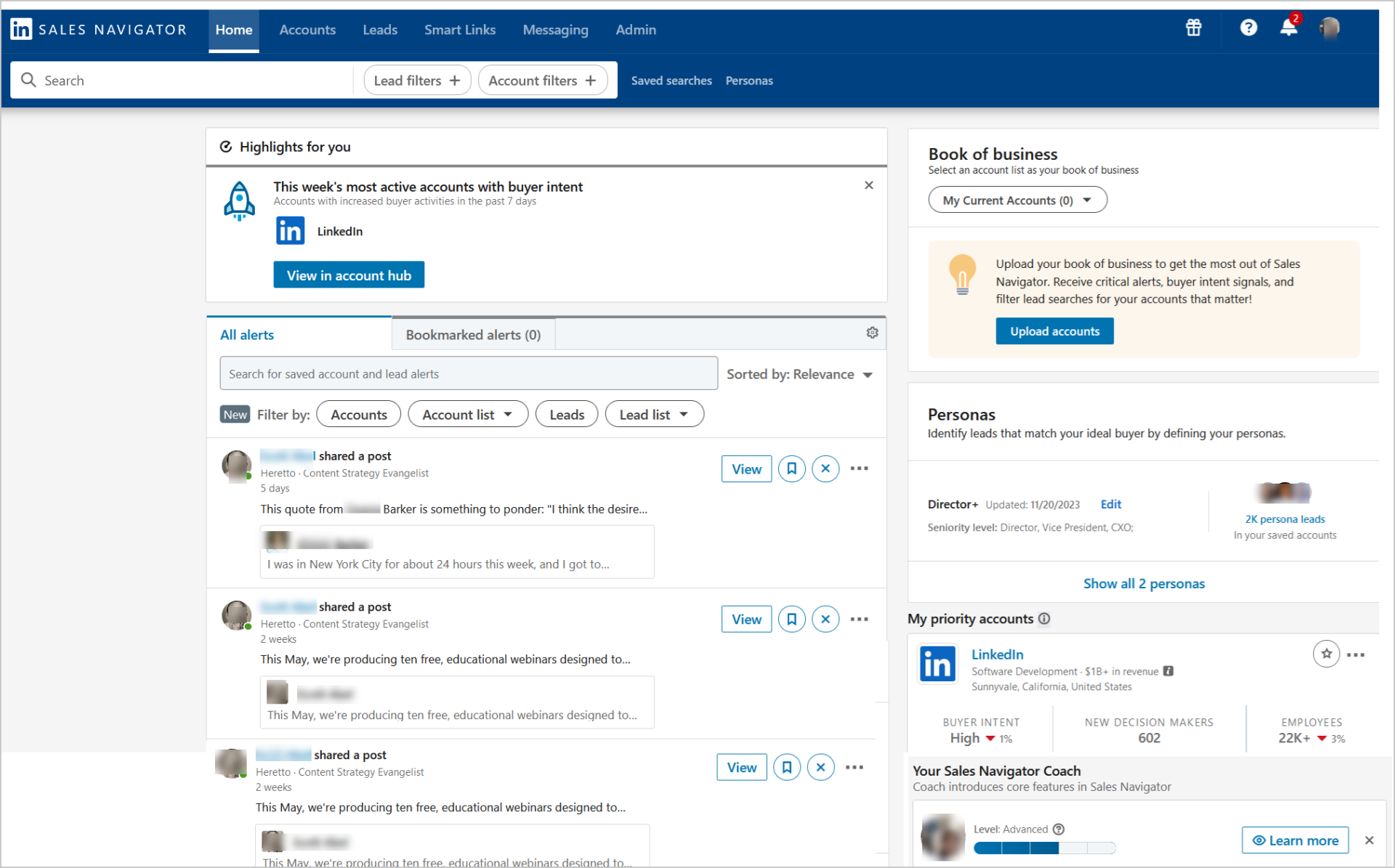
Buyer intent data within Sales Navigator refers to signals that indicate a prospect's readiness to make a purchase. These signals help sales professionals understand which individuals or accounts are actively engaging with their company, content, or product category.
Sales Navigator's buyer intent features identify specific individuals showing interest and indicate whether they are decision-makers. This provides insights into the entire buyer funnel, from LinkedIn ad engagement to InMail acceptance.
Understanding Sales Navigator's intent signals
- Sales Navigator identifies intent through first-party data within the LinkedIn ecosystem and, for advanced users, interactions outside LinkedIn through the LinkedIn Insight Tag. The platform tracks how accounts and individuals interact with your company across multiple touchpoints.
- The system monitors LinkedIn activity including profile views, engagement with company posts, connections with your employees, and direct messaging activity like InMail acceptances. Sales Navigator also captures engagement patterns like content interactions, clicks on product ads, and company page visits.
- For companies that install the LinkedIn Insight Tag on their corporate websites, Sales Navigator can detect website visits from LinkedIn members. This bridges off-LinkedIn behavior with LinkedIn profiles, providing deeper intent insights.
Key intent categories to monitor
LinkedIn classifies buyer intent into two main categories:
- Active buyer intent reflects prospects currently in the buying process, demonstrated by direct engagement with your content, products, or services.
- Passive buyer intent indicates prospects who might be using competitor products or experiencing pain points but are not yet actively searching for solutions.
Sales Navigator aggregates signals into an Account Buyer Interest score, often displayed as low, neutral, high, or very high. This scoring is based on over 180 insight signals, allowing sellers to prioritize accounts showing the strongest buying signals.
The platform also highlights "Product Category Intent" when prospects show interest in specific product categories based on their LinkedIn activity, such as visiting multiple product information pages in a concentrated timeframe.
How to identify high-value buyer intent signals
Setting up your Sales Navigator preferences
- Start by accessing your Sales Navigator account and navigating to the Account Hub. This dashboard highlights accounts showing buying signals and provides a buyer activity timeline. Configure your preferences to receive real-time alerts for significant buyer activities.
- Set up alerts for when prospects view your profile, interact with your content, or research your company. These notifications appear on the Sales Navigator homepage, in email notifications, and on the LinkedIn mobile app.
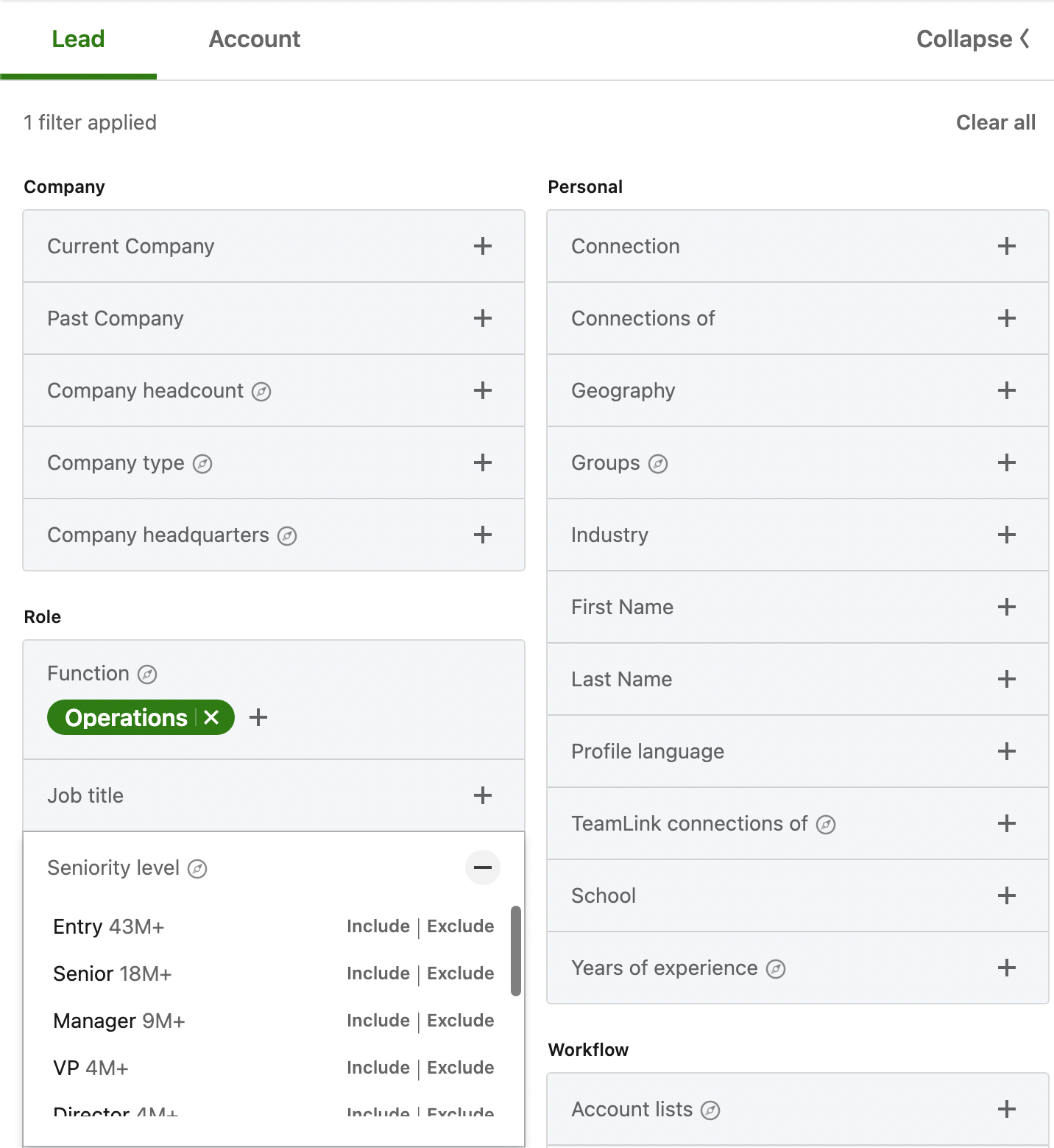
- Enable the buyer intent filter in your "Build a List" feature. This allows you to filter leads and accounts by intent level when building prospecting lists, streamlining your targeting process.
Tracking account and lead activity
The Account Dashboard shows which accounts are demonstrating intent and identifies both current and new accounts. The platform provides a graph illustrating distribution across various activities and highlights specific people who completed intent activities in the past 30 days.
Individual account pages display the buyer intent score and key factors affecting that score, such as InMail acceptance rates, company page engagement, and profile page views of your sales representatives. Monitor these pages weekly to spot trends and identify accounts moving from low to high intent.
Use the relationship intelligence features to identify decision-makers connected with your team, former coworkers from current or prior jobs, and prior customers associated with closed-won opportunities in your synced CRM.
Examples of buyer intent signals
- Strong buyer intent signals include frequent visits to your company profile, repeated engagement with your posts, or consistent interaction with multiple employees at your company. Direct actions like downloading whitepapers, attending webinars, requesting demos, or completing lead generation forms indicate high intent.
- Company-level signals matter too. When multiple stakeholders from the same account research similar topics or show coordinated engagement patterns, this suggests organizational buying intent rather than individual curiosity.
- Professional changes create intent windows. Job changes, promotions, or senior leadership transitions often trigger evaluation cycles. Track these alerts alongside engagement signals to identify optimal outreach timing.
"Instantly has completely transformed our email outreach. The platform is super intuitive, easy to set up, and makes it simple to manage multiple domains and inboxes at scale. Deliverability is great and the analytics give us exactly what we need to optimize campaigns quickly." - Shaiel P. on G2
Filtering for actionable insights
- Apply filters in Sales Navigator to focus on high and moderate buyer intent accounts. Combine intent filters with firmographic criteria like company size, industry, and growth alerts to build targeted lists.
- Prioritize accounts showing multiple intent signals over a compressed timeframe. An account that visited your website, engaged with three LinkedIn posts, and had two employees view your profile in the past week scores higher than an account with a single profile view last month.
- Export these filtered lists for outreach. Sales Navigator allows you to save leads and accounts, making it easy to track which prospects move from research to evaluation stages.
To extend your outreach beyond just LinkedIn use Instantly's connection feature in its CRM.
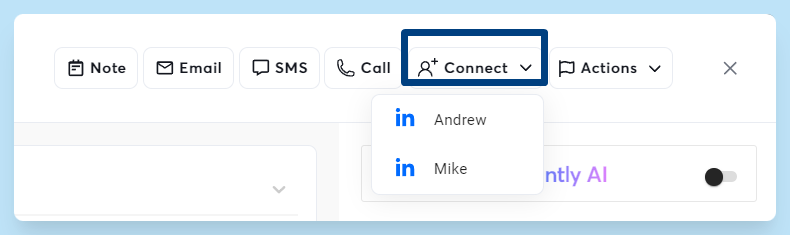
Also leverage all of our data integration to get enriched, verified leads for both email and Inmail campaigns.
Translating intent into hyper-targeted outreach strategies
Crafting personalized messaging based on intent
- Match your message to the specific intent signal. If a prospect downloaded your pricing guide, reference pricing in your subject line and open with a direct offer to discuss budget and implementation timeline. If they engaged with a thought leadership post, open by referencing that specific content and asking a related question.
- Avoid generic value propositions. Instead of "We help companies improve sales productivity," try "I noticed you visited our sales productivity dashboard page twice this week. Most teams in your industry see 20-30% faster rep ramp when they implement this approach. Can I show you how three similar companies structured their rollout?"
- Keep messages concise and question-driven. Aim for 50-80 words in your initial email. State the intent signal you observed, connect it to a specific outcome, and ask one clear question.
Building intent-driven prospect lists
Export high-intent accounts from Sales Navigator and enrich them with verified contact data. Instantly's lead enrichment provides deep firmographic, technographic, and funding data for 450M+ contacts with waterfall enrichment across multiple providers, ensuring you find the right decision-makers.
Validate email addresses before launching campaigns. Verified contacts protect deliverability by keeping bounce rates below 2%. One bad list can crash domain reputation for months.
Segment lists by intent signal type. Create separate campaigns for website visitors, content engagers, and direct responders. Each segment needs different messaging and follow-up cadences.
Segmenting prospects by intent level
- High-intent prospects deserve immediate, personalized outreach from senior reps. These are accounts showing multiple signals in the past 7-14 days. Use shorter sequences with tighter follow-up windows.
- Medium-intent prospects need nurture sequences that provide value before asking for meetings. Space follow-ups 3-5 days apart and include relevant case studies or insights.
- Low-intent prospects belong in longer-term nurture campaigns. Focus on education and thought leadership. Check back quarterly to see if their intent score has increased.
Strategies for targeted outreach
- Build multi-step sequences that reference specific intent actions. Email 1 might reference a website visit. Email 2 could share a case study related to the page they viewed. Email 3 asks for 15 minutes to discuss their specific use case.
- Time your sends based on prospect behavior patterns. If Sales Navigator shows a prospect is most active Tuesday through Thursday mornings, schedule your sequence to hit their inbox during those windows.
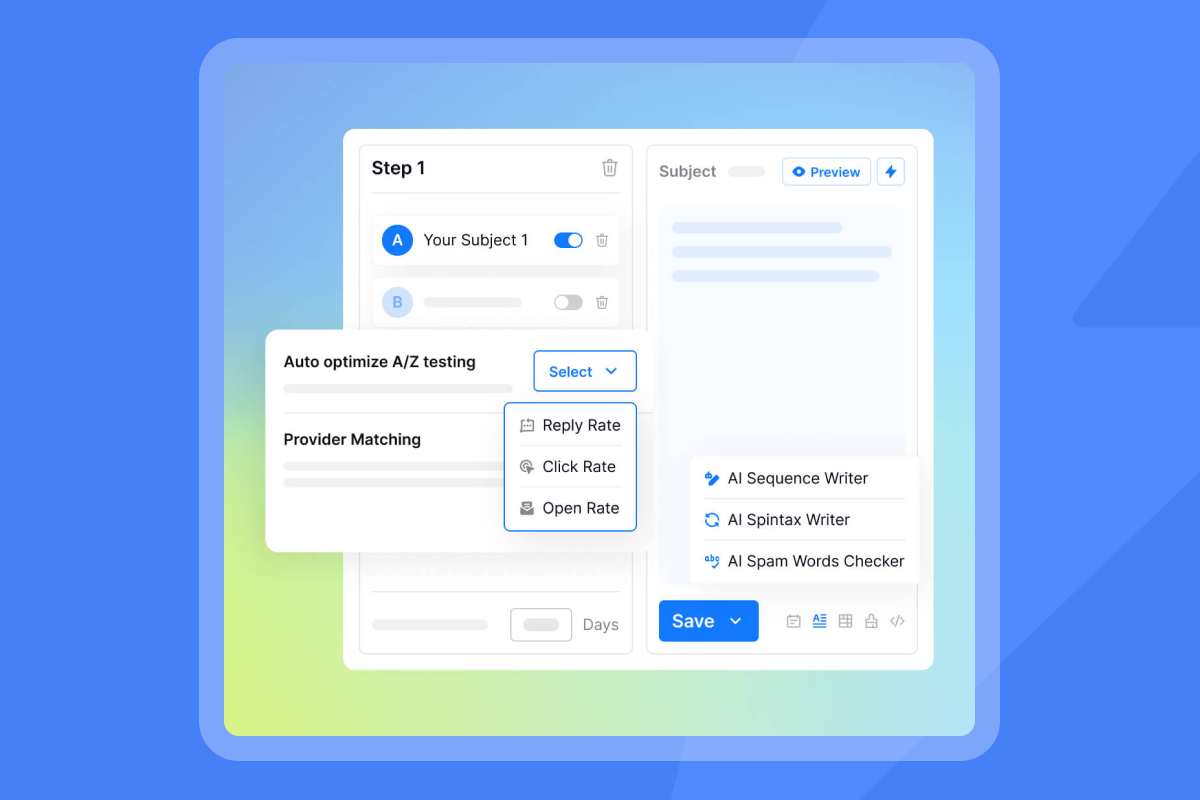
- Use A/B testing to optimize messaging for each intent segment. Test subject lines, opening hooks, and calls to action. Track which variants drive higher reply rates for different intent types.
Executing intent-driven cold email campaigns with Instantly
Why Instantly for Sales Navigator prospecting
- Sales Navigator identifies the right prospects. Instantly ensures your messages reach them. The platform provides unlimited email accounts and warmup on all plans, allowing you to scale outreach without per-seat penalties.
- Instantly's private deliverability network of 4.2M+ accounts ensures new domains build sender reputation quickly. Automated warmup gradually increases daily send volumes while maintaining engagement patterns that mailbox providers trust.
- The platform monitors where your emails land across major providers. Set up automated alerts to pause campaigns when placement drops below 80% or bounce rates exceed 2%.
"I like that instantly can handle large scale email campaigns without worrying about deliverability. The automation for inbox rotation, warm up and sending limits makes outreach very smooth and saves a lot of manual work." - Anjali T. on G2
Setting up your Instantly campaigns for intent
- Import your segmented Sales Navigator lists into Instantly. Use custom variables to include intent-specific personalization like {{visited_page}} or {{engagement_type}}.
- Configure send windows to match prospect activity patterns. Most B2B emails perform best between 8:30-10:30 a.m. in the recipient's timezone. Instantly automatically adjusts send times based on recipient location.
- Set up your sequence structure. Start with 10-20 sends per day per inbox for the first week. Increase to a max of 30 sends per inbox per day if bounce rates stay below 1% and inbox placement remains above 85%. Follow a slow ramp plan for new domains to protect sender reputation.
Ensuring deliverability and domain health
- Use Instantly's automated campaign pause rules to stop sends when risk thresholds are exceeded. Set alerts for 80-85% inbox placement minimum and less than 2% hard bounces to protect sender reputation.
- Monitor your domain health dashboard daily during the first two weeks of any new campaign. Check inbox placement test results, bounce classifications, and spam trap hits.
- Run A/B tests on subject lines and opening sentences. Track reply rates, not just open rates, since opens can be misleading. Target 5%+ reply rates as your baseline benchmark for intent-driven campaigns.
Instantly's approach to using intent data
- Instantly's AI agents handle lead responses quickly, ensuring hot leads get immediate engagement. Configure human-in-the-loop approval for high-value accounts or set autopilot mode for standard qualification questions.
- Copilot assists with campaign creation, analytics summaries, and lead targeting recommendations. Use it to draft intent-specific messaging variants and identify which accounts to prioritize based on engagement patterns.
- The unified inbox consolidates replies across all sending accounts, preventing prospects from falling through the cracks. Tag replies by intent type and route them to the appropriate rep based on account size or vertical.
"They specialize in getting emails delivered at a much higher rate than our previous email provider, and make it generally easy to find contacts, and use AI to assist in writing emails." - Verified user on G2
Measuring and optimizing your intent-based campaigns
Key metrics for Sales Leaders
- Track four core metrics: Inbox placement percentage should stay at 80%+ for primary inbox delivery. Reply rate should target 5-10% for well-targeted campaigns. Track meetings booked per 100 sends. Calculate cost per meeting by dividing monthly Instantly spend by meetings generated.
- Calculate your email reply rate accurately by dividing total replies by total emails delivered, excluding bounces. Monitor this weekly and investigate any drops exceeding 1%.
- Compare intent-driven campaigns against standard cold outreach. Intent-targeted messaging typically delivers higher reply rates and faster qualification when prospects are already researching solutions in your category.
Iterating for better results
- Run controlled tests on one variable at a time. Test subject line length, personalization tokens, call-to-action phrasing, and follow-up timing. Give each test at least 200 sends before drawing conclusions.
- Review your campaign analytics in Instantly to identify which intent segments convert best. Double down on high-performers and pause underperforming segments.
- Refine your Sales Navigator filters based on campaign results. If accounts with 3+ intent signals in 14 days convert at 12% while those with single signals convert at 3%, adjust your minimum threshold.
- Share playbooks across your team. Document which intent signals, messaging frameworks, and follow-up cadences drive the best results. Standardize processes to ensure consistent execution as you scale.
Turn intent signals into predictable pipeline
LinkedIn Sales Navigator identifies who's researching your solution right now. The signals are clear. The opportunity is real. But signals alone don't close deals.
You need a reliable execution system that protects sender reputation while scaling targeted outreach. Instantly provides unlimited accounts, a 4.2M+ account deliverability network, and AI agents to handle replies, all on predictable flat-fee pricing.
Start with verified lists, slow ramp new domains, and target 5%+ reply rates on intent-driven campaigns. Track cost per meeting to validate ROI. When deliverability crashes or analytics mislead, you risk the quarter.
Try Instantly free and connect your Sales Navigator intent data to a cold email engine built for scale, deliverability, and transparent reporting. Your next pipeline review will show the difference.
FAQs
How long does it take to see results from intent-driven cold email campaigns?
Most teams book their first meetings within 10-14 days after launching intent-based campaigns with properly warmed domains. Ramp sending volumes to max of 30 emails per day per inbox. Expect 5%+ reply rates on high-intent segments if your domains maintain 80%+ inbox placement and bounce rates stay below 2%.
What's the minimum Sales Navigator subscription needed to access buyer intent data?
Buyer intent features are available on Sales Navigator Advanced and Advanced Plus subscriptions. The basic Core subscription does not include intent scoring or the Account Hub dashboard. Advanced plans typically require annual contracts for full access to intent signals and alerts.
How do I install the LinkedIn Insight Tag to capture website visitor intent?
Access your LinkedIn Campaign Manager, navigate to the Insight Tag section under "Account Assets," and copy the JavaScript code snippet. Paste this code on every page of your website, ideally before the closing </head> tag, or use Google Tag Manager for easier deployment by creating a new tag and pasting your Partner ID. Verification takes up to 24 hours after installation.
Can I integrate Sales Navigator intent data directly into Instantly?
Export targeted lead lists from Sales Navigator as CSV files, then import them into Instantly campaigns. Use Zapier or Make.com to automate the flow from Sales Navigator to Instantly to your CRM. Instantly's API also supports custom integrations for advanced workflows.
What bounce rate threshold should trigger campaign pauses for intent-driven outreach?
Pause campaigns immediately when hard bounce rates exceed 2%. Set up automated rules in Instantly to stop sends when bounces hit 1.5%. Hard bounces damage sender reputation quickly. Re-verify your list and reduce daily send volume before resuming.
How often should I refresh my Sales Navigator intent lists?
Check your Sales Navigator Account Hub daily during active campaigns. Intent signals decay quickly. Prospects showing high intent this week may move to competitors next week. Refresh and export new high-intent accounts every 3-5 days. Remove prospects who haven't responded after 3 follow-ups to keep lists current.
Key terminology glossary
Buyer intent data: Signals indicating a prospect's readiness to purchase, including engagement with content, website visits, and research activities.
Inbox placement: The percentage of sent emails that land in the primary inbox versus spam or promotions folders. Target 80-85% minimum for cold email campaigns.
LinkedIn Insight Tag: A JavaScript tracking code installed on websites to identify LinkedIn members visiting specific pages and feed that activity into Sales Navigator.
Reply rate: The percentage of delivered emails that receive a response, calculated as total replies divided by total emails delivered. Target 5-10% for well-targeted B2B campaigns.
Sender reputation: A score assigned by mailbox providers based on bounce rates, spam complaints, engagement patterns, and authentication. Poor reputation results in spam folder placement.
SISR (Server and IP Sharding and Rotation): A deliverability technique using dedicated and private IP pools to distribute sending across multiple servers, protecting sender reputation at scale.
Warmup: The process of gradually increasing daily send volumes from a new domain to build positive sender reputation with mailbox providers over 2-4 weeks.
Verified contacts: Email addresses confirmed as valid and active through multiple verification methods, keeping bounce rates below 2% to protect deliverability.


