


Updated November 8th, 2025
TL;DR: You don't need expensive, fragmented tools to run effective personalized cold email outreach. Agency operators can achieve high deliverability and engagement at scale by combining strategic personalization with integrated platforms that prioritize sender reputation. We cover free manual techniques for pilot campaigns, tactical segmentation strategies, and advanced AI-powered personalization. You'll learn how to scale campaigns from 100 to 1,000+ emails per week safely while maintaining list hygiene and converting replies into booked meetings without per-seat penalties or tool sprawl.
Instantly was designed to solve this problem for agencies. Unlimited email accounts, automated warmup, 450M+ verified leads, and AI reply handling under one flat fee. As you read this guide, you'll see how we've integrated every best practice into one platform so you can focus on client results, not tool management.
Why personalized cold email matters for agencies
If you run an agency, personalized cold email is your foundation for predictable client acquisition. When you execute it properly, personalization transforms your generic blasts into relevant conversations that land in primary and drive measurable results.
Boost engagement and reply rates
Personalized emails consistently beat generic sends. Personalized subject lines are 26% more likely to be opened, and personalized CTAs convert 202% better than default ones. The math is simple. Send 1,000 emails at 3% reply rate and you get 30 replies. Improve personalization to 5% and you get 50 replies. That's 20 extra conversations and 2-4 more booked meetings per 1,000 sends.
One agency operator managing 10+ client inboxes reported:
"Instantly has become the backbone of our outbound system. What stands out most is the deliverability and domain health performance." - Luisa R. on G2
Quick gut check before you hit send on your next campaign. Can you explain in one sentence why this specific person should care about your offer right now?
Build trust and sender reputation
Your cold email is often your first impression. When you personalize, you signal that you did your homework.
Your sender reputation rises when recipients engage. ESPs like Gmail and Microsoft watch your opens, clicks, and complaint rates. When you drive higher engagement through personalization, you send strong positive signals that tell ESPs your emails are desired and valuable. This improves your inbox placement over time.
Watch our deep dive guide on how to avoid landing spam in 2025:
Scale client acquisition efficiently
You can't scale personalization manually across 10+ client domains. You need systems that replicate results. Marketers report a 760% increase in email revenue from adopting personalized campaigns, and segmented emails generate 58% of all revenue.
"The platform is super intuitive, easy to set up, and makes it simple to manage multiple domains and inboxes at scale." - Shaiel P. on G2
Agencies that master scalable personalization onboard new clients faster, run more campaigns simultaneously, and show consistent results without hiring additional SDRs.
Data quality determines personalization success
Your personalization is only as good as your data. We see agencies make three fatal mistakes with data quality.
First, using stale data where names, titles, or companies are outdated. This kills trust instantly. Second, skipping email verification and accepting 2-5% bounce rates. Keep bounces under 1% or you'll burn domains. Third, missing fallback content when personalization fields are empty, so emails go out with {{FirstName}} showing.
Here's your data checklist before every send:
- Verify all email addresses
- Deduplicate contacts
- Confirm first and last names are accurate
- Enrich missing fields using waterfall enrichment from multiple providers
- Test merge tags on 5 sample sends
Instantly's SuperSearch handles verification and enrichment automatically, pulling from 5+ data sources to fill gaps your first provider misses. For detailed list management, read our guide on mastering email list hygiene.
Instantly's SuperSearch gets you verified leads data on demand:
How to send personalized mass emails for free or low cost
For small lists under 100 contacts, start with manual personalization in Google Sheets:
- Create columns for first name, last name, company, title, and one custom personalization field
- For each contact, write a one-sentence opener referencing their recent LinkedIn post, company announcement, or industry pain point
- Export as CSV and import to your email tool for mail merge
This approach works for pilot campaigns where you're testing messaging before you scale.

Segment lists for targeted messaging
Divide your list into groups based on shared characteristics. Segmented campaigns show 50% better click-through rates than non-segmented ones.
Segment by:
- Industry: Healthcare, SaaS, e-commerce, finance
- Company size: Startups, SMBs, enterprise
- Role: Founder, VP, director
- Engagement: Opened previous emails, clicked links, no response
Create separate copy for each segment. A founder's pain points differ from a mid-level manager's.
Free tools for small pilots
Google Sheets paired with mail merge add-ons like Yet Another Mail Merge (YAMM) lets you send up to 50 personalized emails per day for free. This works for testing messaging with small audiences before investing in dedicated platforms.
When free methods hit limits
Free tools break down when you scale:
- Volume caps: Gmail's 500/day limit won't support one client, let alone 10
- No automated warmup: New domains risk immediate spam placement
- No deliverability monitoring: You can't test inbox placement or track reputation
- Manual effort: Personalizing 1,000+ contacts per client manually is impossible
For agencies managing multiple clients and 10+ sending inboxes, investing in a dedicated platform becomes cost-effective within weeks.
Watch how Instantly can help you personalize thousands of emails without hours of work:
Essential tools for cold email personalization
When free methods hit limits, you need a platform that protects client domains while scaling campaigns safely. Look for these capabilities:
What agencies need in a cold email platform
Flat-fee unlimited accounts
Per-seat pricing nukes agency margins as you add inboxes. Look for platforms charging flat monthly fees regardless of connected accounts. We built Instantly's Growth plan to start at $37 per month with unlimited accounts and warmup included.
Built-in warmup and deliverability
Warmup is non-negotiable. Platforms should offer automated warmup that gradually increases send volume over 30 days. Instantly's deliverability network includes 4.2M+ accounts used for warmup and engagement.
Advanced features you need:
- Inbox placement testing: Automated tests send emails to seed lists and report where they land
- Bounce detection: Automatic removal of invalid addresses before they damage reputation
- Send window optimization: Scheduling during recipient time zones and business hours
- SISR (Server and IP Sharding): Advanced sender pools that isolate reputation across dedicated IPs
For deliverability fundamentals, watch Instantly's Ultimate Guide to Cold Email Deliverability in 2025.
Integrated lead data
Sourcing clean contact data is half the battle. Look for platforms with built-in databases that offer 100M+ verified contacts, waterfall enrichment from multiple providers, and AI-assisted research.
AI for content and reply handling
95% of marketers who use generative AI for email creation rate it as effective. AI streamlines two bottlenecks: writing personalized copy at scale and managing reply volume.
"Instantly has been a game changer for my vertical in merchant service where email marketing is key. I've converted several leads into deals using Instantly and it's paid for itself 5x." - Philip Hendrich on Trustpilot
How Instantly solves agency scaling challenges
You face three pain points when scaling: per-seat costs that compound with growth, tool sprawl across warmup/data/sending/CRM, and manual reply handling that eats 10-15 hours per week.
Unlimited accounts and automated warmup
Connect as many domains and inboxes as you need. Each account gets automated warmup that gradually increases send volume over 30 days with conversation simulation, health monitoring, and adaptive pacing. No extra cost regardless of how many inboxes you add.
For a complete setup walkthrough, watch Instantly AI Full Tutorial.
SuperSearch for clean data
SuperSearch provides access to 450M+ B2B leads with waterfall enrichment from 5+ providers. Search by industry, company size, job title, location, and technologies used. Email addresses are verified before export, reducing bounces. LLM-assisted enrichment researches prospects and generates personalized opening lines.
Pricing starts at $9/month for 150 credits, with higher tiers offering up to 200,000 credits for large agencies.
AI Reply Agent for automated handling
Instantly's AI Reply Agent automatically handles lead replies in under 5 minutes. It categorizes replies as interested, not interested, out of office, or requiring more information, then drafts contextual responses. Choose human-in-the-loop mode for review via Slack, or autopilot to send approved responses automatically.
For agencies handling hundreds of replies per day, this saves 10-15 hours per week. The agent costs 5 Instantly credits per AI-generated reply.
Unified Inbox for centralized management
Instantly's Unified Inbox centralizes all client email replies in one dashboard. Filter by campaign, client workspace, or engagement status. Tag replies, assign follow-ups to team members, and respond directly from Slack. For agencies managing 10-50+ client inboxes, centralized handling prevents conversations from falling through cracks.
"I love instantly. The interface is extremely easy to understand and very intuitive. I started using it just for my own outreach and ended up using it for my client's outreach too." - Berel Media on Trustpilot
Comparing platforms for agency use
When you compare platforms, look at total cost of ownership for 20 accounts across 5 clients. Here's how Instantly stacks up against per-seat tools:
| Feature | Instantly | Apollo | Lemlist |
|---|---|---|---|
| Pricing model | Flat-fee unlimited | Per-seat | Per-seat |
| Starting price | $37/month | $49/month per seat | $55/month per seat |
| Unlimited accounts | Yes, all plans | No, seat-based | No, seat-based |
| Automated warmup | Yes, included | Limited | Yes, Lemwarm |
| Lead database | 450M+ contacts | 275M+ contacts | No native database |
| Waterfall enrichment | 5+ providers | Single provider | No |
| AI reply handling | Yes, automated | No | No |
| Inbox placement tests | Yes, automated | No | No |
| SISR / dedicated IPs | Yes, Light Speed | No | No |
| CRM features | Unified Inbox | Full CRM | Basic tracking |
Cost comparison for 20 accounts:
- Instantly: $97/month (Hypergrowth) + $47/month (SuperSearch) = $144/month total
- Apollo: $49 × 20 accounts = $980/month
- Lemlist: $55 × 20 accounts = $1,100/month
Instantly saves you $836 to $956 per month at 20 accounts. At 50 accounts, Instantly costs $144/month while Apollo costs $2,450/month and Lemlist costs $2,750/month. The gap grows as you scale.
- Choose Instantly if you manage multiple clients, need unlimited accounts, and want deliverability, data, and AI in one flat-fee platform.
- Choose Apollo if you need a full sales CRM with multichannel outreach and can absorb per-seat costs. Best for individual reps or small teams under 5 people.
- Choose Lemlist if you prioritize video personalization and LinkedIn automation with fewer than 5 accounts.
Thousands of agencies trust Instantly to power their outbound engine.
Personalized cold email best practices checklist
Use this checklist before launching campaigns to ensure deliverability and engagement:
Data and hygiene:
- Verify all email addresses (keep bounces under 1%)
- Deduplicate contacts across campaigns
- Confirm first names, last names, and company names
- Remove previous unsubscribes and spam complaints
- Enrich missing fields using waterfall enrichment
- Check for spam traps and role-based emails
Content and personalization:
- Personalize subject line with name, company, or relevant detail
- Include one personalized sentence in opening
- Keep email body under 100 words
- Include one clear call-to-action
- Add fallback content for unpopulated fields
- Avoid spam trigger words
- Test sends to catch merge tag errors
Deliverability:
- Warm new domains for 14-30 days before cold email sends
- Use 2-3 inboxes maximum per domain
- Set up SPF, DKIM, and DMARC on all domains
- Use secondary domains for cold outreach
- Run inbox placement tests before scaling
Testing:
- A/B test subject lines (personalized vs. generic)
- Test send times (morning vs. afternoon)
- Test email length and CTA phrasing
- Run tests for 100+ sends per variation
- Track reply rate, not just open rate
Reply management:
- Set up centralized inbox to track all replies
- Define reply categories and template responses
- Assign follow-ups for interested replies within 24 hours
- Track reply-to-meeting conversion rate
For a complete tactical guide to improving reply rates, read our cold email reply rate optimization blueprint.
Advanced personalization strategies
Use behavioral segmentation
Behavioral segmentation groups subscribers based on actions like website visits, email engagement, or past purchases. One e-commerce retailer segmented by purchase history and sent "Recommended for You" emails, resulting in a 28% increase in conversions.
Implementation steps:
- Track key behaviors (opens, clicks, page visits)
- Create segments for each behavior
- Build automated sequences with messaging that addresses their specific action
- Set triggers to move contacts between segments
Apply AI for content optimization
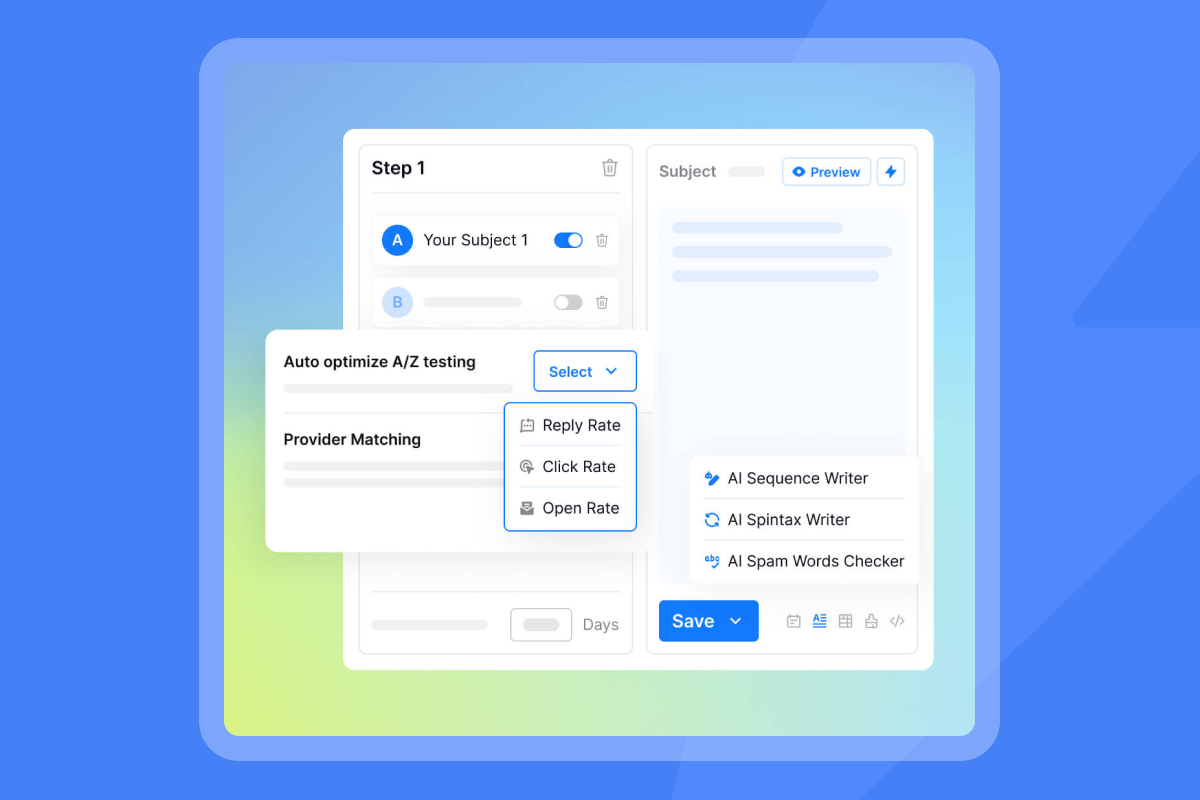
AI algorithms analyze behavior and preferences to dynamically adjust email content. AI helps you generate personalized subject lines, write custom opening lines, optimize send times, and A/B test automatically.
Watch how to use our AI Copilot for a detailed tutorial.
Test systematically
Test one variable at a time to isolate impact. Run tests on at least 200 contacts per variation for 3-5 days. Declare a winner only if results show 95% confidence.
Variables to test:
- Subject line personalization
- Opening line approach
- Email length
- Call-to-action phrasing
- Send time in recipient time zone
Start scaling today
To win in 2025, prioritize sender reputation, maintain strict list hygiene, and use tools that scale without compounding costs. We built Instantly to give you unlimited sending accounts, a deliverability network of 4.2M+ accounts, 450M+ leads via SuperSearch, and AI-powered reply handling within agency-friendly flat-fee economics.
"Instantly is for me the Apple of Cold Outreach tools. Easy to use, intuitive, minimal clicks/steps to get stuff done, and things just work." - Thomas D. on G2
Your next client campaign can launch in under an hour with proper warmup, verified contacts from SuperSearch, and AI handling replies while you focus on booked meetings. Start with our 14-day free trial and use the ramp plans and hygiene checklists in your dashboard to launch your first campaign today.
FAQs
How much does email personalization improve reply rates?
Personalized emails achieve 41% higher click-through rates than generic emails. For cold outreach, expect personalization to lift reply rates from 2-3% to 5-8%.
How long should I warm up new email accounts?
Warm new accounts for 14 days minimum, 30 days on the safe side.
What bounce rate damages sender reputation?
Keep bounces at or below 1%. Anything above 2% will tank your inbox placement.
Should I send from my main domain or secondary domain?
Always use secondary domains for cold outreach, never your primary brand domain. If you burn a secondary domain, your main domain remains protected.
How many email accounts should I use per domain?
Start with 2-3 accounts per client domain to distribute volume and protect reputation. For clients needing 100+ sends per day, add a second domain with 2-3 more accounts.
Key terms glossary
Sender reputation: A score ESPs assign based on your sending behavior, engagement rates, and complaints. High reputation leads to primary inbox placement, low reputation sends emails to spam.
Warmup: Gradually increasing email send volume over 30 days to build sender reputation. Automated warmup simulates real conversations to signal legitimate sending patterns.
List hygiene: Regular cleaning and verification of email lists to remove invalid addresses, duplicates, and unengaged contacts. Critical for maintaining deliverability.
Primary inbox: The main inbox folder in Gmail or Outlook where important emails appear. Your goal is primary placement, not promotions or spam folders.
Bounce rate: The percentage of emails that fail to deliver. Keep total bounce rate under 1% to protect sender reputation.
Waterfall enrichment: Using multiple data providers in sequence to fill missing contact information, increasing data coverage and accuracy.
SISR (Server and IP Sharding and Rotation): Advanced infrastructure that distributes send volume across multiple dedicated IP addresses to isolate reputation and improve deliverability at scale.


