


Spintax creates variations in email copy (e.g., {Hi|Hello|Hey}) to improve deliverability and avoid repetition. Spintax checkers validate spintax formatting for accuracy and let you preview variations before sending.
Some spintax checkers are standalone, while platforms like Instantly.ai integrate an AI Spintax Writer into a powerful cold email automation platform to help teams scale safely and naturally.
Spintax (short for “spin syntax”) is a popular technique for generating multiple variations of the same text. Instead of sending the same message to every contact, you insert options inside brackets, using a “|” to separate them, and the system randomly selects one.
This way, each recipient receives a slightly different version of your message, which feels more natural and maintains strong deliverability for email campaigns. The challenge comes when you try to scale it.
Writing spintax by hand is error-prone, and even small mistakes can break your message formatting. That’s where spintax checkers come in, helping you validate, preview, and test variations before your campaign goes live.
Some modern sales engagement platforms, like Instantly.ai, even go further with built-in tools that generate and check spintax automatically. This article briefly breaks down how spintax checkers work, their ideal use cases, and a few reliable options worth considering.
What are Spintax and Spintax Checkers?
Spintax is one of the most important elements to incorporate into cold email marketing campaigns. Email providers routinely assess the emails you send, and having the same templated email from your accounts will eventually trigger spam alarms.
So if you’re looking for an AI sales tool, cold email automation software, or outreach platform, make sure it has spintax features. Spintax ensures your campaigns have high deliverability by creating variations of your email copy.
The format for most spintax looks like this: {Affordable|Budget-friendly|Low-cost}. However, you don’t always have to use spintax at the word level. You can also use sentences, spintax inside bulleted lists, and spintax for programmatic generation.
With so many use cases for spintax, it’s essential to check if what you’re spinning is outputted correctly. For example, in cold email marketing, the last thing you want your leads to see is:
“I'd love to {{RANDOM |learn | hear | find out}} more about the way you {{RANDOM|handle | manage | deal with}} sales at {{companyName}}.”
Spintax checkers ensure that your variables, options, and even spacing are syntactically correct, so the output is error-free. They catch unbalanced braces, illegal nesting, and empty options. But that’s just scratching the surface.
How do Spintax Checkers Work?
A spintax checker is a validator and previewer for spintax strings. Here’s an example of a correct spintax and an incorrect spintax. Let’s see if you can spot the difference.
- Spintax 1: {Hi|Hello} {{first name}}, {quick note|brief update} about {{topic}}.
- Spintax 2: {Hi|Hello {{first name}}, {quick note|brief update} about {{topic}}.
If you spotted the missing closing bracket of spintax 2, you have good eyes! But human eyes can only spot so much, especially when scaling and using nested spintax. Luckily, spintax checkers don’t need eyes to see any errors. Here’s how they work:
Syntax Validation
A solid checker reads every character, not just the noticeable braces. It verifies that each { pairs with a }, options are separated by ASCII |, nesting closes in order, and there are no empty choices.
It also looks for invisible strings like zero-width spaces or full-width symbols that look correct but break parsers. Here’s an example: {Book now||Schedule}. Syntax checkers would flag the empty option between ||.
Variable checks
The checker confirms every variable exists in your data schema and will actually merge. It warns on typos, Unicode inside keys, and values needing formatting for dates, currency, or phones. For example, using {{name}} is different if your data has {{first_name}} as the variable.
Preview and sampling
Syntax can be perfect while the prose reads awkward. Preview tools generate randomized outputs you can skim for tone and grammar, plus edge cases like the shortest and longest expansions to test layouts.
They also help you spot near-duplicates that add no real variation.
- Use random previews for a quick vibe check.
- Use seeded previews to reproduce the same samples for QA.
Rules and linting
Guardrails keep everything consistent and on-brand. The checker enforces casing and punctuation rules, flags tense or person mismatches, and nudges you to keep option lengths in a tight range so layouts do not lurch.
Channel fit
Some spintax checkers account for hard limits and heuristics. They often mix in other elements aside from the spintax itself to ensure there won’t be any issues before you publish.
For example, a spintax checker can warn when you exceed field caps, if the output looks spammy, or has variations that would clip on smaller device screens.
When Do You Need Spintax Checkers
Spintax checkers are best used when spinning at scale and when variations become complex and nested. This often happens when you introduce new variables, fresh data from a CRM, or push to channels with stricter limits.
Here’s when you need both spintax and checkers:
- You send to thousands and want each to see a different yet on-brand line.
- You use nested options or more than two variable fields in a single line.
- You publish to constrained surfaces such as ad headlines, button labels, or SMS subjects.
- You operate at many locations and need light personalization without separate copy.
- You are migrating templates between tools or importing new data fields.
Best Spintax Checker Tools
Whether you’re validating one subject line or templating a copy across thousands of records, the “best” spintax checker depends on your workflow. Let’s look at the best ones available for specific use cases.
Instantly: Best Spintax Checker for Cold Email Marketing

G2 Rating: 4.8/5 ⭐ from 3,780 reviews
Instead of juggling a separate spintax checker alongside your cold email software, Instantly combines everything in one place: campaign builder, deliverability safeguards, analytics, and now, an AI Spintax Writer.
In just a click, the AI Generator provides natural spintax variations for your copy to help you avoid repetitive messaging that can tank deliverability.
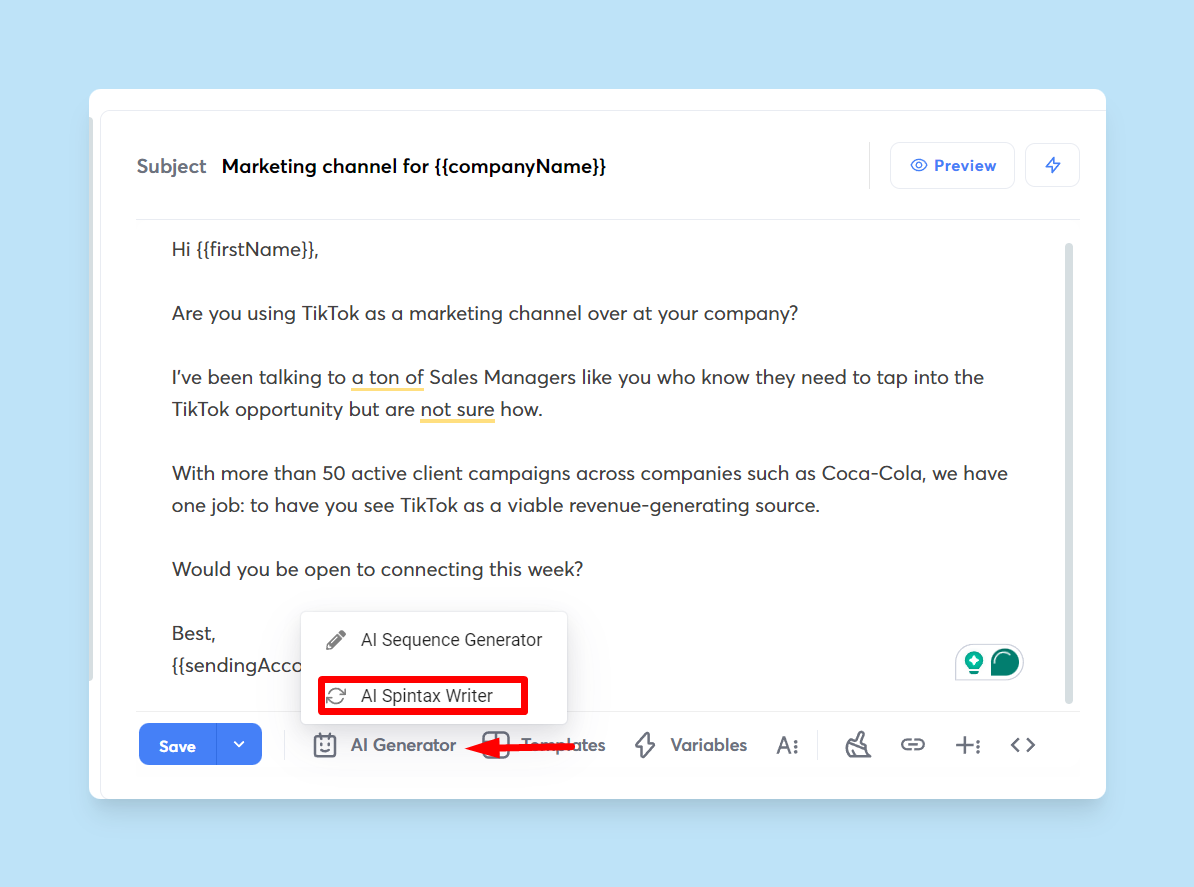
You can then preview every version before launch, so nothing slips through broken or awkward.
Spintax works seamlessly with Instantly’s other personalization features (like custom variables pulled straight from your lead lists) so each recipient gets a unique message that still feels on-brand.
Because it’s part of the wider Instantly system, your spintax lives alongside powerful automation: sequences, auto-follow-ups, inbox rotation, A/B testing, and a full analytics dashboard.
That means fewer moving parts, less manual checking, and more confidence that your outreach emails will hit the inbox looking natural.
Key Features:
- AI Spintax Writer: Automatically adds on-brand spintax variations to your emails.
- Syntax Checks + Previews: Validate and test every variation before sending.
- Custom Variables: Pull personalization tokens directly from CSVs or lead lists.
- RANDOM Support: Rotate greetings, CTAs, and sign-offs naturally.
- All-in-One Platform: Sequences, mailboxes, follow-ups, analytics, and A/B testing included.
- Deliverability Network: Warmup and inbox reputation tools keep your messages out of spam.
With Instantly, you’re getting an outreach platform that makes spintax part of a bigger system designed for scaling safely and effectively.
Publer: Social + Google Business Profile posting

If you’ve done local SEO for a business with multiple locations, you know how time-consuming it is to make updates unique and localized. Publer lets you write one post, add spintax, and schedule it across many profiles and locations in one calendar.
Each time it publishes, Publer picks a clean variation, so every page gets a unique caption without you rewriting anything.
Key features:
- Recurring queues that republish posts with new spintax variants.
- Multi-profile publishing for brands with many pages or regions.
- Google Business Profile scheduling alongside other networks.
- Saved snippets you can combine with spintax for consistent CTAs.
- Bulk composer and calendar to load a week or a month at once.
CheckSpintax
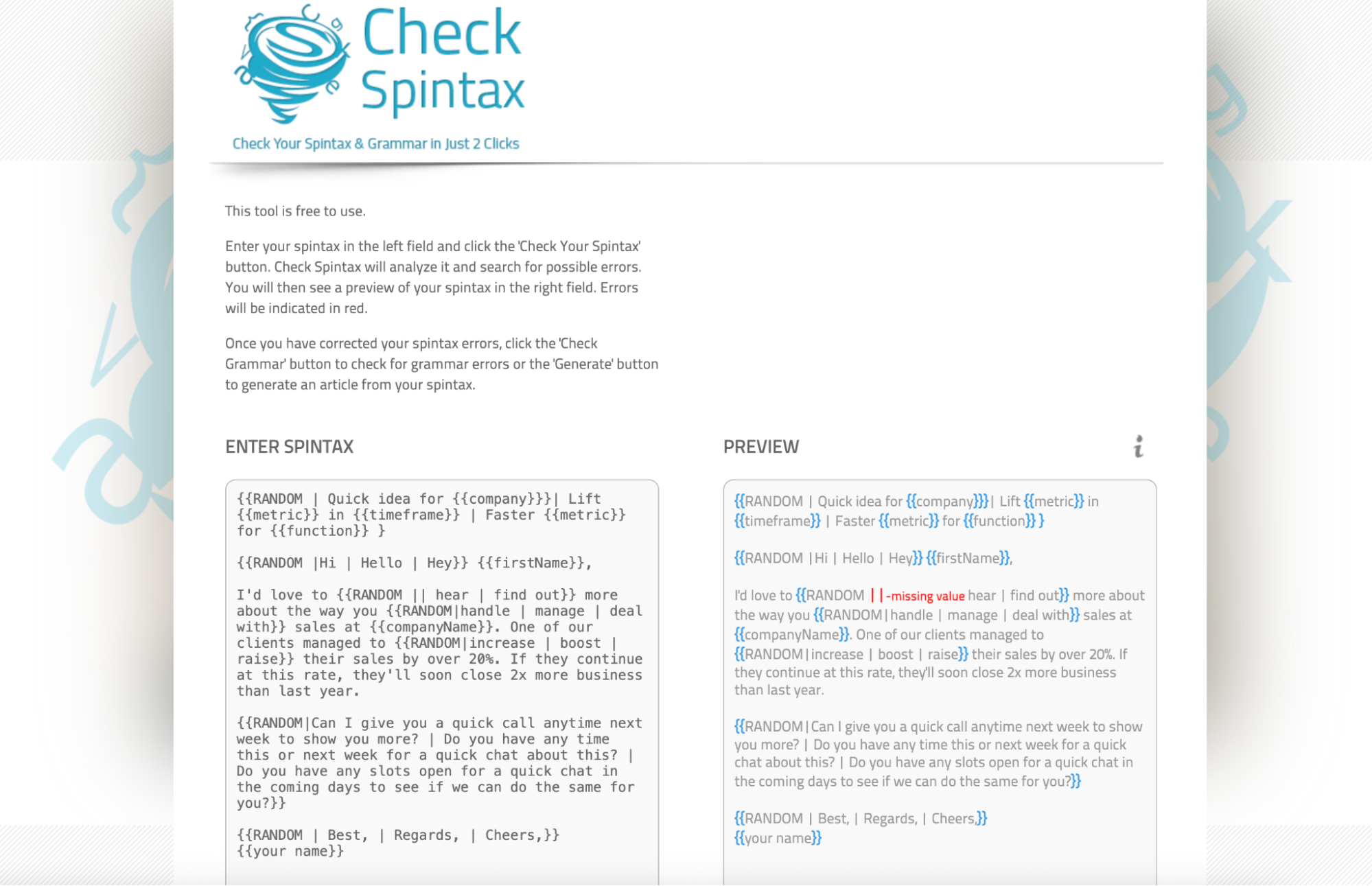
CheckSpintax is arguably the best free spintax checker tool because of its simplicity. You paste your spintax, click one button, and immediately see the errors highlighted in red and a preview of the corrected output.
It runs in the browser, perfect for fast QA on social captions, GBP posts, ad headlines, and SEO micro-variants.
Key Features:
- Instant syntax validation with clear error highlights
- Side-by-side preview of expansions before you publish
- Free to use, no login required
- Optional grammar check after fixing syntax
- One-click expand to generate full text (best for micro-variation, not full article spinning)
Rank Math: Best for micro-varying SEO titles and meta in WordPress

Rank Math lets you add spintax directly in the Titles and Meta fields, so you can micro-vary page titles and descriptions without rewriting them by hand. It even offers a persistent vs. non-persistent random word variable for cases where you want a stable pick per URL or a fresh pick on each load.
Key Features:
- Spintax in Titles and Meta with random word variables, including persistent and non-persistent modes
- SEO variables for dynamic fields in titles and descriptions
- Clear workflow in the Titles and Meta settings screen
- Bulk editor to update many titles and descriptions at once
- Title and description length guidance while you edit
Developer and CI workflows: Best for Shipping Safe Spintax at Scale

Putting your spintax checker inside the codebase and CI means broken braces, bad variables, or over-length variants never reach production.
You can lint templates on every commit, enforce channel limits for SMS and in-app UI, assign variants deterministically per user, and publish preview samples as build artifacts for fast QA.
Key Features:
- Parser SDKs for JavaScript/TypeScript or Python to parse, validate, count variants, and sample outputs
- Deterministic assignment using a stable seed per user or device, so a person sees the same variant across touches
- Channel validators for SMS segments, push titles, button labels, and other tight fields with shortest and longest expansion checks.
- Variant math with probability reporting and safe sampling to avoid complete enumeration of huge trees
- Unicode and whitespace normalization to block zero-width characters and non-ASCII braces or pipes
Key Takeaways
Spintax checkers ensure that the output of whatever you’re spinning has no issues or strings that can break the spin. And because you can use spintax in different channels, you have multiple spintax checkers. To recap, here’s what we recommend:
- Instantly: Best for adding spintax into high-volume cold email campaigns
- Publer: Automates spintax to Google and Social media and ensures output is correct
- CheckSpintax: Free and easy-to-use spintax checker for errors and output issues
- Rank Math: Automates and checks spintax for WordPress
If you’re looking for a way to improve your cold email campaign deliverability, implementing spintax is one of the best places to start. With Instantly, you can automate spintax for every lead and preview emails before sending. Start your free Instantly trial.


