

Last update: December 2, 2025
Warming up a new domain is how you show email service providers (ESPs) you’re a legitimate sender. Start with low daily sending volumes (30-50 emails), keep it steady, and let the reputation build. Make sure your domain is authenticated first.
After three to four weeks, you can safely start cold outreach. Keep a slice of your daily volume for ongoing warmups, test your emails, and scale by adding more warmed domains when you’re ready.
When you buy a new domain, it’s tempting to plug it straight into your cold outreach tool and start sending. But new domains behave like new credit cards. They need a little history before anyone trusts them.
If you warm them up slowly, inboxes open up. If you rush it, email service providers (ESPs) flag you, and the domain likely gets blacklisted. Thankfully, warmup isn’t all that complicated. It’s a steady routine of sending and receiving small batches of email until your domain looks like a real, healthy sender.
Everything else becomes easier once that foundation is in place. Before unpacking the process, let's start with what warmup actually is and why it's non-negotiable.
What is Email Domain Warmup?
Think of a brand-new domain like a stranger walking into a room full of ESPs. Nobody knows you yet or trusts you. And if you suddenly start sending cold emails out of nowhere, the room gets nervous fast.
That’s why warmup exists. You’re showing email providers that your domain behaves like a normal sender. Warmup happens naturally when a domain sends and receives real emails over time.
The problem is the pace. If you tried to do this manually across multiple domains (each with a few inboxes sending 30 to 50 messages a day), you’d be stuck replying to your own test emails for weeks.
Most senders simply don’t have the bandwidth, which is why they automate email warmup. Instead of babysitting inboxes, you let a system send, receive, open, and reply on your behalf. You get the same reputation boost without the grind.
Why Warming Up a Domain Isn’t Optional
If you plan to use a domain for cold outreach, you warm it up. There’s no debate. ESPs judge you by your sending behavior long before they judge your copy or intentions. Here’s what warmup protects:
- Improved deliverability: Cold emails only work if they land in inboxes. When a domain starts cold outreach with no sender reputation, ESPs treat it as suspicious by default. Enough negative signals can get you throttled or flagged. Warmup builds the trust you need before you send anything important.
- Better spam scoring: Email filtering systems like SpamAssassin look at your wording, formatting, domain history, etc. You can’t cheat that system. A consistent warmup routine shows that your domain is legitimate and safe. That alone improves your SpamAssassin score (and similar filtering scores) over time.
- Reduced bounce rates: Healthy domains have healthy engagement patterns. The more positive interactions your domain logs during warmup, the more ESPs trust your emails. That trust shows up as lower bounce rates, which keeps you in good standing as you scale.
How to Warm Up Email Domains With Instantly
G2 Rating: 4.8/5 ⭐ from 3,861 reviews
If you’ve ever tried to warm up a domain by hand, you already know how tedious it gets. Instantly takes that entire chore off your plate. You set it once, and the system quietly builds a reputation in the background while you work on meaningful outreach.
Inside your Instantly dashboard, head to "Email Accounts" and pick the account linked to your email domain, and tweak things as needed in the "Settings" tab.
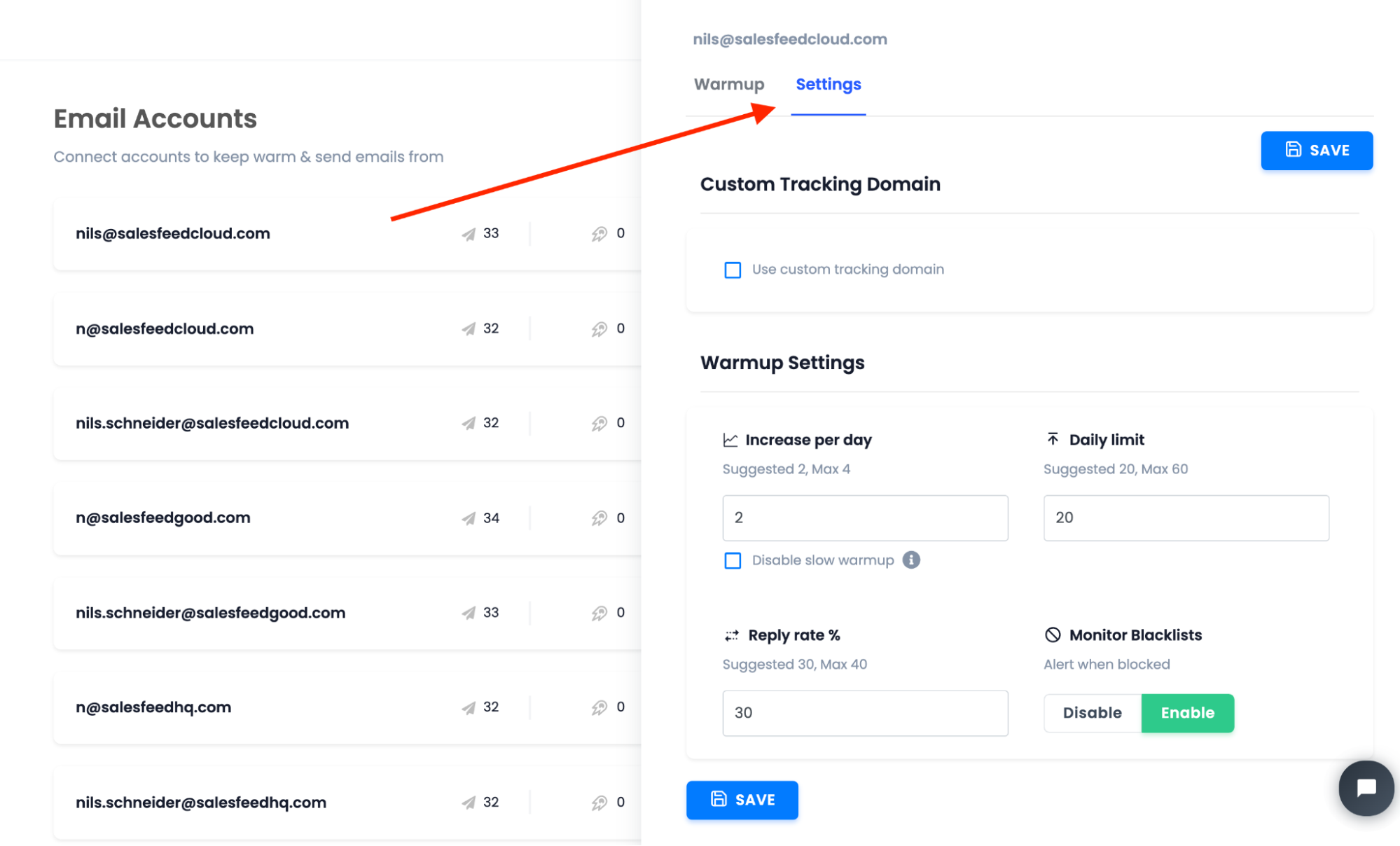
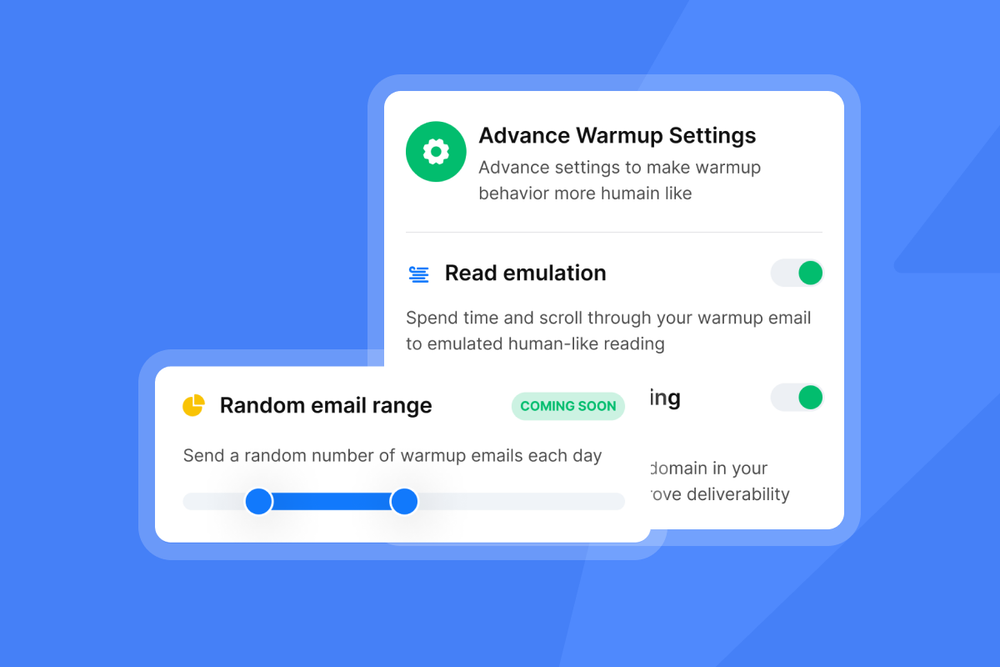
Most senders stay with the defaults because they’re already tuned for healthy warmup patterns, but you can adjust daily sends, pacing, and how quickly the account scales. You also have a few advanced options that make warmups feel more “human” to inbox providers:
- Weekdays only so warmups mirror normal business behavior.
- Read emulation so incoming warmup emails look genuinely engaged.
- Custom tracking domain warmup so even your tracking domain builds a reputation instead of dragging deliverability down.
The goal here is consistency. A brand-new inbox blasting hundreds of emails per day is the fastest way to land on a global blocklist.
Providers like Google technically allow high limits, but safe cold email sending lives far below that. Think 30-50 warmup emails a day per inbox during the first few weeks. Slow and steady wins this race every time.
Once your domain is stable, keep a slice of your daily volume reserved for warmups. Somewhere around 20%-30% works well. Cold outreach doesn’t generate too many replies by nature, and warmups provide valuable positive signals (opens, reads, replies) that keep your reputation from dipping.
One thing you must do before any of this: authenticate the domain. DNS records like MX, SPF, DKIM, and DMARC aren’t optional. They’re your “ID card” on the internet. Without them, email providers don’t trust who you are.
Each registrar sets these up a little differently, so the exact steps depend on where you bought the domain. Alternatively, Instantly’s Done-for-You (DFY) email setup service streamlines this process.
We handle all DNS propagation technicalities, so you don't have to. Just get your configured email accounts with warmup running in the background and start sending.
What To Do After Your Warmup Is Done
Three or four weeks in, your new domain finally feels “real.” It has a small history, and ESPs stop treating it like a stranger, which means you can start sending cold emails without stressing over every send.
But this part is where people get too confident too fast. Warmup is only the first checkpoint. What you do next decides whether the domain stays healthy or quietly burns out in the background.
Keep Your Sending Volume Under Control
Daily volume is the easiest thing to mess up. You feel good about the warmup. You want to scale. And suddenly your domains get rate-limited or flagged. This is why Instantly built Campaign Slow Ramp.
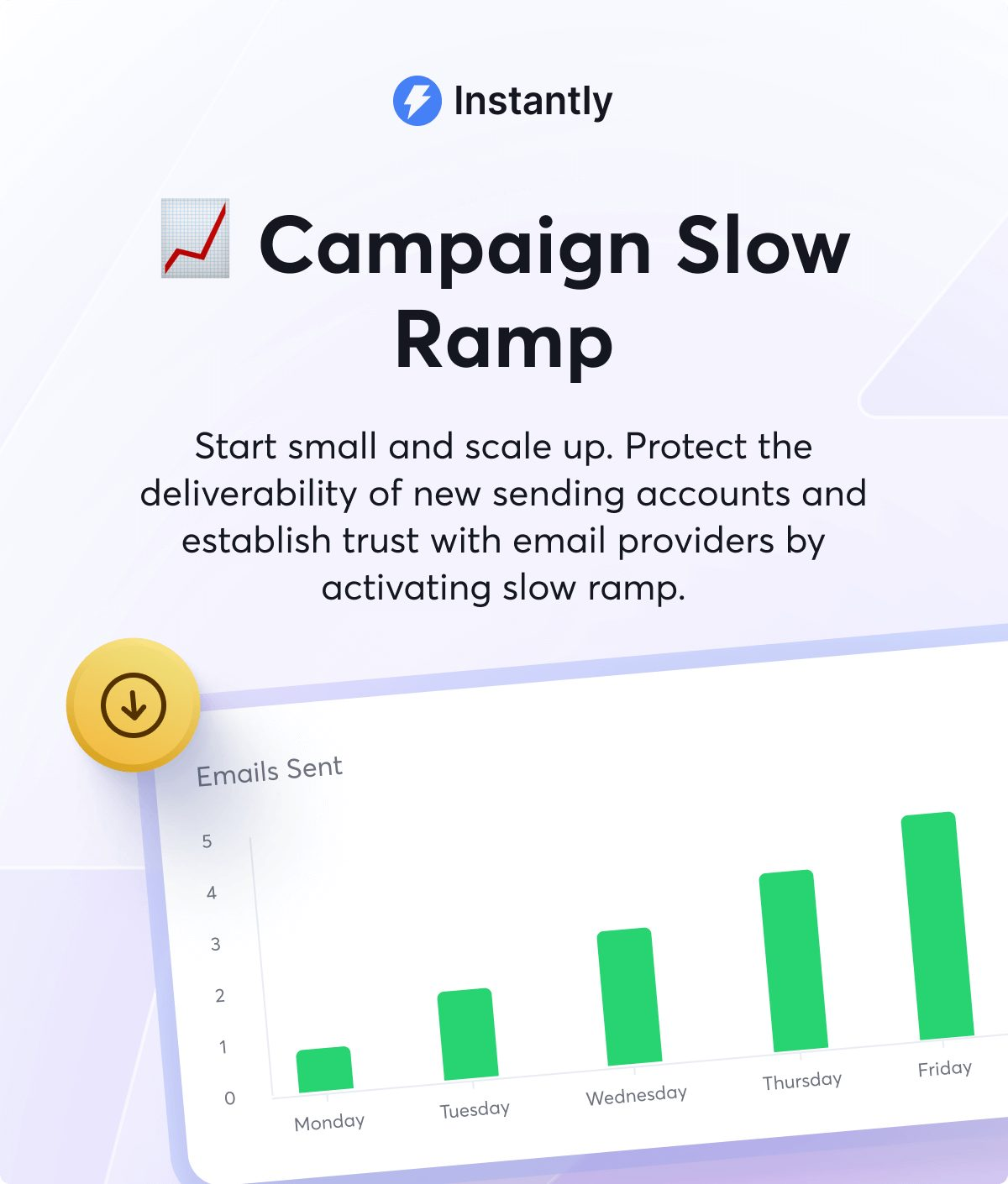
Instead of jumping from 3 sends to 60 sends overnight, your volume increases gradually, which means good standing with ESPs. You’ll see better inbox placement and steadier reply rates.
Keep A/B Testing Copy Even When Deliverability Looks Good
Warmup is just one of several factors in cold email success. If your open rates drop after warmup, the problem might be your subject line. If replies tank, it might be your call-to-action. So keep running a/b tests.
With Instantly, for instance, you can run multiple variations in one campaign and let the platform automatically pick a winner. It’s hands-off, but still grounded in real data.
Scale Safely With More Domains
Once your campaigns start producing replies, the temptation is to crank volume. A better approach is to add more domains, warm them up, and spread your sends across all of them. It’s safer and gives you more long-term consistency.
And if you don’t want to fiddle with DNS records, Instantly’s Done-For-You (DFY) offers an effortless shortcut.

You pick a domain, confirm a few details, and wait for the DNS records to propagate. Usually 24–72 hours. Once it’s live, you warm it up and add it to your sending rotation.
Key Takeaways
Warmup gives you a head start, but maintaining deliverability is ongoing. Keep daily sending limits steady. Keep a slice of your volume dedicated to warmups. Keep testing. Keep adding domains as you grow.
Follow the process appropriately, and cold outreach stops feeling risky. It becomes a predictable system you can scale without breaking anything. Try Instantly for free today.


