


Updated December 03, 2025
TL;DR: Sales leaders can ensure consistent primary inbox placement and protect sender reputation for their AI-powered cold outreach by implementing Instantly's structured 30-day warmup plan, which involves warming inboxes for at least 2–3 weeks before launching AI agents, capping at 30 emails per inbox per day, and maintaining bounce rates below 1%, while keeping warmup enabled continuously through Instantly's private deliverability network of 4.2M+ accounts with automated inbox placement tests, and configuring the AI Reply Agent to handle replies in under 5 minutes with ongoing monitoring to safeguard the pipeline.
We will show you the exact 30-day plan we recommend for sales teams integrating AI Reply Agents, the metrics to monitor weekly, and how to address dips before they become disasters.
Why a 30-day warmup is critical for AI Reply Agents
Mailbox providers like Gmail and Microsoft judge sender reputation on behavior patterns, not just authentication records. New inboxes or domains that suddenly send 50 automated emails per day trigger spam filters, even if your SPF, DKIM, and DMARC records are perfect.
AI Reply Agents amplify this risk because they operate at scale and respond in under 5 minutes, creating high-velocity activity that ESPs scrutinize closely.
The risk of skipping warmup with AI outreach
Skipping warmup or rushing the ramp puts your entire outreach system at risk. When you deploy AI Reply Agents on cold inboxes, several failure modes appear within days.
Research on email deliverability shows that new domains without proper warmup land in spam 60-80% of the time during the first two weeks of sending. This happens because ESPs have no positive engagement history to reference.
Your AI Reply Agent might craft perfect responses, but if your emails never reach the inbox, reply rates collapse and your pipeline stalls. Without warmup, bounce rates spike above 5%, spam complaints increase, and mailbox providers flag your domain.
Recovery takes 4-6 weeks of reduced sending and careful reputation repair. This is time you cannot afford when quota targets loom.
For a full deep dive into deliverability, watch our 2025 masterclass below:
How sender reputation impacts AI Reply Agent effectiveness
Sender reputation determines where your emails land. A strong reputation means primary inbox placement, high open rates, and the opportunity for your AI to engage.
A weak reputation means spam folders, wasted credits, and zero meetings booked.
Your AI Reply Agent consumes 5 Instantly credits per reply. If half your emails land in spam due to poor sender reputation, you are burning credits on conversations that never happen. Teams waste $500-1000 per month in AI credits when they skip the warmup phase.
Reputation builds through consistent positive signals like opens, replies, and low bounce rates over time. Instantly's warmup automation simulates these interactions within a network of real accounts, creating the engagement history ESPs require.
"The thing which i liked about Instantly is we can set up multiple email accounts, automate campaigns and still have everything look super cool. Instantly helps in saving a lot of time without feeling robotic and it's deliverability is really great compared to o..." - Verified user on G2
The 30-day plan below ensures your AI Reply Agents operate on a foundation of trust, not suspicion.
Your 30-day warmup plan for AI-powered outreach
This plan assumes you are starting with new or cold inboxes on alternate domains dedicated to cold outreach. We recommend 2-3 inboxes per domain to spread volume safely.
For a complete walkthrough of the agent setup, watch this full tutorial on YouTube.
Week 1: Initial setup and low-volume sending
Week one focuses on authentication, connection, and establishing baseline activity.
- Set up domain authentication: Configure SPF, DKIM, DMARC, and MX records for every sending domain. Instantly's "Test domain setup" button in your Email Accounts dashboard verifies these records are correct. If you prefer to avoid DNS configuration, Instantly offers Done-For-You email accounts with authentication pre-configured, ready for warmup within 24-72 hours.
- Connect email accounts to Instantly: Add your sending email accounts to the platform. Instantly supports unlimited email accounts on all outreach plans. Enable warmup by clicking the flame icon in your Email Accounts dashboard to activate automated warmup using the private deliverability network.
- Begin sending 5-15 emails daily: Start with a conservative daily send limit using simple, conversational copy without links in the first email. Target <1% bounce rate from day one.
- Monitor basic metrics: Track delivery rate, bounce rate, and spam complaints in Instantly's analytics. If bounces exceed 1%, pause sends and verify your contact list.
Week 2: Gradual volume increase and engagement
Week two increases volume and introduces varied content to simulate natural sending behavior.
- Increase sends to 15-30 emails daily: Gradually raise your daily send limit per inbox. This slow ramp approach protects domain health by giving ESPs time to observe consistent positive engagement before you scale further.
- Introduce varied content and reply prompts: Use these Instantly features to reduce pattern detection:
- AI Sequence Writer to generate multiple copy variants
- AI Spintax to create wording variations at send time
- AI spam words checker to identify phrases that trigger filters before launching
- Monitor reply rates and spam complaints: Target 3-5% reply rate at this stage. Aim for <0.1% complaint rate, ideally zero. If complaints rise, review your targeting and copy immediately.
For a detailed look at deliverability monitoring, watch this YouTube guide on avoiding spam folders.
Week 3: Stabilize volume and optimize engagement
Week three continues the gradual ramp to 20-25 emails while you refine copy and test inbox placement.
- Increase to 20-25 emails daily per inbox: Continue the gradual ramp while refining copy and testing inbox placement. Instantly's best practices advise never scaling past 30 emails per single inbox per day to protect deliverability. Scale volume by adding more inboxes rather than increasing per-inbox send limits.
- Refine copy based on engagement data: Review which subject lines and opening lines drive the highest reply rates. A/B test different value propositions and calls to action using Instantly's analytics to identify what works.
"I really enjoy using Instantly for a variety of reasons. Its simplicity in managing inboxes and campaigns stood out immediately, making it a clear choice over other tools I had used before." - Nathan D. on G2
- Utilize Instantly's Inbox Placement tests: Run automated Inbox Placement tests to see exactly where your emails land. Instantly sends test emails to a seed list of major mailbox providers and reports back placement percentages. Your target is 80-85% primary inbox placement. If placement drops below 70%, pause campaigns, run a new test, and address any issues with authentication before resuming.
For a visual guide to this feature, check out this YouTube walkthrough on cold email deliverability.
Week 4: Full volume and AI Reply Agent integration
Week four brings your AI Reply Agents online while maintaining strict volume discipline.
- Scale to target daily send limits: Confirm your stable daily send limit is 30 emails per inbox. If your Inbox Placement tests consistently show 80%+ primary inbox placement and bounce rates remain <1%, you are ready to maintain this volume indefinitely.
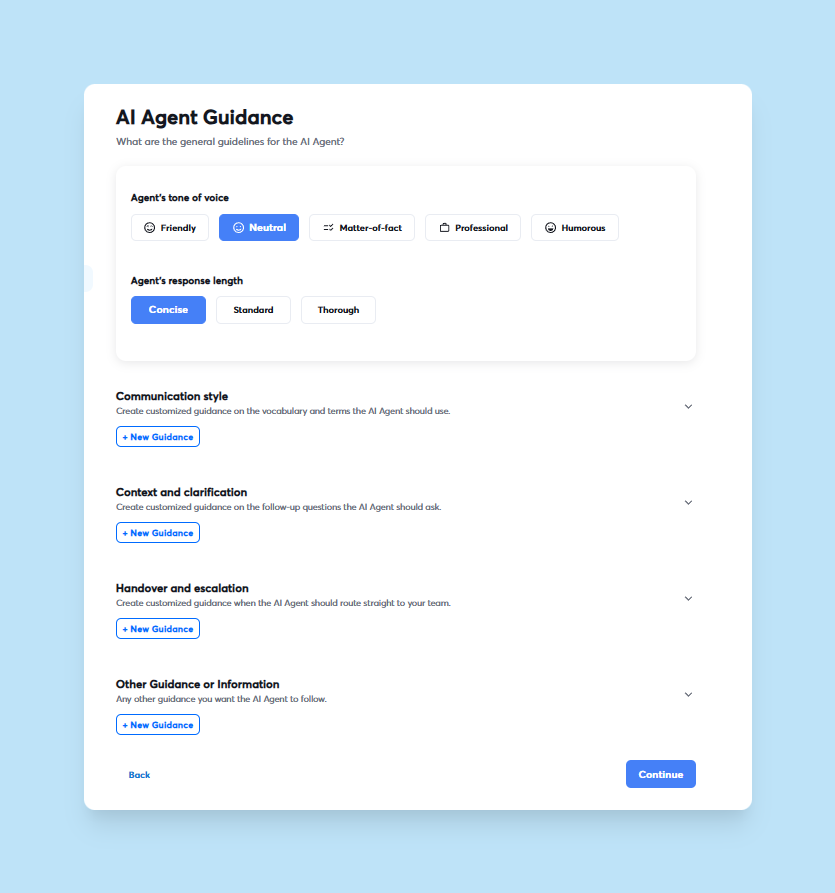
- Activate Instantly's AI Reply Agent: Configure and activate your AI Reply Agent. Start in Human-in-the-Loop mode, where the AI drafts replies but waits for your approval before sending. The AI operates in under 5 minutes, responding to questions, managing objections, and sharing calendar links. Each AI-generated reply costs 5 credits. To optimize credit usage, configure the agent to handle only positive or unsure responses, as detailed in Instantly's agency pricing guide.
"The platform is super intuitive, easy to set up, and makes it simple to manage multiple domains and inboxes at scale. Deliverability is great and the analytics give us exactly what we need to optimize campaigns quickly." - Shaiel P. on G2
- Continuously monitor AI reply quality and deliverability: Review AI-generated replies daily during the first week. Adjust tone of voice settings in the agent's configuration to improve accuracy. Monitor deliverability metrics continuously and pause AI automation if inbox placement dips or bounce rates rise.
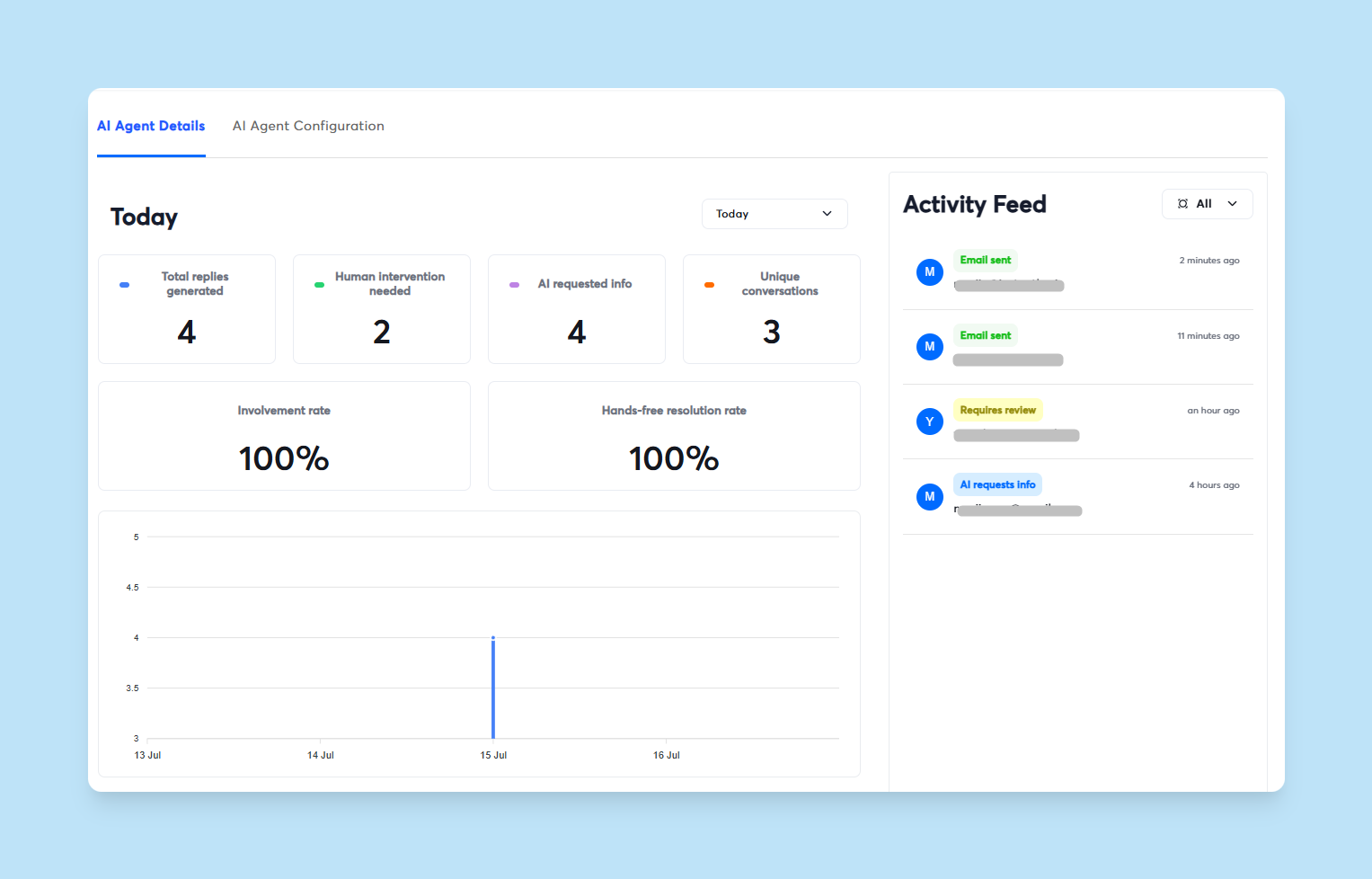
For a complete demo of the AI Reply Agent in action, watch this YouTube tutorial.
Here is the complete 30-day plan in table form:
| Week | Daily Sends per Inbox | Focus | Key Instantly Features |
|---|---|---|---|
| 1 | 5 | Authentication, connection, baseline activity | Domain setup test, unlimited warmup activation |
| 2 | 10-15 | Volume increase, content variation | AI Sequence Writer, AI Spintax, AI spam checker |
| 3 | 20-25 | Stabilize volume, optimize engagement | Inbox Placement tests, analytics dashboard |
| 4 | 30 | AI agent integration, continuous monitoring | AI Reply Agent (HITL mode), deliverability alerts |
Maintaining deliverability with Instantly's AI Reply Agents
Sender reputation requires ongoing care, especially when AI agents operate 24/7.
Ongoing list hygiene and verification
Verify every contact before adding them to a campaign using Instantly's lead verification at 0.25 credits per lead. This removes invalid emails that would otherwise increase bounce rates.
Scrub your lists quarterly to remove inactive contacts. Re-verify any list older than six months to maintain <1% bounce rate.
For a deep dive into contact verification, read Instantly's ultimate guide to verified contacts. Check out how now with Instantly you can verify those pesky catch all emails:
Monitoring domain health and blacklists
Check domain health weekly using Instantly's deliverability analytics. The platform provides real-time visibility into inbox placement, bounce rates, spam complaints, and reply rates.
Run Inbox Placement tests monthly to catch placement dips early. Set up Rules & Alerts to automatically pause campaigns if bounce rates exceed 2% or inbox placement falls below 70%. These automated safeguards prevent small issues from becoming reputation disasters.
Adjusting send windows and frequency
Optimize email send windows based on your target audience's time zone and work patterns. B2B emails perform best when sent Tuesday through Thursday, 8:30-10:30 AM local time.
Instantly's send window controls let you set precise sending times per campaign. Spread sends throughout the day to avoid sudden bursts that look automated to ESPs.
Leveraging Instantly's deliverability network and SISR
Instantly's private deliverability network includes 4.2M+ accounts that participate in automated warmup. This network creates authentic engagement signals that build trust with ESPs.
For teams on the Light Speed plan or above, SISR distributes email volume across dedicated IP pools. This protects sender reputation by isolating risk and giving you full control over IP reputation.
Here is a monitoring checklist:
| Metric | Target | Action if Off-Target |
|---|---|---|
| Bounce rate | <1% | Pause, verify list, remove invalids |
| Inbox placement | 80-85%+ | Run seed test, check authentication, adjust copy |
| Spam complaint rate | <0.1% | Review targeting, improve copy, reduce volume |
| Reply rate | 5%+ | A/B test copy, improve personalization, refine ICP |
How Instantly supports your deliverability and AI outreach
Instantly combines the tools sales leaders need to scale AI-powered outreach safely.
Built-in warmup and unlimited email accounts
Unlimited email accounts and warmup come standard on all Outreach plans. Add as many sending inboxes as needed without per-seat penalties.
The automated warmup runs continuously in the background, simulating positive engagement within Instantly's deliverability network. This automated approach protects sender reputation continuously without manual intervention.
"I find Instantly extremely user-friendly since everything was very easy to use from the start, and the great training provided made the setup even smoother." - Carter W. on G2
Automated Inbox Placement tests and alerts
Inbox Placement automated tests show exactly where your emails land across Gmail, Outlook, Yahoo, and other providers. Run these tests weekly during warmup and monthly once stable.
Combine tests with Rules & Alerts to automatically pause campaigns when deliverability thresholds are breached.
AI Reply Agent for consistent, fast reply handling
The AI Reply Agent operates in under 5 minutes, handling objections, answering questions, and booking meetings while you focus on live conversations. Start in Human-in-the-Loop mode to train the AI on your tone, then switch to Autopilot once reply quality is consistent.
Watch this YouTube demo of the AI Reply Agent replacing manual sales work.
Transparent reporting for pipeline health
Instantly's analytics dashboard provides real-time visibility into campaign performance, deliverability metrics, and AI agent activity. Track opens, replies, meetings booked, and cost per meeting to measure cold outreach ROI.
Export campaign data to your CRM via native integrations or API. Instantly supports HubSpot, Salesforce (via OutboundSync), Slack, Zapier, and Make.
"Instantly is an excellent platform for email marketing outreach. I've been using it for over two years, have recommended it to many clients, and we've all had great results." - Muhammad Auoon on Trustpilot
For teams managing multiple clients, watch this YouTube guide to Instantly's CRM features.
Protect your pipeline with smart AI outreach
Consistent primary inbox placement depends on three weeks of disciplined warmup before activating AI Reply Agents. Sales leaders who invest this time upfront enjoy high reply rates and predictable pipeline. Those who skip it face deliverability crashes, wasted credits, and missed quota.
Keep warmup enabled continuously, monitor bounce rates and inbox placement weekly, and maintain strict volume discipline at 30 emails per inbox per day. Instantly's built-in tools automate the heavy lifting, but your oversight ensures the system stays healthy as you scale.
Ready to ensure your AI-powered outreach lands in the primary inbox? Try Instantly free and apply this 30-day warmup plan with our built-in tools.
FAQs
How long should I warm up a new domain before activating AI Reply Agents?
Warm for a minimum of 2-3 weeks at 5-30 emails per day before activating AI agents. Brand new domains benefit from 4 weeks. Confirm 80%+ inbox placement and <1% bounces before full automation.
Do I need separate domains for AI-powered cold outreach?
Yes. Use alternate domains for cold email to protect your primary business domain. If a cold domain encounters deliverability issues, your main brand remains unaffected.
How much do AI Reply Agent credits cost and how should I budget?
Each AI-generated reply costs 5 Instantly credits. Configure the agent to handle only positive responses and budget based on expected reply volume to control costs.
What bounce rate should I target during warmup?
Target <1% bounce rate from day one. If bounces exceed 2%, pause campaigns immediately and verify your contact list. High bounce rates damage sender reputation faster than any other factor.
Can I scale past 30 emails per inbox per day after warmup?
No. We advise never exceeding 30 emails per single inbox per day to protect deliverability. Scale volume by adding more inboxes across multiple domains, not by increasing per-inbox limits. Instantly supports unlimited accounts for exactly this reason.
Key terms glossary
Deliverability: The ability of an email to successfully reach the recipient's inbox rather than spam folders. Measured as inbox placement rate by testing across multiple mailbox providers.
Sender reputation: A score assigned by Email Service Providers based on sending behavior, authentication, engagement rates, bounce rates, and spam complaints. Strong reputation earns primary inbox placement.
Warmup: The process of gradually increasing email sending volume from a new or cold inbox over 2-4 weeks to build sender reputation. Automated by Instantly's private deliverability network.
AI Reply Agent: An artificial intelligence tool that automates handling and responding to incoming email replies in under 5 minutes. Costs 5 Instantly credits per reply, operates in Human-in-the-Loop or Autopilot modes.
Inbox Placement Test: An automated test that sends emails to a seed list of major mailbox providers and reports where they land (primary inbox, spam, promotions). Target 80-85%+ primary inbox placement.
SISR (Server & IP Sharding & Rotation): A technique that distributes email sending across multiple dedicated servers and IP addresses to improve deliverability and isolate reputation risk. Included on Instantly's Light Speed plan and above.
List hygiene: The practice of regularly verifying and cleaning email lists to remove invalid, inactive, or unengaged contacts. Essential for maintaining <1% bounce rates and protecting sender reputation.


