


Updated September 22, 2025
TL;DR: Put Instantly’s Website Visitors data inside your CRM so reps act on real buying intent the moment it happens. Install the pixel, create a high-intent “Website Visitor view,” and connect alerts plus a simple automation to HubSpot, Salesforce, or Pipedrive. Score visits to pricing, demo, and docs, push priority accounts to reps, and log outcomes for audit-ready forecasting.
You can see which companies are on your pricing page right now, with that intent data landing in your CRM as tasks, fields, and alerts. This runbook shows you exactly how to set it up with Instantly’s Website Visitors so your team stops chasing cold lists and starts working warm, identified accounts.
What is website visitor data and why sales leaders need it
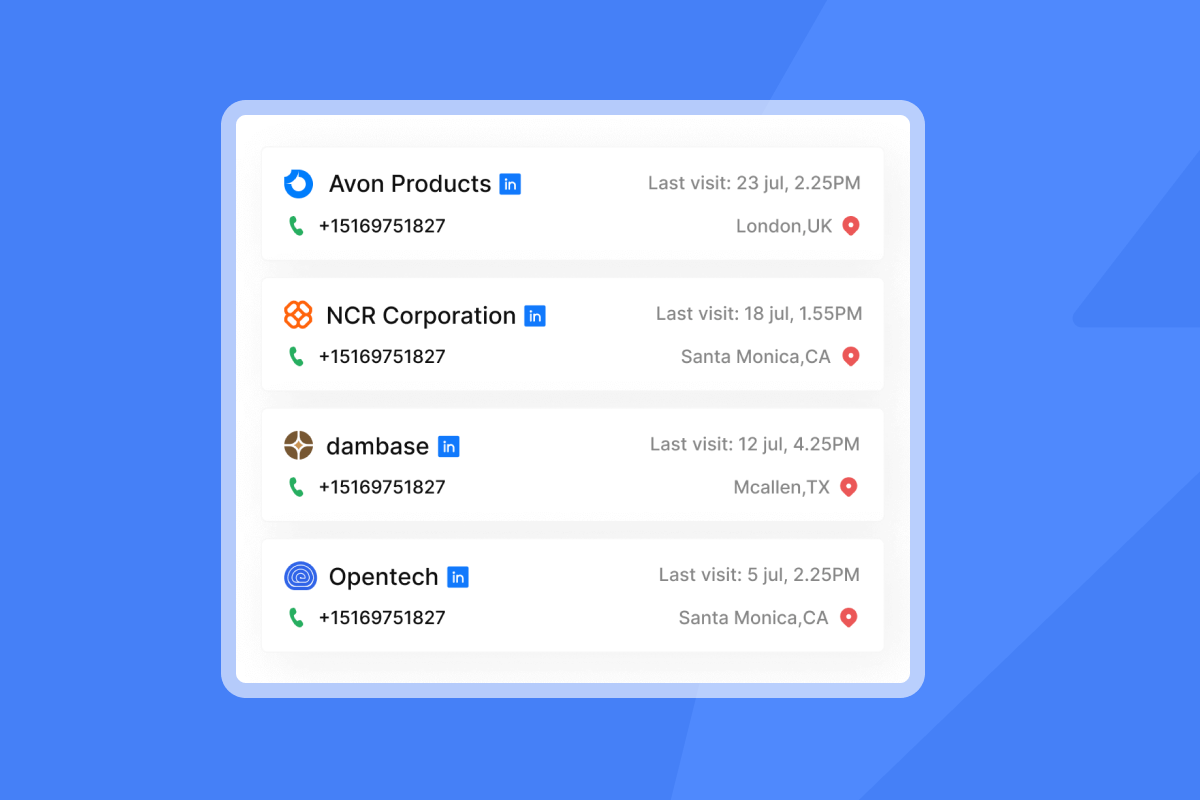
Website visitor data turns anonymous sessions into sales signals you can work. With a small script on your site, Instantly identifies U.S. visitors, enriches company and contact details, and records page-level behavior that correlates with buying intent. You can add the Website Visitors pixel in your site header or tag manager.
Why this matters:
- Most B2B sites convert only 1 to 3 percent by form. In B2B SaaS, a 2025 benchmark shows a 1.1 percent conversion, so roughly 98 percent leave without raising a hand. See the B2B conversion benchmark.
- Buyers have limited vendor face time. Gartner reports they spend only 17 percent of buying time with suppliers, so timing and relevance win. See the Gartner report.
- Buyers want early contact. Research shows 88 percent of B2B buyers welcome vendor outreach during the research phase. See the B2B buyer statistics.
Beyond basic analytics: identifying warm leads from website traffic
Analytics count visits. Visitor identification shows who is visiting and what they viewed. Instantly’s pixel focuses on U.S. traffic, enriches company details, and can include business emails where available, then lets you filter and route those visitors into outreach and alerts. Read the Website Visitors getting started guide.
- Install the pixel once in your site header or tag manager.
- Build a Website Visitor view that filters for high-intent pages and ICP fit.
- Send hot visits to a Slack channel for immediate action with Slack alerts.
Teams routinely find more qualified accounts via identification than forms alone, because most qualified visitors do not convert on-page. See the B2B conversion benchmark.
Related videos
- See the full workflow in How to Identify and Contact Your Website Visitors.
- For a platform tour, watch the Full Instantly.ai Tutorial 2025.
Strategic value: boosting sales efficiency with visitor insights
- Shorten time to first touch. Real-time Slack alerts and CRM tasks help reps reach prospects during the research window. Buyers are open to outreach at this stage.
- Improve account coverage. Technology purchases usually involve several stakeholders, so account-level signals matter more than single form fills. See the B2B buyer statistics.
- Forecast with proof. When opportunities reference specific visit events and pages, leaders can audit pipeline sources and intent tiers in CRM reviews using the Salesforce and HubSpot integration via OutboundSync.
Checklist: benefits for sales leaders
- Bold prioritization based on live behavior
- Repeatable routing and tasks for reps
- Fewer cold touches, more relevant outreach
- Audit-ready source attribution and conversion tracking
- Slack alerts for hot visits only
- Less tool sprawl and fewer rogue automations
Essential features: what sales leaders need in a tracking solution
Use this short list when evaluating vendors:
- Identification scope and filters
- U.S. traffic coverage, page-level filters, and ICP filters
- Clear guidance on verification before outreach
- CRM integration patterns
- Native connectors, partner routes, and iPaaS recipes
- Field mapping for domain, last page, last visit, and score
- Real-time operations
- Slack alerts, near-real-time updates, and daily exports
- Security and privacy
- Data Processing Addendum and published sub-processors
- U.S.-only collection for this feature and cookie-banner guidance in the compliance onboarding guide and DPA
- Admin controls and reporting
- Audit logs, team standards, and dashboard visibility in account settings
Helping sales: prioritizing leads with CRM-integrated visitor data
Keep the scoring rules simple and auditable. Rank both behavior and fit.
Scoring framework (example weights)
- High-intent pages: Pricing, demo, ROI calculator in last 3 days (+50)
- Recency and frequency: 2+ visits in 7 days (+30). 5+ pages in session (+15)
- ICP fit: Headcount 50–1,000, U.S. HQ, target industry (+25)
- Account status: Existing opp or renewal window (+10 each)
CRM flags and routing
- Hot lead: Score at or above 70. Create Company + Contact, set task due right now, post to Slack.
- Warm lead: Score 40–69. Queue for SDR follow-up within 1 business day.
- Nurture: Score below 40. Add to remarketing and future sequences.
Operational tips
- Keep rules to 3–5 major signals.
- Log score components on the record for manager audits.
- Track conversion by score tier monthly. Adjust weights, not just thresholds.
Instantly’s Website Visitors: your sales leader’s advantage
Instantly adds visitor identification to an outbound platform you already use for outreach, data, and CRM. That means identified visitors flow to Slack, campaigns, and reporting without stitching multiple vendors or per-seat fees. Explore the Instantly features guide.
Highlights for this use case
- Direct paths to HubSpot, Salesforce, and Pipedrive via native connections, webhooks, iPaaS, or partner integration. You can connect HubSpot to Instantly.
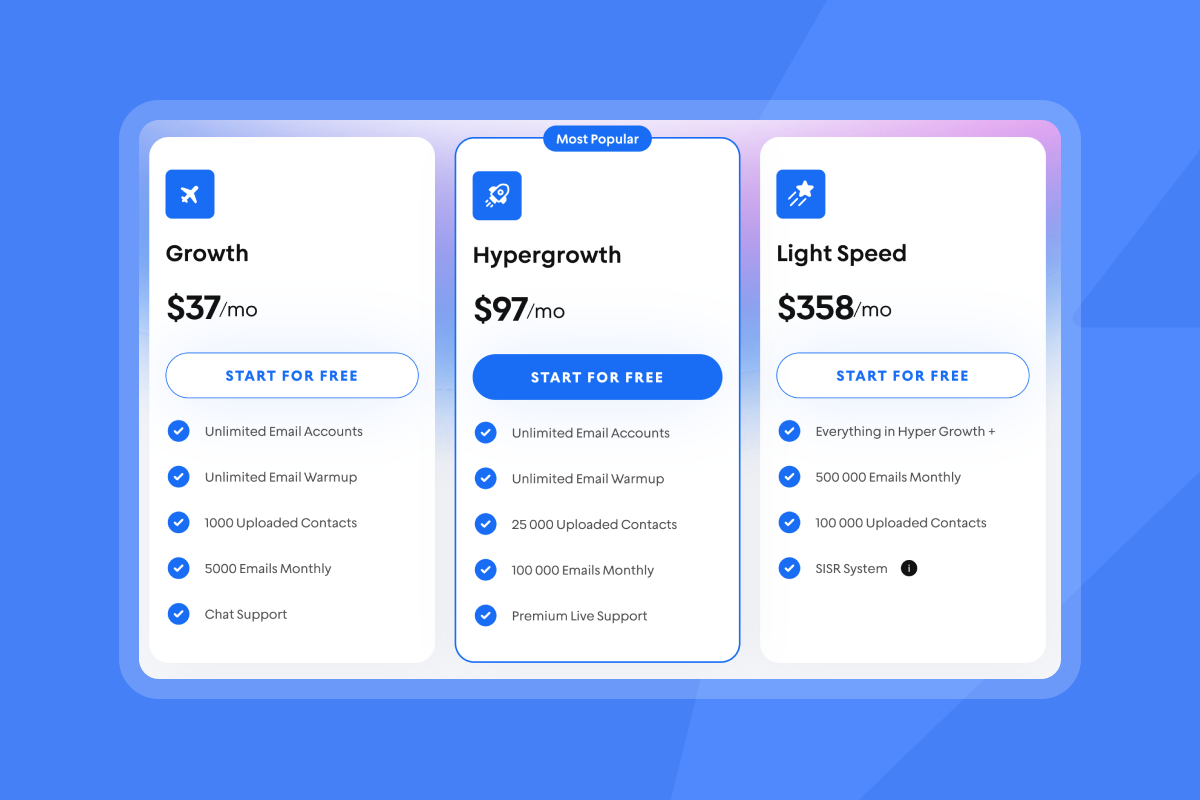
- Flat-fee pricing for Website Visitors: 97 dollars per month for Hyper Visitors and 397 dollars per month for Lightspeed Visitors. No per-seat penalties.
- U.S.-only collection for this feature with a compliance onboarding guide and DPA for procurement. See the getting started guide.
What customers say
"The setup was super easy. The process is very reliable." - G2 review by a verified user in marketing and advertising
"Flexible account linking options, quick and easy setup." - G2 review by Poushali D.
"Instantly.ai has assisted us in creating outbound email systems that reach your ideal buyer's inbox and foster meaningful connections. Also, their customer support is next level, 10/10." - G2 review by a verified user in investment banking
"We increased our revenue by six figures within 4 months of starting with instantly." - Trustpilot review by Alexander
"Fast, easy, responsive and polite, what more do you need!" - Trustpilot review by Susan Cambridge
CRM integration runbook: connecting Instantly’s Website Visitors to HubSpot, Salesforce, and Pipedrive
Pre-integration checklist
- Confirm access
- Admin in Instantly and your CRM. Access to your site header or tag manager.
- Done when: You can edit site header and install scripts.
- Publish privacy updates
- Cookie banner live. Privacy policy discloses analytics and enrichment.
- Done when: Legal text matches the compliance guide.
- Install the pixel
- Add Instantly’s pixel to your global header or via your CMS instructions.
- Done when: First events appear in Instantly within minutes. See the pixel install guide.
- Define ICP and scoring
- Mark high-value pages and scoring thresholds.
- Done when: A short doc lists signals and weights.
- Map fields
- In CRM, create fields for Visitor Score, Last Visit, Last Page, and Source.
- Done when: Fields exist on Company and Lead/Contact objects.
Integrating with HubSpot
You have three reliable patterns. Pick one now and add others later.
Pattern A. Real-time alerts plus manual record creation for the hottest accounts
- Create a “Website Visitor view” in Instantly. Filter by URL contains /pricing or /demo, plus ICP fit.
Done when: View returns only high-intent visitors. See importing Website Visitors into a campaign. - Connect Slack alerts to that view using an incoming webhook.
Done when: A test visit posts to your Slack channel. Set up Slack alerts. - In HubSpot, create Companies and Contacts from those Slack alerts.
Done when: A test pricing-page visit appears as a Company with Last Visit and Last Page fields filled.
Pros: Fast and simple for hot accounts. Con: Manual for volume.
Pattern B. Daily import to Companies and Contacts
- Export identified visitors daily from Instantly or add them to a campaign view for batching.
Done when: CSV shows domain, last page, last visit, and score. See importing Website Visitors into a campaign. - HubSpot import wizard: Create or update Companies by domain. Then import Contacts.
Done when: Imports show new or updated records with mapped fields.
Pros: Clean mapping at scale. Con: Not instant.
Pattern C. Automation via partner or iPaaS for ongoing attribution and routing
- Connect OutboundSync to HubSpot and Instantly to log outbound activity and tie replies and statuses back to CRM.
Done when: Instantly events appear on timelines and in reports. See Salesforce and HubSpot integration via OutboundSync. - Add a Zapier or Make scenario to create HubSpot records when a lead crosses a threshold in your “Website Visitor view” workflow, such as when a rep marks a lead as Interested.
Done when: A test Interested event creates a HubSpot Contact with mapped fields. See the Zapier recipe.
Notes: OutboundSync handles ongoing campaign attribution and block-list logic. Pair it with your visitor routing so sales sees the full funnel. See OutboundSync for Instantly + HubSpot.
Related video
- Watch a hands-on HubSpot integration walkthrough.
Integrating with Salesforce
Use the same three patterns, adapted to Salesforce objects.
Pattern A. Real-time alerts plus manual record creation
- “Website Visitor view” + Slack alerts for hot traffic.
Done when: Slack alert fires on a test pricing visit. See importing Website Visitors into a campaign. - Create an Account by domain. If contact email exists, create a Lead or Contact.
Done when: Account shows Visitor Score, Last Visit, Last Page.
Pattern B. Daily import to Accounts and Leads
- Export daily CSV of identified visitors.
Done when: CSV contains domain and behavior fields. - Data Import Wizard: Upsert Accounts by Website domain, create Leads for contacts.
Done when: Test row produces one Account and one Lead without duplicates.
Pattern C. Automation via partner or iPaaS
- Connect OutboundSync to Salesforce and Instantly to log activities and statuses for full-funnel reporting.
Done when: Events appear on Leads or Accounts/Contacts with metadata. See OutboundSync for Instantly + Salesforce. - Add a Make or Zapier flow to create Salesforce Leads when a visitor becomes “Interested” in your Instantly workflow.
Done when: Test event creates a Lead with domain, score, last page, and last visit. See how to use webhooks.
Integrating with Pipedrive
Pattern A. Real-time alerts plus manual record creation
- “Website Visitor view” + Slack alerts for hot visits.
Done when: Test visit posts to Slack. See importing Website Visitors into a campaign. - Create Organization by domain and a Person when an email exists.
Done when: Organization shows custom fields for score, last visit, and last page.
Pattern B. Daily import to Organizations and Deals
- Export daily CSV and import into Pipedrive.
Done when: Organizations update by domain without duplicates.
Pattern C. iPaaS automation on status change
- A Zapier recipe can create a Pipedrive lead or deal when a lead is marked Interested in an Instantly campaign fed by your “Website Visitor view.”
Done when: Test Interested event creates a Pipedrive Lead. See Integrations collection.
Post-integration best practices and troubleshooting
- Field audit
- Verify Visit URL, Last Visit, Last Page, and Score write correctly on each record.
- SLA and routing
- Hot lead SLA: 1 business day. Warm: 2 business days. Track overdue tasks weekly.
- Meeting hygiene
- Associate meetings to the originating record for attribution.
- Data drift
- If fields stop updating, re-auth integrations, check iPaaS logs, and confirm API limits.
- Duplicate creep
- Dedupe Companies/Accounts by domain and Contacts by email.
- Alert fatigue
- Post only hot visits to Slack. Route warm to queues.
Quick fixes
- No records created: Check pixel install status and that the test IP is U.S. and consenting. See the pixel install guide.
- Missing fields: Revisit field mappings and object permissions.
- Too many low-value alerts: Tighten your visitor view to pricing, demo, and docs.
Top website visitor tracking tools: a comparison for sales leaders
| Tool | Key features | Pricing model | Scalability for agencies | CRM integration |
|---|---|---|---|---|
| Instantly | US visitor ID and email enrichment. Slack alerts and CRM push. | Flat fee modules. No per seat outreach. Website Visitors $97 Basic, $397 Light Speed. | High. Unlimited accounts and warmup per paid outreach plan. | Native CRM connectors and webhooks. Partner routes for full attribution. |
| Hotjar | Heatmaps, recordings, surveys, funnels. Insights not person level ID. | Flat monthly tiers. | High. Easy to add across many sites. | Exports and integrations by tier. |
| Leadfeeder | IP to company ID, firmographics, alerts. Company level ID only, no person level data. | Tiered by identified companies. | Moderate. Often paired with a separate outreach tool. | Common CRM connectors. |
| Albacross | IP to company ID with firmographics and alerts. Focus on company level data, not person level. | Tiered by identified companies. | Moderate. Often paired with separate outreach tools. | Common CRM connectors. |
| Microsoft Clarity | Session replay and heatmaps. | Free. | High. Lightweight and free. | Limited CRM workflows. |
| Apollo.io | Data plus outreach with sequences, testing, CRM sync. | Per seat plus credits. | Moderate. Seat costs add friction for agencies. | Salesforce, HubSpot, Pipedrive with native sync and field mapping. |
| Outreach | Enterprise engagement, dialers, governance. | Per seat enterprise pricing. | High inside one org. Harder across many clients. | Salesforce and Microsoft Dynamics 365 native bidirectional sync. |
| Salesloft | Enterprise engagement, dialers, governance. | Per seat enterprise pricing. | High inside one org. Harder across many clients. | Salesforce, Microsoft Dynamics 365, HubSpot through CRM Sync. |
| Plausible | Privacy first analytics with no person level ID. | Flat or self hosted. | High for analytics. | Export driven. |
| Matomo | Privacy first analytics with no person level ID. | Flat or self hosted. | High for analytics. | Export driven. |
Note: Instantly’s advantage is integrated outbound + CRM with flat-fee pricing and no per-seat penalties. See pricing.
Navigating data privacy: compliance for sales leaders
Safe deployment patterns
- U.S.-only collection for Website Visitors helps align with GDPR and PIPEDA constraints while you use a U.S.-focused signal. See the compliance onboarding guide.
- Use a cookie banner and update your privacy policy for analytics, enrichment, and CRM processing. See the compliance onboarding guide.
- Execute a DPA and review sub-processors during your DPIA. See the DPA document.
Governance practices
- Limit data to business context and avoid restricted categories noted in the DPA. See Instantly DPA.
- Honor access and deletion requests by mapping identities to CRM records.
Tailoring tracking to your sales role
- SDR manager
- Hot queue in CRM. Tasks due in 1 business day. Slack for hot only. Score fields visible in list views.
- AE lead
- Account-level rollups of visits and contacts. Alerts on target account activity. Opp auto-creation above score thresholds.
- RevOps leader
- Source = Website Visitors. Conversion by score tier. Forecast notes citing intent events. Audit logs enabled in account settings.
Your downloadable CRM integration checklist
- Access and security
- Admin in Instantly and CRM. DPA signed. Privacy policy updated. See the DPA document.
- Pixel and scope
- Pixel installed on all pages. U.S.-only collection confirmed. See the pixel install guide.
- Fields and mapping
- Visitor Score, Last Visit, Last Page, Source mapped. Dedupe by domain and email.
- Scoring and routing
- Hot threshold defined. Slack alerts for hot only. Tasks assigned by territory. Set up Slack alerts.
- QA and reporting
- End-to-end test complete. Dashboards for source, conversion, SLA, meetings set. Weekly data review scheduled.
When visitor intent lives in your CRM, reps spend less time guessing and more time starting relevant conversations. Install the pixel, pick your routing pattern, add score-based alerts, and log every outcome. You get a cleaner queue, faster first touches, and a forecast grounded in auditable behavior.
Start free, add the Website Visitors pixel, and route hot accounts to your team today on Instantly Website Visitors.
Frequently asked questions about website visitor data for sales
- What identification rate should I expect?
Rates vary by traffic mix and consent. Run a 14-day pilot and publish your observed coverage. Prioritize quality over a single match-rate number. - How fast does data appear in the CRM?
Slack alerts fire near real time from your visitor view. CRM creation is instant with automation, or within a day with imports. See Slack alerts. - Which pages should I score the highest?
Pricing, demo, competitor-comparison, and integration docs usually correlate with near-term intent. Validate against your data. - How do I avoid duplicates?
Dedupe Companies/Accounts by domain and Contacts by email. Test updates before going live. - What is a good SLA for hot leads?
1 business day for hot. 2 business days for warm. Track adherence in your CRM.
Key terminology glossary
- Visitor identification: Turning an anonymous session into a company or business contact.
- Firmographics: Company attributes like size, industry, and location.
- Intent signal: A behavior correlated with buying interest.
- Lead scoring: Numeric priority based on fit and behavior.
- ICP: Ideal customer profile used to filter and score leads.
- SLA: Service level for response time.
- Dedupe: Rules that prevent duplicate records.
- Source tagging: A field that labels where a record originated.


