


Updated October 02, 2025.
TL;DR:
Connect Instantly AI and Zapier to automate the entire outbound motion. Use Instantly for deliverability, data, and AI agents. Use Zapier to enrich records, move data into your CRM, triage replies, and summarize results. Start with five workflows:
1) Push “interested” replies to CRM with meeting tasks
2) Enrich new leads
3) Personalize at scale with AI by Zapier and Instantly Copilot
4) Send deliverability alerts to Slack
5) Roll up campaign stats to Sheets
Expect faster handoffs, cleaner data, and safer scale across unlimited inboxes.
What is Zapier? Your no-code automation hub
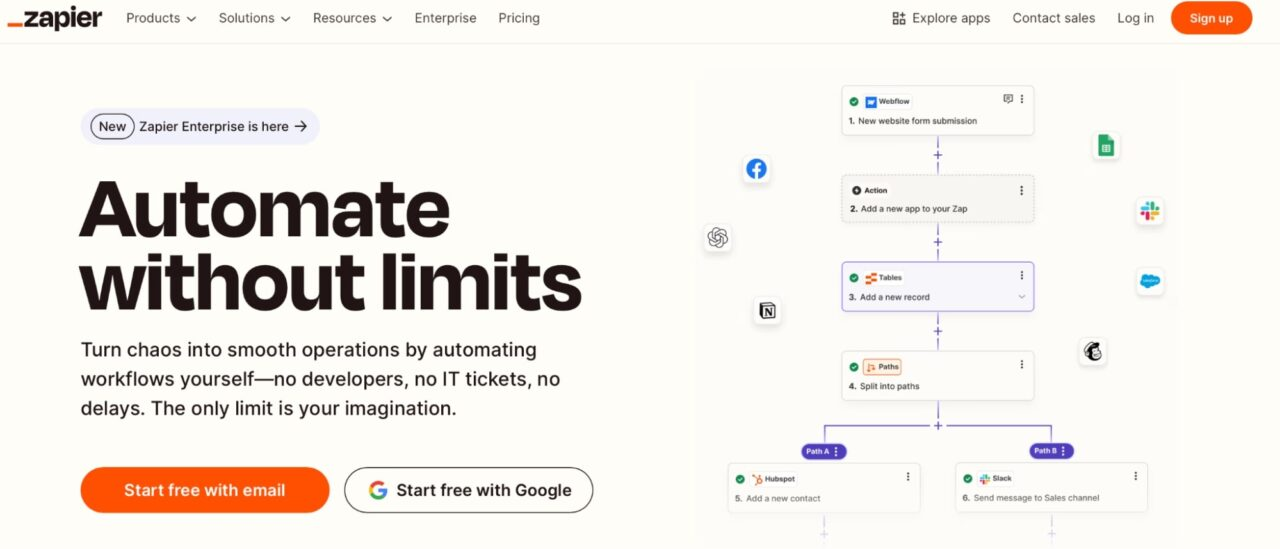
Zapier connects your tools so they share data and trigger actions without code. You build Zaps that link a Trigger (an event in one app) to one or more Actions (tasks in other apps).
- Connect 7,000+ apps across CRM, calendars, chat, spreadsheets, and more, including Instantly AI and AI by Zapier for text generation and extraction Zapier app directory.
- Build filters, paths, and multi-step Zaps to handle real-world branches.
- Add AI steps to summarize, classify, or transform text before it hits your CRM.
Why it matters for outbound: your emails, replies, and lead status changes in Instantly can push clean, enriched data into your CRM, Slack, Google Sheets, and back again. That means less manual work and fewer gaps in reporting.
Instantly: Powering your sales engagement
Instantly is the email growth engine for agencies, founders, and lean sales teams. It combines deliverability, data, automation, and AI, so you can run reliable outreach across unlimited inboxes.
Core advantages to anchor your system:
- Deliverability system
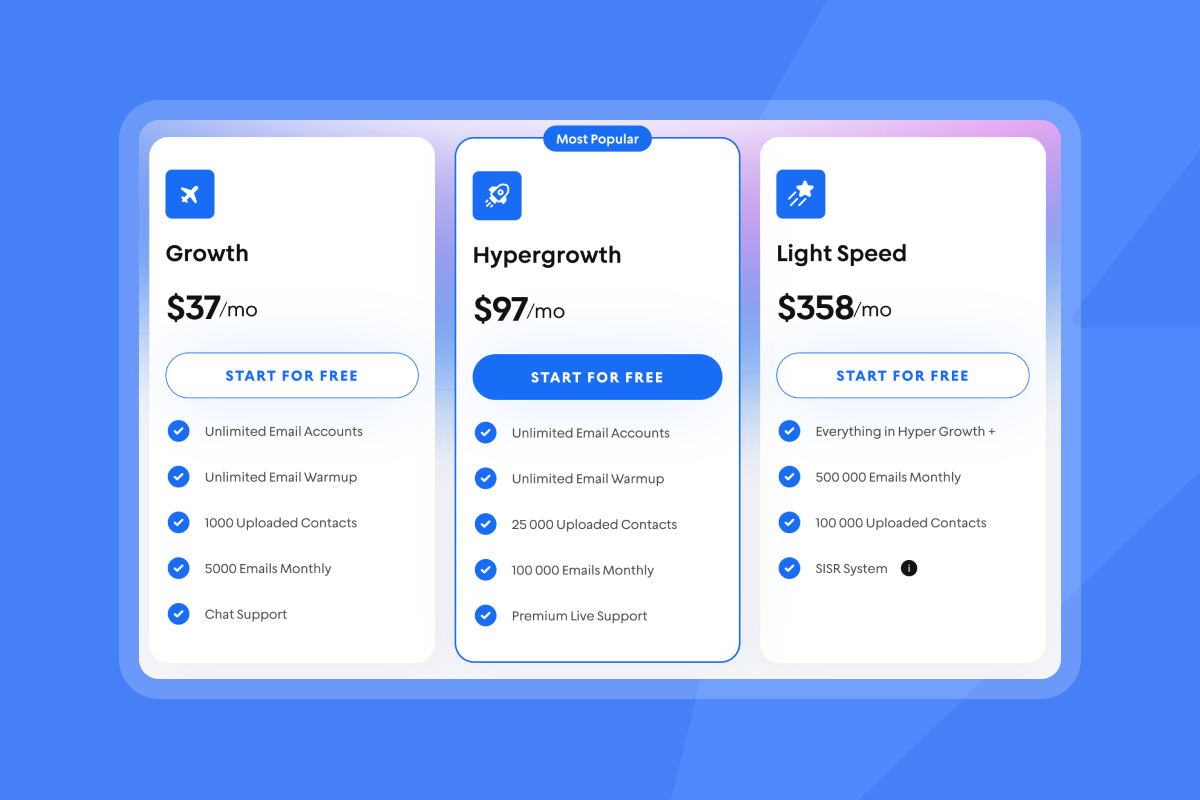
- Unlimited email accounts and warmup on every outreach plan Instantly pricing.
- Private Deliverability Network and automated Inbox Placement tests to protect primary-inbox placement Inbox Placement.
- Light Speed plan adds SISR (Server & IP Sharding & Rotation) for dedicated/private IP pools.
- Data that scales
- SuperSearch with 450M+ B2B contacts and waterfall work-email enrichment.
- AI agents and workflows
- Copilot to chat through ICP targeting, write sequences, and summarize analytics.
- AI Reply Agent to auto-handle replies in under 5 minutes, with human-in-the-loop or autopilot options and clear credit costs.
- Operations and reporting
- Unibox shared inbox for triage, Instantly CRM for deals, and revenue-oriented analytics on replies and meetings.
- Compliance posture
- Data Processing Addendum and public sub-processor list for procurement reviews.
Put simply, Instantly handles sending, placement, data, and AI. Zapier connects those events to the rest of your stack. Here's how to get started with Instantly:
How Zapier and Instantly AI work together: Seamless integration
You connect Instantly to Zapier from the Instantly app using your API key, then select a campaign and event types to watch. Typical Instantly triggers include:
- New Event with event types like Email Sent, Email Opened, Reply Received, Lead Marked as Interested, Email Bounced, Campaign Completed.
- Lead status changes via tags or attributes.
Useful Instantly actions in Zapier include:
- Find Lead, Add Lead to Campaign, Update Lead.
- Add or remove lead tags.
- Move or stop leads across campaigns.
Common patterns:
- Reply triage. When a Reply Received event fires, call AI by Zapier to classify the reply, then route to Slack, create a CRM task, or assign an owner in Instantly CRM.
- “Interested” handoff. When a lead is marked interested, create or update a contact and opportunity in your CRM and attach the email thread from Unibox.
- Data hygiene. On new lead added, verify email, enrich with company data, and update custom fields before the first send.
More How to articles with Instantly & Zapier integration
- Zapier integration: Add a lead to Close CRM when marked as Interested in Instantly
- Zapier integration: Google Sheets —> Add Lead To Instantly Campaign
- Zapier integration: Receive a message in Slack when a lead is marked as Interested in Instantly
Setting up your first Zapier + Instantly integration (checklist)
- Get your Instantly API key. Done when you can paste it into Zapier and connect.
- Create a Zap with Instantly as Trigger. Done when a sample event pulls through.
- Filter for the precise event. Done when only “Reply Received” or “Interested” continues.
- Add your Actions. Done when the CRM record is created or updated without duplicates.
- Add an AI step if needed. Done when the AI output is mapped cleanly to fields.
- Test end to end. Done when one Instantly test reply produces the full outcome.
- Turn on the Zap and monitor tasks. Done when runs succeed for 48 hours.
Here's a real world walkthrough for you to follow:
AI by Zapier: Enhancing Instantly workflows for smarter outreach
AI by Zapier lets you add intelligent text steps inside Zaps. It can:
- Extract data from messy text. Pull a meeting date from a reply and format it as ISO for your CRM.
- Summarize threads. Reduce a long email chain from Unibox into a two-sentence CRM note.
- Classify intent. Tag a reply as “Interested,” “Not now,” “Referral,” or “Unsubscribe.”
- Personalize at scale. Generate a single personalized opener from company news pulled in a prior step.
Why this works: Generative AI has been shown to speed up writing tasks significantly. A 2023 Science study found a 37% productivity lift on writing tasks with generative AI assistance Science. In outbound, that time saving compounds across triage, notes, and personalization.
Pattern to copy:
- Trigger: Instantly → Reply Received
- Action: AI by Zapier → Classify reply into one of four intents
- Path A (Interested): Create Contact + Opportunity in CRM. Add a task “Send calendar link today.” Add a Unibox link.
- Path B (Referral): Update lead owner and add a follow-up step in Instantly.
- Path C (Not now): Tag “Nurture” and add to a 60‑day follow-up sequence.
- Path D (Unsubscribe): Immediately remove from all campaigns.
For growth marketers: Optimize campaigns and data quality with AI automation
Growth teams care about reply rate, CAC, and clean measurement. Outbound falls apart when data is messy and reporting does not reconcile. Use Instantly for deliverability and sending controls, then Zapier for enrichment, QA, and reporting.
What to build:
- Verified data in, bad data out. Run new SuperSearch exports through verification and waterfall enrichment. Save risky contacts to a review tab. Keep hard bounces at or below 1%.
- Personalization without busywork. Use AI by Zapier to generate a single opener from a company description or recent headline. Store it in a custom field like {{custom.ai_intro}}. In Instantly, Copilot can help finalize the full sequence with dynamic fields.
- A/Z tests at scale. Standardize four to six subject variants and two body variants per step. Use Zapier to push performance snapshots to a central sheet daily.
- Clean attribution. When a lead converts, push the Instantly campaign ID and variant to CRM deal fields so you can evaluate pipeline per test.
Proof points:
- Gmail recommends keeping spam complaint rates below 0.3% for bulk senders, which makes list hygiene and reply handling critical,
- B2B buyers spend only about 17% of their total buying time with all suppliers combined, so your message must land and be relevant fast.
Growth marketer automation blueprint (checklist)
- Source leads from SuperSearch. Done when you have 500+ verified contacts with industry and firmographic fields.
- Verify and enrich via Zapier. Done when verification flags and enrichment fields populate in Instantly.
- Build two sequence variants with spin syntax. Done when both pass Inbox Placement checks.
- Cap sending per inbox at 30/day. Done when throughput meets engagement targets without placement drops.
- Set A/Z tests for subject and CTA. Done when a daily snapshot lands in your “Outbound scorecard” sheet.
- Route replies with AI. Done when “Interested” replies create contacts and tasks in CRM within 2 minutes.
- Reconcile pipeline. Done when CRM deals include Instantly campaign and variant IDs.
For agency operators: Scale outreach and manage clients cost‑effectively
Agencies need economics that scale, plus guardrails across clients. Instantly’s flat-fee unlimited accounts, inbox rotation, and private warmup network make multi-client scale possible. Zapier adds repeatable onboarding, enrichment, and standardized reporting.
- Flat-fee economics: Avoid per-seat bloat as you add inboxes and client brands Instantly pricing.
- Standardized client templates: Clone Zaps for enrichment, reply triage, and CRM pushes. Keep the same data model per client.
- Deliverability as a service: Use Instantly’s automated warmup and Inbox Placement tests as your health check productized in your retainer.
- Shared triage: Pipe “Interested” across all clients into a manager Slack channel for quick QA before handoff.
For sales leaders: Standardize and streamline sales processes with confidence
Sales leaders care about primary-inbox placement, clean handoffs, and audit‑friendly reporting. Build a system with clear limits and catch‑all runbooks.
- Deliverability controls. Use Instantly warmup, send windows, inbox rotation, and automated placement tests. Trigger Slack alerts on bounce spikes.
- Standard operating sequences. Lock in the ramp plan and A/Z library. Keep per-inbox daily sends at or below 30 to protect sender reputation.
- CRM reconciliation. Every “Interested” reply creates a contact, an opportunity, and a dated task with the Unibox link. Revenue attribution includes campaign and variant.
- Audit posture. Keep a sheet of campaign settings, throttle limits, and health checks. Share Instantly DPA and sub-processors during security reviews.
Sales workflow standardization checklist
- Ramp plan documented. Done when every inbox is warmed and capped at 30/day.
- Deliverability health gates. Done when placement passes before scaling any campaign.
- Reply classification AI. Done when standard labels drive your CRM paths.
- CRM fields mapped. Done when deals show Instantly campaign, variant, and reply date.
- Manager QA queue. Done when “Interested” hits Slack and is picked up within 15 minutes.
- Weekly scorecard. Done when replies, meetings, bounces, and placement trend in one dashboard.
For startup founders: Rapid pipeline and cash‑efficient growth with AI
You need meetings fast without hiring a full SDR team. Keep your stack lean and predictable.
- One platform for sending, data, and inbox management. Instantly covers outreach, SuperSearch, Unibox, and light CRM.
- AI to reduce grunt work. Copilot helps write sequences and summarize analytics. AI Reply Agent handles common replies within minutes Copilot, AI Reply Agent.
- Automations that pay for themselves. Many teams use automation to remove low-value writing and triage time. McKinsey estimates marketing and sales are among the top functions for generative AI impact at scale McKinsey–Gen AI potential.
Practical math:
- If AI and Zapier remove 6 hours per week in drafting and triage and your burdened hourly rate is $60, that is $360/week saved.
- If your automations lift lead-to-opportunity by even 2 to 3 percentage points through faster handoffs, that compounds across months.
Practical use cases: Zapier + Instantly AI in action
Use these recipes as starting points. Keep them simple, then add branches.
- Push “interested” replies to CRM with tasks
- Trigger: Instantly → Reply Received.
- AI: AI by Zapier → Classify intent and extract meeting availability if present.
- Actions:
- CRM → Find or Create Contact.
- CRM → Create Opportunity with source = Instantly Campaign ID.
- CRM → Create Task “Send calendar link today” with Unibox thread URL.
- Slack → Post summary for manager.
- Enrich new leads from SuperSearch before first send
- Trigger: Instantly → New Lead Added to Campaign.
- Actions:
- Email Verification app → Verify deliverability.
- Data Enrichment app → Append title, industry, company size.
- Instantly → Update Lead custom fields (industry, headcount, domain).
- Filter: If risky or unverifiable, tag “Review” and pause.
- Personalize first lines with AI and store in custom fields
- Trigger: New row in Google Sheet or new CRM Lead.
- Action: AI by Zapier → Generate one-sentence opener using name, company, and industry.
- Action: Instantly → Update Lead → set {{custom.ai_intro}}.
- In Instantly: Use Copilot to help write the rest of the sequence and reference {{custom.ai_intro}} in Step 1.
- Deliverability alerts to Slack
- Trigger: Instantly → New Event → Email Bounced.
- Path:
- Formatter → Compute 24‑hour bounce count by campaign (using a Sheets lookup, if needed).
- Filter → Only continue if bounce rate > 1%.
- Slack → Alert with campaign name and recommended pause.
- Optional: Instantly → Tag affected leads “Verify” and remove from live send list.
- Roll up campaign stats nightly to a scorecard
- Trigger: Schedule by Zapier → Every day at 6 p.m.
- Action: Webhooks → Call Instantly API for campaign metrics.
- Action: Google Sheets → Update “Outbound scorecard” with sends, opens, replies, meetings, bounces per campaign and per variant.
- Output: A weekly dashboard for growth and RevOps.
- Route web form or chat leads into Instantly with AI notes
- Trigger: New Form Submission in HubSpot or Typeform.
- AI: Summarize the notes into two bullets for SDR.
- Actions:
- Instantly → Add Lead to “Fast follow-up” sequence with {{custom.ai_notes}}.
- Slack → Post the submission with assigned owner.
- Auto-nurture “not now” replies without risking footprint
- Trigger: Instantly → Reply Received and AI classification = “Not now.”
- Actions:
- Instantly → Remove from current campaign.
- Instantly → Add to a 60‑day nurture sequence from a different warmed inbox in your rotation.
Measurement tips:
- Define guardrails up front. Do not exceed 30 emails per inbox per day. Keep hard bounces at or below 1% and spam complaints far below 0.3%.
- Track outcomes where revenue lives. Push Instantly campaign and variant IDs into CRM deals so you can measure pipeline per test and per list source.
Improve your sales with intelligent automation
Zapier gives you the connective tissue. Instantly gives you deliverability, data, and AI. Together, you remove manual work, protect sender reputation, and turn replies into meetings with clear handoffs and clean reporting.
Try Instantly free and explore Zapier integrations to automate your sales outreach. Use the Zapier integration guide to get up and running in 2 minutes.
FAQ:
- How many apps does Zapier connect? Over 7,000 apps across categories, including CRMs, chat, spreadsheets, and AI tools Zapier app directory.
- How do I keep deliverability safe while scaling? Warm every inbox, cap sends at 30/day, use Instantly Inbox Placement tests, keep bounces at or below 1%, and keep spam complaints well below 0.3%.
- Can AI write my emails automatically? Yes for snippets and drafts. Use AI by Zapier for openers and Instantly Copilot to write and refine sequences. Keep a human review step for governance,
- How fast can replies get to my CRM? With a Zap triggered on Reply Received and a single path, expect under 1 to 2 minutes to create a contact, opportunity, and task.
- What’s the ROI case for adding AI steps? Generative AI can lift writing productivity by roughly a third in controlled studies, and marketing and sales are top functions for impact at scale.
Terminology box
- Zap: A workflow in Zapier.
- Trigger: Event that starts a Zap.
- Action: Task a Zap performs.
- Multi-step Zap: Zap with more than one action.
- Filter: Step that gates a Zap by conditions.
- Path: Branching logic in Zapier.
- Webhook: HTTP call step for custom API work.
- AI by Zapier: Zapier’s built-in AI step.
- Instantly AI Copilot: In‑app assistant for research, writing, and analytics.
- Unibox: Instantly’s shared inbox for replies.
- Deliverability Network: Instantly’s automated warmup and health signals.
- SuperSearch: Instantly’s 450M+ B2B contact database.
- Waterfall enrichment: Layered data append from multiple providers.
- Primary inbox: The main inbox folder recipients read.
- Sender reputation: Trust score of domain/IP with mailbox providers.
- Spin syntax: Light variations to avoid repeatable fingerprints.
- A/Z testing: Testing many variants across a step or campaign.
- CRM integration: Sync between Instantly, Zapier, and your CRM.
- DPA and sub-processors DPA, Sub‑processors
- Gmail bulk sender 0.3% complaint rate
- McKinsey on gen AI impact in marketing and sales McKinsey–Gen AI potential


